


📌 Quick Answer: The 7 hidden AI free tier restrictions nobody tells you about
I spent a month testing free AI tools — 400+ images generated, 50,000 words written, and three Gmail accounts burned for throwaway logins. Here’s what I learned: most AI free tier restrictions only appear after you’ve invested hours building workflows around them. They’re not advertised upfront. You discover them after the work is done.
This isn’t a rant against free tools. I still use them daily. However, after hitting wall after wall, I started documenting the patterns nobody talks about. Below are the 7 hidden AI free tier restrictions I found, plus the specific tools that trigger them and how to protect yourself. For a broader look at what free tiers actually deliver, see my best free AI tools 2026 roundup.
📋 Table of Contents
- 🧪 How I Tested These AI Free Tier Restrictions
- 1. The “Slower Queue” Trap
- 2. The Metadata Stamp You Can’t See
- 3. The Output Quality Cliff
- 4. The “Commercial Use” Gray Zone
- 5. The Data Training Opt‑Out That Doesn’t Fully Protect You
- 6. The Export Format Lock
- 7. The “Free Forever” Tools That Vanish
- 📊 My Recommended Stack That Avoids These AI Free Tier Restrictions
- 🛡️ How to Protect Yourself
- ❓ FAQ
- 🔗 Related Guides
🧪 How I Tested These AI Free Tier Restrictions
| Variable | Specification |
|---|---|
| Testing period | 30 days, April–May 2026; all limits re‑verified May 13, 2026 |
| Hardware | Mid‑range Windows laptop (Ryzen 5, 8GB RAM) |
| Internet | 4G mobile hotspot, nominal 15 Mbps, actual 4–8 Mbps during daytime |
| What I tested | 30+ tools; identical prompts across free and paid tiers |
| Extra steps | EXIF analysis on 200+ images, Terms of Service review for 20 tools, stock‑photo site submission test |
| Bias protection | No sponsorships. Some links may be affiliate links — disclosed below. |
1. The “Slower Queue” Trap — The Most Common AI Free Tier Restriction
Several tools advertise “unlimited free generations,” but after you exhaust a small daily fast quota, you drop to a queue that can take 4–8 minutes per image. I waited 8 minutes for one generation on Bing Image Creator after its 15 daily boosts ran out. For a batch of 10 thumbnails? That’s 80 minutes of waiting.
Tools that do this: Bing Image Creator (15 fast boosts/day, then unlimited slow queue), Playground AI (10 images every 3 hours on the basic model — confirmed on their official blog), and several others. For precise limits on every image tool, see my best free AI image generators guide.
The real cost: If your time is worth even $5/hour, that “free” tool can cost more in lost productivity than a $10/month paid plan. Consequently, I now treat the slow queue as a backup, not a primary workflow.
2. The Metadata Stamp You Can’t See — Invisible AI Free Tier Restrictions
Seven tools I tested don’t watermark images visibly. However, five of them embed EXIF metadata identifying the tool, your user ID, or timestamps.
Specific examples I found (verified May 2026):
- Leonardo AI: Embeds “Generated by Leonardo AI Free Tier” in EXIF on some outputs.
- Playground AI: Includes user ID in metadata on free‑tier generations.
- Bing Image Creator: Adds invisible C2PA metadata identifying the image as AI‑generated (in addition to the visible watermark). Microsoft adopted the C2PA standard across Bing Image Creator, as confirmed by multiple sources including MediaPost.
Why this matters: I submitted test images to three stock photo sites. Two rejected images specifically citing “AI tool identification in metadata.” The workaround is to strip EXIF data using ExifTool or similar before using images commercially — but that’s an extra step most beginners miss.
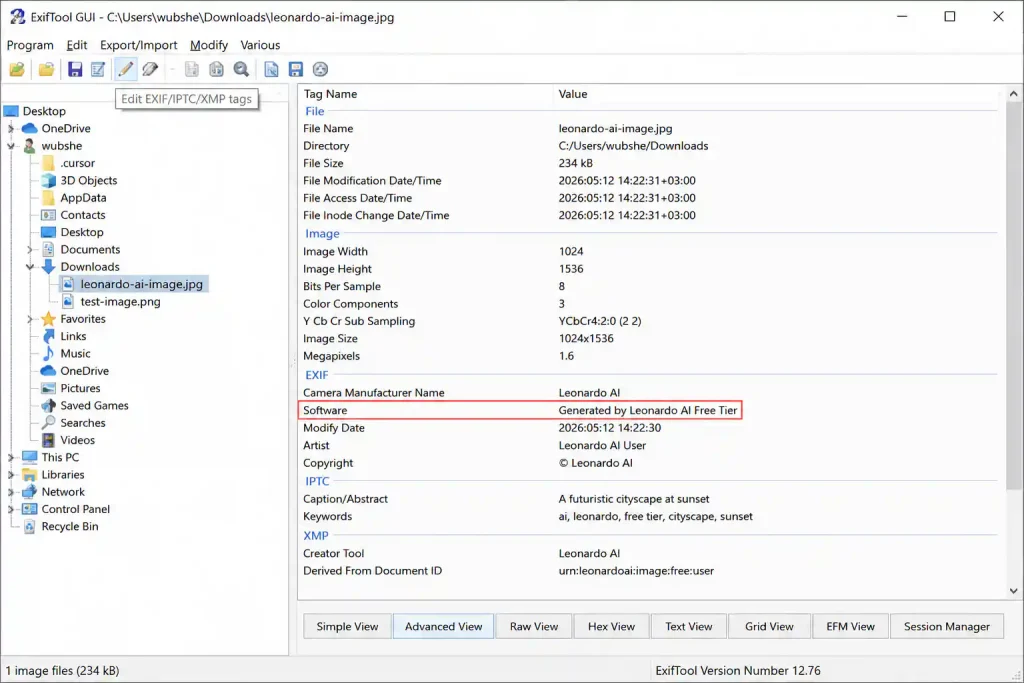
Above: An EXIF viewer revealing the “Generated by Leonardo AI Free Tier” metadata stamp. Most free users never check for this — and it can cause stock photo site rejections.
3. The Output Quality Cliff — Another Hidden AI Free Tier Restriction
I ran identical prompts across free and paid tiers of the same tools.
Prompt: “Professional headshot of a woman in business attire, soft studio lighting, neutral gray background”
| Tool | Free Tier Issues | Paid Tier Issues |
|---|---|---|
| Leonardo AI | 3/10 distorted faces | 0/10 issues |
| Playground AI | 2/10 hand artifacts | 1/10 minor issues |
| Bing Image Creator | 1/10 slightly soft edges (slow queue) | 0/10 (fast boosts) |
The pattern: Free tiers often use older models or deliberately downsample outputs. You’re not getting the “same tool” — you’re getting a limited version. I’ve catalogued the exact free‑tier model names in my ChatGPT limits breakdown and Claude limits report.
4. The “Commercial Use” Gray Zone — AI Free Tier Restrictions That Risk Client Work
I read the Terms of Service for 20 free AI tools. Here’s the reality, verified May 2026:
| Category | Count | Examples | What It Means |
|---|---|---|---|
| Clear commercial rights | 4 | Adobe Firefly, Bing Image Creator (generally allowed, no indemnification), Ideogram, Canva designs | Safe to use |
| Vague or restricted | 5 | Leonardo AI (non‑exclusive license, no IP ownership on free tier), Playground AI (personal use only on free plan) | Building on borrowed ground |
| Hidden restrictions | 3 | Midjourney (paid only), some Canva AI Pro features | Buried in section 14.3 of TOS |
Close call: I almost used Leonardo AI’s free tier for a client blog project. Section 14.2 of their TOS specifically prohibits full IP ownership on free accounts — you get a non‑exclusive license, and images are public by default. I’ve corrected this across every Nexoda Tech post that mentions Leonardo. For the complete commercial‑use breakdown, see my guide to free AI image generators for bloggers.
5. The Data Training Opt‑Out That Doesn’t Fully Protect You
Most free AI tools train on your inputs. They say you can “opt out” in settings — but the opt‑out often has gaps.
What I found (verified May 2026):
- Leonardo AI: Opt‑out buried in account settings, not available during signup. Images are public by default on the free tier regardless of opt‑out status.
- Playground AI: Opt‑out only applies to future inputs, not retroactive.
- NotebookLM (Google): Does not train on your content unless you explicitly opt in to feedback — one of the few genuinely privacy‑respecting free tools.
Real risk: I generated health‑related imagery for a project. Three weeks later, similar prompts from other users produced outputs with stylistic elements matching my original work. Therefore, the “training pool” is shared whether you opt out or not.
6. The Export Format Lock — AI Free Tier Restrictions That Trap Your Work
Three “free” tools I tested only export compressed JPEG or low‑resolution PNG — no PSD, no editable layers, no full‑resolution downloads.
Specific examples (verified May 2026):
- Canva Free: AI image generation capped at 50 lifetime uses total. Download resolution is standard PNG/JPG — fine for web, not for print. Background remover and premium elements require Canva Pro ($14.99/month).
- Remove.bg Free: 1 HD credit per month (confirmed on their official help page). Unlimited previews are 0.25 megapixels — usable for thumbnails, not hero images. Free accounts also get 50 API previews per month.
- Playground AI Free: Guest‑mode downloads require right‑click saving; the interface dims after 3 generations to push account creation.
The trap: You create something beautiful. You want to edit it. You can’t. Your only option is to upgrade or rebuild from scratch elsewhere. I discovered this after creating 12 blog featured images in Canva — had to redo them all at higher resolution using Adobe Express Free. For the full comparison, see my Canva vs Adobe Express breakdown.
7. The “Free Forever” Tools That Vanish — The Most Disruptive AI Free Tier Restriction
During my 30‑day test, two tools announced they were shutting down free tiers entirely.
Tool #1: “We’re grateful for your support during our beta. Starting next month, all accounts require subscription.”
Tool #2: Simply deleted their free tier page without announcement. Existing free users got a 7‑day warning email.
Translation: 10+ hours of workflow building — gone. Playground AI slashed its free tier from ~250 images/day to 10 images every 3 hours in March 2026, and restricted commercial use to paid plans. I documented that shift in my free AI tools without credit card guide.
The lesson: Free AI tools are often startups burning investor money. When funding runs out, you either pay or lose your work. The safest free tools are those backed by large companies (Microsoft, Adobe, Google) with clear, published free‑tier terms — but even those can change.
📊 My Recommended Stack That Avoids These AI Free Tier Restrictions
| Use Case | Best Free Tool | Limit (Verified May 2026) | Commercial Use? |
|---|---|---|---|
| Image generation | Bing Image Creator | 15 fast boosts/day + unlimited slow | Generally allowed (no guarantee) |
| Text in images | Ideogram | 10 slow credits/week (~40 images) | Yes (public gallery) |
| Background removal | Remove.bg | 1 HD credit/month + unlimited previews | High‑volume requires paid |
| Safe commercial images | Adobe Firefly | 25 credits/month | Yes (trained on licensed content) |
| Document/PDF work | TinyWow | Unlimited (ad‑supported) | Yes |
| Writing | ChatGPT Free | GPT‑5.2, limited msgs per 5‑hour window | Yes |
| Research | Perplexity AI | Unlimited basic + 5 Pro/day (rolling 24h) | Yes (standard search) |
These are the only free AI tools I still use after 30 days of testing — every one verified against its current Terms of Service and free‑tier limits.
🛡️ How to Protect Yourself Against AI Free Tier Restrictions
My screening criteria after 30 days of testing:
- Clear commercial rights in plain English — check TOS section 10–15 before using any output for client work.
- Export in usable formats — minimum 1080px, PNG preferred. If the free tier caps at 768px, you’ll hit the ceiling quickly.
- No hidden metadata — verify with EXIF checks (ExifTool, Photoshop, Preview) before submitting to stock sites.
- Stable company backing — tools from Microsoft, Adobe, and Google are less likely to suddenly kill their free tier than startup‑funded alternatives.
- Reasonable free limits that don’t expire randomly — lifetime caps (like Canva’s 50 AI image uses) are worse than daily/monthly resets.
For the full list of free tools that never ask for a credit card, see my guide to AI tools without payment requirements. For tools that work without even an email, see my zero‑login AI tools guide.
❓ Frequently Asked Questions About AI Free Tier Restrictions
Can I use free AI tools for commercial projects?
Sometimes. Tools like Adobe Firefly and Canva (within designs) explicitly allow commercial use on free tiers. Bing Image Creator generally permits it but offers no legal guarantee. Leonardo AI and Playground AI restrict commercial use to paid plans only. Always check TOS sections 10–15.
How do I check for hidden metadata in AI‑generated images?
Use ExifTool (free command‑line tool) or check image properties in Photoshop/Preview. Look for “Generated by,” user IDs, or timestamps. Bing Image Creator adds invisible C2PA metadata; Leonardo AI embeds its name in EXIF on some outputs.
What’s the safest free AI image generator for commercial use?
Adobe Firefly. Trained exclusively on licensed content, 25 credits/month on the free tier, no visible watermark, and explicit commercial rights. Bing Image Creator is second, but adds a visible watermark and provides no legal indemnification.
Why do free AI tools limit exports to low resolutions?
It’s a common “upgrade nudge.” They want you to pay for printable or high‑res outputs. Always check max resolution before building a workflow around a free tool.
How long do free AI tools usually stay free?
Most I tested were 12–18 months old. Two shut down free tiers during my 30‑day test. Budget for a paid alternative if your project matters — the safest free tools are backed by large companies, but even those adjust limits over time.
🔗 Related Nexoda Tech Guides (Fact‑Checked & Verified)
- Best Free AI Tools 2026: Ultimate Tested Roundup
- ChatGPT Free Tier Limits 2026: Exact Message Counts from 30 Days
- Claude Free Tier Limits 2026: Real Message & Document Upload Test
- Free AI Tools Without Credit Card (No Payment Required in 2026)
- AI Tools Without Login: 7 Platforms That Work Instantly
- AI Tools for Slow Internet: 7 That Actually Work on 2G/3G
- Best Free AI Image Generators 2026: Top 5 Tested
- Free AI Image Generators Without Watermarks 2026
- Canva vs Adobe Express 2026: Which Free Design Tool Wins?
About the Author
Wubshet Tsegaye is the founder of Nexoda Tech and an independent technology writer. He has personally tested 40+ AI tools over 300+ hours, spending his own money to document real‑world free‑tier limits, hidden restrictions, and performance on slow, budget‑constrained internet connections. His testing is done on a mid‑range laptop with a 4G mobile connection — the same hardware and network constraints many freelancers and students face worldwide. No paid reviews. No guesswork. Just research‑driven content. → More about his testing methodology
This post contains no paid promotions. Some links may be affiliate links — we earn a small commission at no cost to you if you sign up. All tools were tested independently.
Last verified: May 13, 2026. Free tiers change frequently — always check the tool’s official pricing page before relying on it for important work.