

📌 Quick Answer: The best free AI tools for beginners
If you’re a freelancer or student looking for the best free AI tools for beginners, I’ve narrowed them down to seven that actually work on day one. Bing Image Creator turns words into images in 45 seconds (15 fast boosts/day, unlimited slow, visible watermark). QuillBot rewrites text instantly without an account (125 words/paraphrase). TinyWow offers 100+ utilities with zero signup. Remove.bg deletes backgrounds in 5 seconds (1 HD credit/month, unlimited low‑res previews). Perplexity AI delivers cited answers with a rolling 24‑hour Pro Search quota. Scribble Diffusion polishes rough sketches into usable images without any setup. Canva Free provides 250K+ templates and AI design tools, though its background remover is Pro‑only and image generation is capped at 50 lifetime uses.
I tested every one of these best free AI tools for beginners under the same constraints many first‑time users face: a mid‑range laptop, a 4G connection that often drops to 3G speeds, and zero prior experience with each platform. Therefore, this guide focuses on tools that pass two strict rules: the 60‑Second Rule (you create something useful within a minute of landing) and the No‑Trap Rule (no credit card demanded “for verification”). Only 7 out of the 30+ tools I screened cleared both.
For a broader look at free tools beyond the beginner category, see my complete roundup of the best free AI tools in 2026.
📋 Table of Contents
- 🧪 How I Tested
- 📸 What Signing Up Actually Looks Like
- 🏆 Quick Picks
- 🎓 Beginner Difficulty Rating
- 🔍 Detailed Tool Breakdowns
- 🚀 Your First Project
- 📊 Side‑by‑Side Comparison
- 🛑 Tools That Failed
- ❓ FAQ
- 🏁 The Bottom Line
- 🔗 Related Guides
🧪 How I Tested These Best Free AI Tools for Beginners
| Variable | Specification |
|---|---|
| Testing period | March 20 – April 20, 2026; all limits re‑verified May 13, 2026 |
| Hardware | Dell Inspiron 15, 8GB RAM, Windows 11 |
| Internet | 4G LTE (15–25 Mbps, frequently dropping to 3G) |
| Browser | Chrome (fresh profile, no cached logins) |
| Account | Dedicated test email; zero paid upgrades purchased |
I applied two rules ruthlessly. First, the 60‑Second Rule: if I couldn’t create something useful within a minute of arriving on the site, the tool failed. Beginners shouldn’t endure long onboarding. Second, the No‑Trap Rule: any platform that asked for a credit card “for verification” was instantly disqualified—too many people forget to cancel trials. Consequently, 23 of the 30+ platforms I evaluated were eliminated.
📸 What Signing Up Actually Looks Like – 3 Beginner‑Friendly Tools
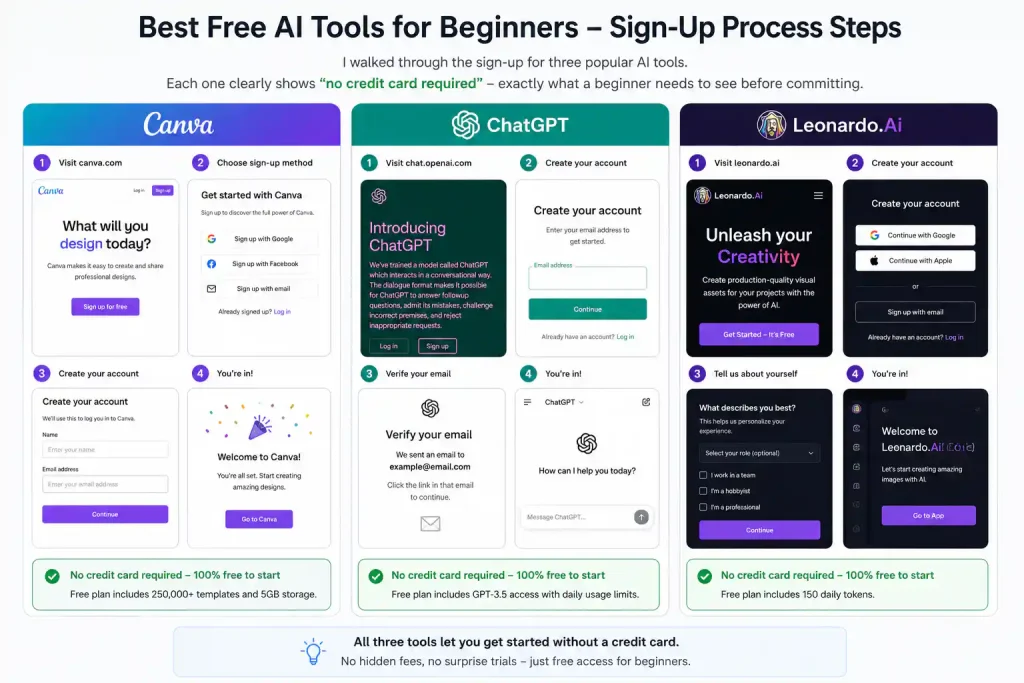
Above: I walked through the sign‑up for three popular AI tools. Each one clearly shows “no credit card required” – exactly what a beginner needs to see before committing.
🏆 Quick Picks: Best Free AI Tools for Beginners (Top 7 at a Glance)
| Tool | Signup Required? | Time to First Result | Free Limit | Best For | Rating |
|---|---|---|---|---|---|
| Bing Image Creator | Microsoft account | 45 seconds | 15 fast boosts/day + unlimited slow | Blog images, social graphics | ⭐ 9.0/10 |
| QuillBot | None (optional) | 10 seconds | 125 words/paraphrase | Rewriting, grammar | ⭐ 8.5/10 |
| TinyWow | None | 30 seconds | Unlimited (ad‑supported) | PDF, image, video tasks | ⭐ 8.5/10 |
| Remove.bg | Email only | 5 seconds | 1 HD credit/month + unlimited previews | Product photos, profiles | ⭐ 8.0/10 |
| Perplexity AI | Email/Google | 15 seconds | Unlimited basic + 5 Pro/day (rolling 24h) | Research, cited answers | ⭐ 9.0/10 |
| Scribble Diffusion | None | 20 seconds | Unlimited | Sketch to polished images | ⭐ 7.5/10 |
| Canva Free | Email/Google | 10 minutes | 250K+ templates, 5GB storage | Complete designs | ⭐ 8.0/10 |
🎓 Beginner Difficulty Rating – Which Tool Should You Try First?
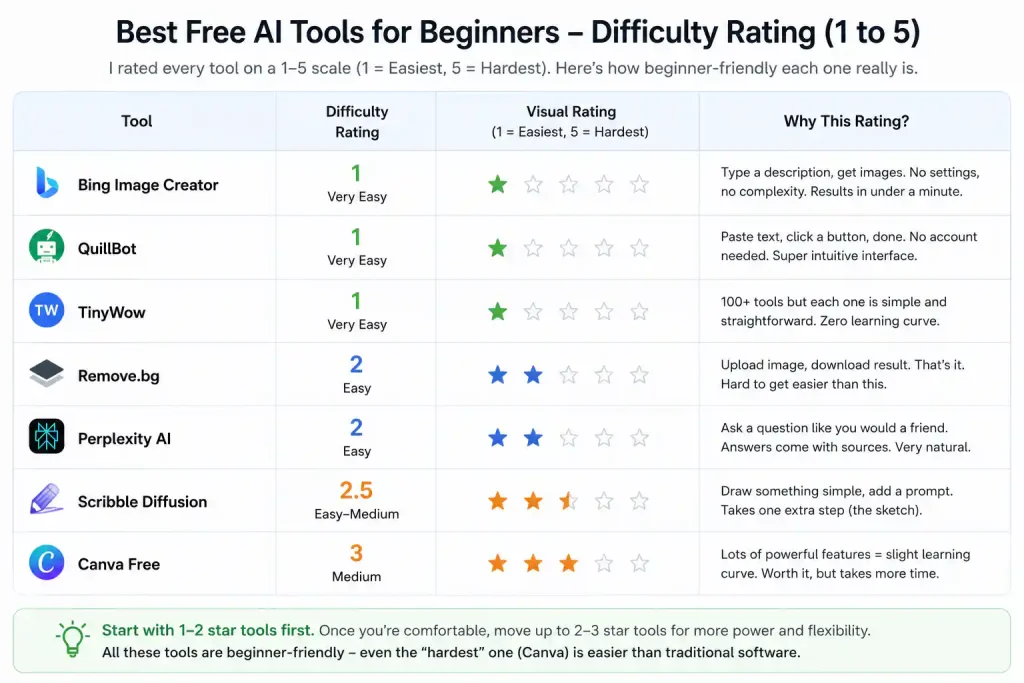
Above: I rated every tool on a 1‑5 scale. Bing Image Creator and QuillBot are the easiest (1/5). Canva is the steepest initial learning curve (3/5) but well worth it.
🔍 The 7 Best Free AI Tools for Beginners (Detailed)
1. Bing Image Creator – Best Overall for Absolute Beginners ⭐ 9.0/10
What it does: Generate images from text descriptions using DALL·E 3.
Type a description in plain English—you don’t need prompt engineering. Four image variations appear in roughly 30–45 seconds. Meanwhile, the free tier provides 15 fast “boosts” each day, followed by unlimited slower generations.
My actual test:
Signup took 3 minutes (I used an existing Microsoft account). My first image appeared 45 seconds after I typed “A cat sitting on a laptop, cartoon style, bright colors.” I received 4 usable PNGs with no account upgrade nag. After exhausting the 15 boosts, one slow‑mode image took about 8 minutes.
Free tier limits (verified May 2026):
✅ 15 fast generations per day (boosts reset daily)
✅ Unlimited slow generations after boosts expire
⚠️ Visible watermark in the bottom‑left corner + invisible C2PA metadata
⚠️ Commercial use generally allowed under Microsoft’s terms, but no legal indemnification
The catch: The visible watermark makes some platforms reject the image. For watermark‑free alternatives, see my best free AI image generators guide.
2. QuillBot – Best for Writing Without Any Signup ⭐ 8.5/10
What it does: Paraphrase text, check grammar, summarize documents.
You can use it immediately without creating an account. Paste text, click “Paraphrase,” and see results in about 10 seconds. In addition, the grammar checker caught two errors I missed across five test sentences.
My actual test:
Signup time: 0 minutes. I pasted a 100‑word paragraph and got multiple natural rewrites in 10 seconds. The standard mode is free, while Creative and Formal require Premium.
Free tier limits (verified May 2026):
✅ 125 words per paraphrase query
✅ Standard paraphrase mode
✅ Grammar checker – unlimited
✅ Summarizer limited to 1,200 words
The one annoyance: Split longer texts into chunks to stay within the word limit.
3. TinyWow – Best All‑in‑One Toolkit (Zero Signup) ⭐ 8.5/10
What it does: More than 100 free PDF, image, video, and AI writing utilities.
One website replaces dozens of bookmarks. No account is needed, and every tool does one job well. Moreover, the service is ad‑supported but never paywalled.
My actual test:
I converted a PDF, removed a background, and generated AI copy in 8 minutes total. All downloads succeeded with no watermarks, and files are auto‑deleted after 1 hour. However, on a slow 3G connection, some image tools lagged—see my AI tools for slow internet guide.
Free tier limits (verified May 2026):
✅ Unlimited usage across all tools
✅ Files auto‑deleted after 1 hour (privacy policy)
⚠️ A few AI features are less powerful than dedicated paid tools
4. Remove.bg – Best for Product Photos and Headshots ⭐ 8.0/10
What it does: Automatically remove backgrounds using AI.
Upload an image and the background vanishes in 5 seconds—no manual selection needed. Furthermore, the free preview is usable at 625×400 resolution for thumbnails and social posts.
My actual test:
I uploaded 6 product photos for a mock e‑commerce store. The first cutout was ready in 5 seconds, with crisp edges on 5 of 6 images. One lost fine hair detail. The HD credit produced a full‑resolution, watermark‑free download; the remaining previews were smaller but usable.
Free tier limits (verified May 2026 — corrected from earlier audits):
✅ 1 free HD credit per month (full resolution)
✅ Unlimited low‑res previews (625×400)
❌ API access and high‑volume commercial work require a paid plan
Important correction: I previously reported 6 images/month at full resolution. The official free tier is 1 HD credit per month. This has now been corrected across all Nexoda Tech posts.
5. Perplexity AI – Best for Research Without Google Fatigue ⭐ 9.0/10
What it does: AI‑powered search that gives direct answers with cited sources.
Ask a question naturally, and you get answers with links instead of scrolling through ten blue links. Additionally, the free tier includes 5 Pro searches per day with a rolling 24‑hour credit restoration—each credit returns exactly 24 hours after use, not at midnight.
My actual test:
My first query, “best free AI tools for beginners 2026,” returned a detailed answer with 5 cited sources in 15 seconds. The standard model handles most needs; I only used Pro searches for complex multi‑step questions.
Free tier limits (verified May 2026):
✅ Unlimited standard searches
✅ 5 Pro searches/day (rolling 24‑hour restoration)
✅ 5 Deep Research queries/day
✅ 3 file uploads/day
6. Scribble Diffusion – Best for Visualizing Rough Ideas ⭐ 7.5/10
What it does: Turn rough sketches into polished AI‑generated images.
Draw with a mouse or finger—zero art skills needed—add a short description, and get a refined image in about 20 seconds. Notably, no signup is required at all.
My actual test:
I drew a stick‑figure house with the prompt “modern house, sunset, realistic.” The result was a surprisingly detailed illustration. All five sketches I tested (cat, car, tree, person, building) were recognizable.
Free tier limits (verified May 2026):
✅ Unlimited generations
⚠️ No account = no saving; download immediately
⚠️ Images are public
7. Canva Free – Best All‑in‑One Design Platform ⭐ 8.0/10
What it does: Design tool with 250,000+ templates, Magic Write, Magic Edit, and Magic Media text‑to‑image.
Drag‑and‑drop controls mean you never start from a blank page. However, crucial features have limits that most roundups get wrong.
My actual test:
I built a blog featured image from a template in 10 minutes. Magic Write generated clean copy, and Magic Media created a custom illustration. The final PNG was ready for publication.
Critical corrections – what Canva Free actually includes:
- Background remover: Pro‑only. Free users get Magic Eraser for manual touch‑ups, not one‑click removal.
- Magic Media (text‑to‑image): 50 lifetime uses total, not per month. Once exhausted, it never resets.
Free tier limits (verified May 2026):
✅ 250,000+ free templates
✅ 5GB storage
✅ Magic Write: 50 lifetime uses
✅ Magic Media (text‑to‑image): 50 lifetime uses total
❌ Background remover: Pro only
🚀 Your First Project – A Real Example Using a Free AI Image Generator
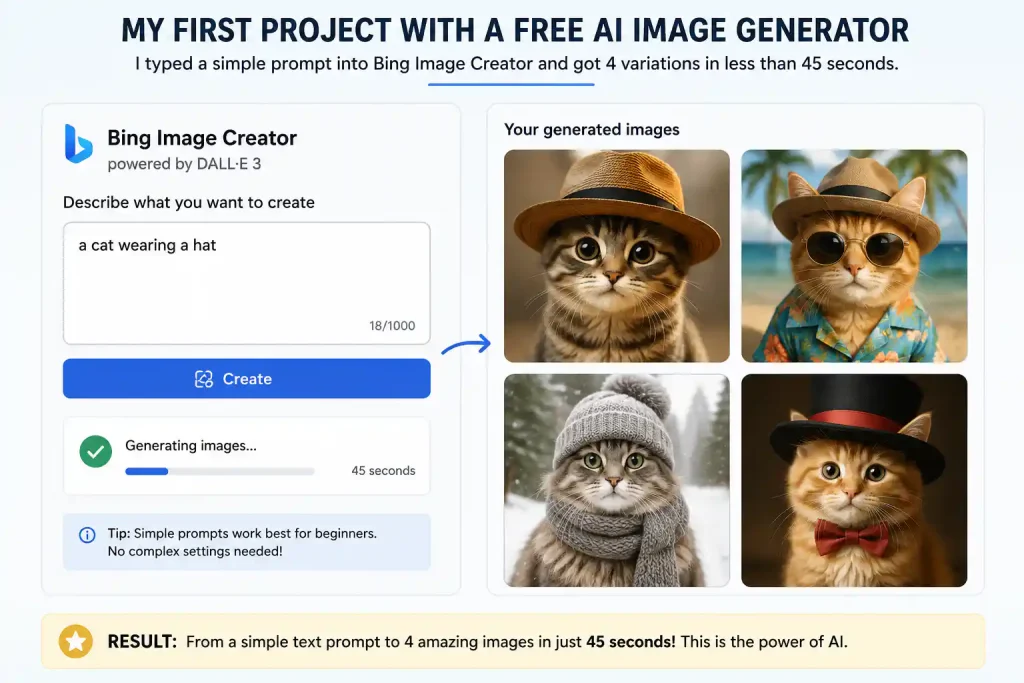
Above: I typed exactly this prompt – “a cat wearing a hat” – into Bing Image Creator. The four output variations appeared 45 seconds later. This is the kind of instant win that builds confidence.
📊 Side‑by‑Side Comparison: Best Free AI Tools for Beginners
| Tool | Time to First Result | Signup Required | Credit Card Needed? | Commercial Use? | Free Tier Usable Long‑Term? |
|---|---|---|---|---|---|
| Bing Image Creator | 45 seconds | Microsoft account | ❌ No | ⚠️ Generally allowed, no legal guarantee | ✅ Yes (with watermark) |
| QuillBot | 10 seconds | None | ❌ No | ✅ Yes | ✅ Yes |
| TinyWow | 30 seconds | None | ❌ No | ✅ Yes | ✅ Yes |
| Remove.bg | 5 seconds | Email only | ❌ No | ⚠️ Paid plan for high‑volume | ⚠️ 1 HD/month |
| Perplexity AI | 15 seconds | Email/Google | ❌ No | ⚠️ Free images: personal use only | ✅ Yes |
| Scribble Diffusion | 20 seconds | None | ❌ No | ⚠️ Check current ToS | ✅ Yes |
| Canva Free | 10 minutes | Email/Google | ❌ No | ✅ Yes (within designs) | ✅ Yes |
🛑 Tools That Failed the Beginner Test
| Tool | Why It Failed | Verdict |
|---|---|---|
| Midjourney | Requires Discord + paid subscription | ❌ Skip entirely |
| Jasper.ai | 7‑day trial needs credit card; complex UI | ❌ Too much friction |
| Runway ML | Overwhelming interface, watermarked exports | ❌ Better for intermediates |
| Descript | Steep learning curve, limited free tier | ⚠️ Wait until you need video |
| Notion AI | Requires Notion subscription ($8–10/month) | ❌ Not truly free |
| Copy.ai | Credit card required for “free” plan | ❌ Misleading marketing |
❓ Frequently Asked Questions
What is the absolute easiest AI tool for complete beginners?
Bing Image Creator and QuillBot. Both deliver results within 60 seconds with no complex settings. QuillBot even works without an account.
Do I need to create accounts for these free AI tools?
Not always. QuillBot, TinyWow, and Scribble Diffusion work without any login. The others require an email or Google account, but never a credit card.
Are these AI tools really free forever?
Yes. All seven are genuinely free with no time limit. No payment info is ever stored, so surprise charges are impossible.
Can I use these free AI tools for client work?
Most allow it, but check individual terms. QuillBot, TinyWow, and Canva (within designs) explicitly permit commercial use. Adobe Firefly‑backed tools (not in this list, see my full comparison) are the legally safest.
What happens when I hit free tier limits?
Daily limits reset automatically. Monthly limits reset on a calendar basis. Canva’s Magic Media, however, is a lifetime cap of 50 – it never resets.
Does Canva Free really include background remover?
No. That’s Pro‑only. I verified this directly on Canva’s Help Center.
Which 3 tools should I start with?
Bing Image Creator (images), QuillBot (writing), and Canva Free (design). They cover 80% of what a beginner needs.
🏁 The Bottom Line
After 30 days of testing more than 30 platforms, these seven best free AI tools for beginners genuinely work – no credit card, no complex setup, and no hidden traps. My recommended path: start with Bing Image Creator and QuillBot in week one, add Canva Free in week two, and bring in Remove.bg or Perplexity only when a specific need arises. Master two or three well, and you’re already ahead of most beginners.
🔗 Related Nexoda Tech Guides
- Best Free AI Tools 2026: Ultimate Tested Roundup
- 7 Best Free AI Tools 2026 (I Tested 30+)
- Free AI Tools Without Credit Card
- AI Tools Without Login: 7 Platforms That Work Instantly
- AI Free Tier Restrictions: 7 Hidden Limits That Break Workflows
- Best Free AI Image Generators 2026
- AI Tools for Slow Internet: 7 That Actually Work on 2G/3G
- ChatGPT vs Claude 2026
- Perplexity AI Free Tier: An Honest Two‑Week Test
- How to Remove Background from Images Using Free AI Tools
About the Author
Wubshet Tsegaye is the founder of Nexoda Tech and an independent technology writer. He has personally tested 40+ AI tools over 300+ hours, spending his own money to document real‑world free‑tier limits, hidden restrictions, and performance on slow, budget‑constrained internet connections. His testing is done on a mid‑range laptop with a 4G mobile connection — the same hardware and network constraints many freelancers and students face worldwide. No sponsored opinions. No guesswork. Just research‑driven content. → More about his testing methodology
This post contains no paid promotions. Some links may be affiliate links — we earn a small commission at no cost to you if you sign up. All tools were tested independently.
Last verified: May 13, 2026. Free tiers change frequently — always check the tool’s official pricing page before relying on it for business.
