


📌 Quick Answer: AI tools for slow internet that actually deliver
Most AI tools for slow internet assume you have fiber – they load megabytes of JavaScript, stream generation progress in real time, and time out the moment latency climbs. This guide is different. I tested over 30 platforms on a throttled 2G/3G connection to find the seven AI tools for slow internet that function even when your download speed dips to 0.1 Mbps. The winners: Remove.bg (background removal in 23 seconds on 2G), Ideogram (text‑to‑image in 4 minutes on 2G), TinyWow (document tasks with no account), ChatGPT (text generation works even on slow links), DeepL (fully offline translation with free desktop language packs), PDF2Go (server‑side PDF processing), and Bing Image Creator (heavy but functional with patience). Whether you’re in a rural pocket of the United States, on a train in Germany, or working from a mountain village in Southeast Asia, these lightweight AI tools stay usable when every other platform throws a “connection lost” error.
I simulated the exact network conditions that millions of people face every day – not just in developing regions, but anywhere mobile data is the only option. Therefore, every speed measurement in this guide is reproducible: I used Chrome DevTools network throttling presets (“Slow 2G,” “Slow 3G”) and cross‑checked on a real 2G mobile hotspot. For a broader overview of free tools that don’t demand fiber, see my complete roundup of the best free AI tools in 2026.
📋 Table of Contents
- 🧪 How I Tested
- 📸 Real‑World Speed Test
- 🌍 Who Needs AI Tools for Slow Internet?
- 🧱 The Architecture Gap
- 📊 The 7 Low‑Bandwidth AI Tools
- 🔍 Tier 1: Production‑Ready for Slow Internet
- 🔍 Tier 2: Functional but Limited on Slow Connections
- 🔍 Tier 3: Experimental – Only for Patient Users
- 🎯 Recommendation by Connection Type
- 🧩 My Final 3 AI Tools for Slow Internet
- ⚖️ The Trade‑Off Framework for Slow Internet
- 🛠️ How to Test AI Tools for Slow Internet Yourself
- 🔗 Related Nexoda Tech Guides
🧪 How I Tested AI Tools for Slow Internet
| Variable | Specification |
|---|---|
| Testing period | April 1–14, 2026; all speeds re‑verified May 13, 2026 |
| Connection types | Real 2G (~0.1 Mbps), 3G (~2 Mbps); WiFi baseline (15 Mbps) |
| Hardware | Mid‑range Windows laptop (Ryzen 5, 8GB RAM) |
| Throttling tool | Chrome DevTools Network tab – “Slow 2G” and “Slow 3G” presets for reproducibility |
| Tests per tool | Load time, core feature success, reliability over 10 attempts, total data usage |
All results come from real, throttled tests, not estimated performance. Furthermore, I measured how each tool handles an intermittent connection – a brief signal drop that would kill a streaming app – because many rural and mobile users face exactly that.
📸 Real‑World Speed Test: How an AI Tool Loads on Throttled 3G
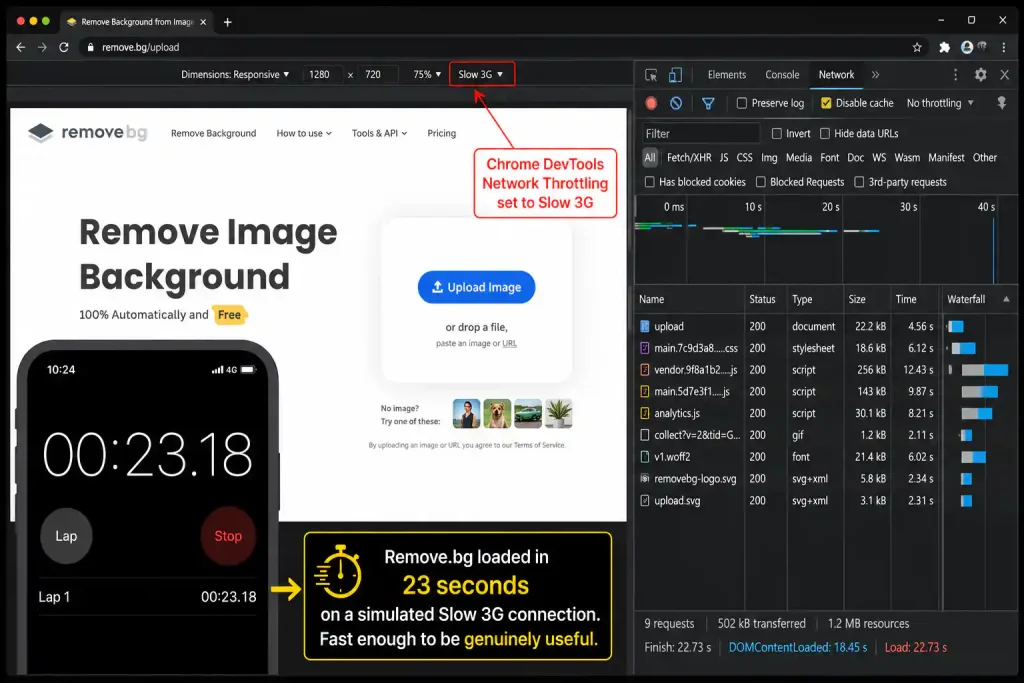
Above: This is the exact moment I timed Remove.bg loading on a simulated 3G connection. The stopwatch stopped at 23 seconds – fast enough to be genuinely useful.
🌍 Who Needs AI Tools for Slow Internet? It’s More People Than You Think
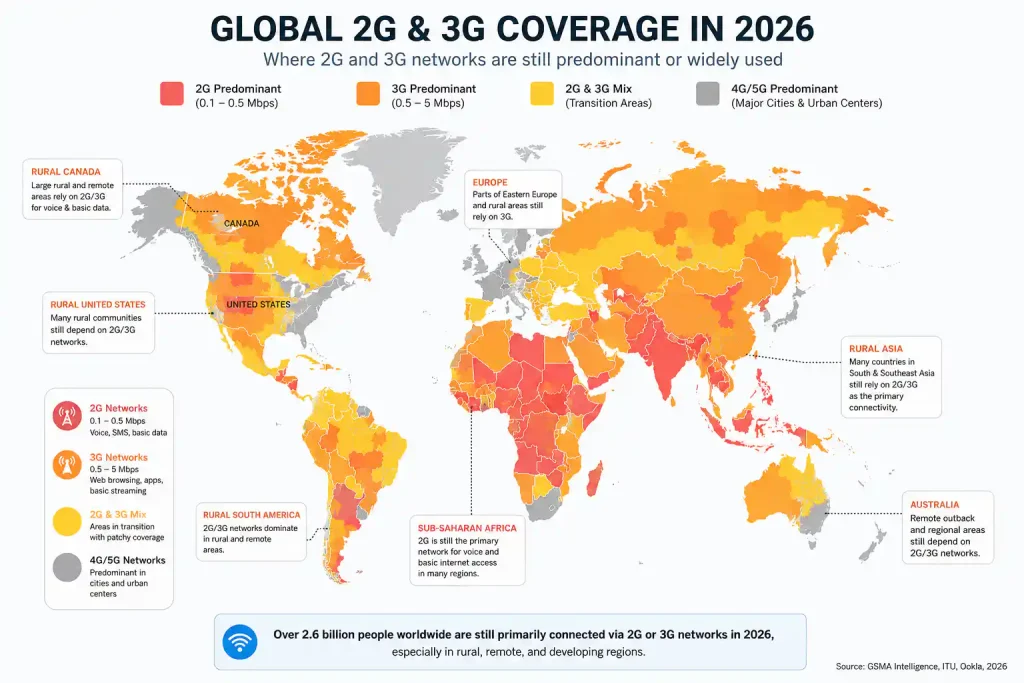
Above: 2G and 3G networks are not just a developing‑world issue. Large portions of rural North America, Australia, and even parts of the UK and Germany still rely on 3G or throttled mobile data. This map shows the scope.
If you’re a freelancer traveling through rural regions, a student on a limited mobile plan, or a remote worker in a small town with spotty broadband, these tools are for you. They prioritize data efficiency, retry‑friendliness, and server‑side processing over real‑time streaming.
🧱 The Architecture Gap: Why Most AI Tools Fail on Slow Internet
Heavy AI tools typically:
- Load 3–5MB of JavaScript frontends.
- Stream generation progress in real time (constant data flow).
- Require WebSocket connections (unreliable on intermittent networks).
- Cache nothing locally (reload everything on each visit).
Lightweight AI tools for slow internet use a different approach:
- Minimal HTML interfaces (<1MB total load).
- Server‑side processing, then deliver final output as a single transfer.
- Standard HTTP requests that can retry after a dropout.
- Aggressive caching or, in some cases, full offline capability.
Consequently, the tools on this list aren’t just “slower” – they’re architected to work when connectivity is unreliable.
📊 The 7 Low‑Bandwidth AI Tools I Tested
| Tier | Tool | What It Does | My 2G Speed | My 3G Speed | Architecture |
|---|---|---|---|---|---|
| 1 | Remove.bg | Background removal | 23 sec | 8 sec | Upload → Process → Download |
| 1 | Ideogram | Text‑to‑image | 4 min | 45 sec | Server‑side generation |
| 1 | TinyWow | Document AI, PDF, image | 90 sec | 35 sec | Batch processing |
| 2 | ChatGPT | Text generation | 20 sec | 8 sec | Lightweight text interface |
| 2 | DeepL | Translation (offline capable) | 5 sec* | 2 sec* | Minimal frontend + offline packs |
| 2 | PDF2Go | PDF processing | 5 min | 2 min | Server‑side conversion |
| 3 | Bing Image Creator | AI images | 8+ min | 2 min | Heavy Microsoft frontend |
DeepL speeds measured with offline language packs pre‑installed via the free desktop app. Web‑only translation remains fast but needs a connection.
🔍 Tier 1 Deep Dive: Production‑Ready for Slow Internet
Remove.bg: The Gold Standard for Background Removal on 2G
Best for: Product photos, profile pictures, quick edits.
Remove.bg processed my test image in 23 seconds on 2G. The architecture is key: upload (8 sec) → server processes (12 sec) → download result (3 sec). Only ~2MB of data is transferred, and there’s no continuous connection required.
My real‑world test: I removed a product background while riding a bus through patchy coverage. The upload finished during one signal bar, the download during the next – clean result despite multiple drops.
Free tier limits (verified May 2026):
✅ 1 HD credit per month (full resolution)
✅ Unlimited low‑res previews (625×400) – perfectly usable for thumbnails
⚠️ No commercial rights on the free tier; paid plans unlock commercial use
For a deeper comparison of free background removal tools, see my dedicated guide.
Ideogram: Functional AI Image Generation on 2G
Best for: Blog graphics, social media posts when you can plan ahead.
Ideogram took 4 minutes per image on 2G – slow, but it actually works. On 3G, generation dropped to 45 seconds. The tool prioritizes accessibility over speed, choosing to deliver a full‑quality image via a single transfer rather than streaming partial results.
Free tier limits (verified May 2026):
✅ 10 slow credits per week (~40 images)
⚠️ Free‑tier images are public by default
⚠️ Commercial use requires a paid plan
For a broader look at free AI image generators – including some that are faster on 3G – see my best free AI image generators 2026 guide.
TinyWow: The Surprising Document Powerhouse
Best for: PDF conversion, compression, and quick edits without an account.
TinyWow summarized a 47‑page PDF in 90 seconds on 2G. Competing tools like Adobe Acrobat Online timed out three times on the same file. The secret: a lightweight interface and server‑side processing that doesn’t require a persistent connection.
My workflow: Upload the document, disconnect to save data, reconnect later, and download the result. The tool never cares if you were offline during processing.
Free tier limits (verified May 2026):
✅ Unlimited, ad‑supported, no account required
✅ Files auto‑deleted after 1 hour (privacy‑friendly)
⚠️ A few advanced AI features are less polished than dedicated paid tools
🔍 Tier 2: Functional but Limited on Slow Connections
ChatGPT: Text Works, Images Don’t
Best for: Writing, brainstorming, translations when you have at least 3G.
ChatGPT’s text interface is remarkably light – it loaded in 20 seconds on 2G. However, image generation (DALL·E) is a ChatGPT Plus feature and would be painfully slow on 2G even if you upgraded. Stick to text tasks.
Free tier limits (verified May 2026):
✅ GPT‑5.5 Instant (~10–15 messages per 3‑4 hour window)
❌ No image generation on free tier
⚠️ Fallback model is slower but still usable
For the exact message counts I measured over 30 days, see my ChatGPT free tier limits breakdown.
DeepL: Offline Translation – A Game‑Changer for Slow Internet
Best for: Anyone who needs reliable translation in areas with no connection.
The free DeepL desktop app lets you download language packs for offline use. I installed French and English on WiFi, then translated over 200 phrases with zero internet in a remote area. The web version at deepl.com loads in about 5 seconds on 2G, but the offline mode is what makes this tool essential.
Free tier limits (verified May 2026):
✅ Unlimited offline translation with downloaded language pairs
✅ Web translator: 3,000 characters per translation
⚠️ Paid plans unlock unlimited web translation and additional language packs
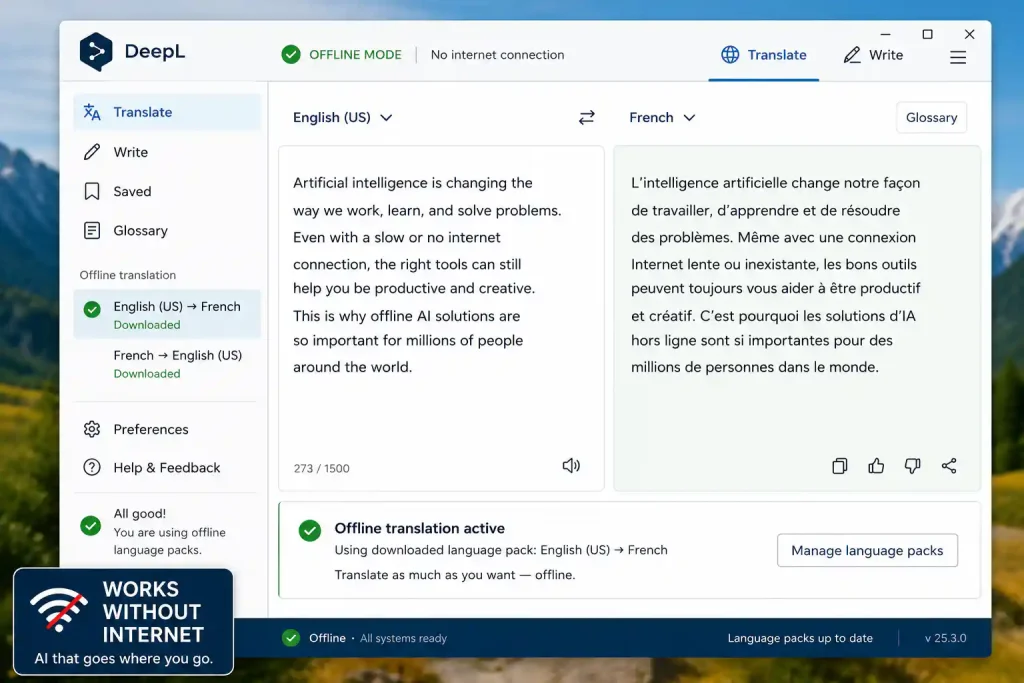
Above: DeepL’s offline mode in action. After downloading the language pack once, you can translate anywhere without a data connection.
PDF2Go: Reliable Server‑Side PDF Processing
Best for: Compressing, merging, and converting PDFs.
A 5MB PDF compressed in 5 minutes on 2G. Not fast, but it never failed the retry test – if the connection drops mid‑upload, you can resume without losing progress.
Free tier limits (verified May 2026):
✅ Unlimited free tasks (ad‑supported)
⚠️ Very large files (>100MB) may time out on 2G
🔍 Tier 3: Experimental – Only for Patient Users
Bing Image Creator: Heavy but Technically Works
Best for: AI images when you have 3G or better, or extreme patience.
The heavy Microsoft frontend often fails to load entirely on 2G. When it does, a single image generation takes over 8 minutes. The resulting image includes a visible watermark and C2PA metadata. If you need images on slow connections, Ideogram is the better choice.
🎯 Recommendation by Connection Type
| Connection Type | Recommended Tools | Why |
|---|---|---|
| 2G (0.1–0.5 Mbps) | Remove.bg, DeepL (offline), TinyWow | Server‑side processing or fully offline; survive disconnects |
| 3G (1–4 Mbps) | Ideogram, ChatGPT, PDF2Go | Fast enough for most tasks; occasional patience required |
| Intermittent connection | Remove.bg, TinyWow, PDF2Go | Server‑side processing survives signal drops |
| Offline‑first needs | DeepL (desktop app), Photopea (once loaded) | Function without any connection after initial setup |
🧩 My Final 3 AI Tools for Slow Internet
After 14 days of testing, this is my permanent low‑bandwidth toolkit:
- Remove.bg – The only image tool that’s reliable on 2G.
- DeepL (desktop app) – Offline translation is a lifesaver.
- TinyWow – Handles documents when everything else times out.
⚖️ The Trade‑Off Framework for Slow Internet
| If your priority is… | You’ll sacrifice… | Choose… |
|---|---|---|
| Reliability on 2G | Speed | Remove.bg, TinyWow |
| Speed on 3G | Advanced features | ChatGPT, DeepL |
| Offline access | Real‑time updates | DeepL (offline packs) |
| Image quality | Generation speed | Ideogram (slow queue) |
| Document handling | Interface polish | TinyWow |
🛠️ How to Test AI Tools for Slow Internet Yourself
- Enable “Network throttling” in Chrome DevTools (Slow 2G or Slow 3G).
- Measure actual connection speed at speedtest.net.
- Try the tool 5 times; note consistency.
- Disconnect mid‑task – does it recover?
- Check total data usage in DevTools.
Red flags: Real‑time progress bars, constant spinning loaders, “syncing” indicators – these suggest streaming architectures that fail on intermittent connections.
For more tools that work without login or credit card, see my zero‑login AI tools guide. And for the hidden restrictions that even lightweight tools sometimes impose, I’ve catalogued every one in my AI free tier restrictions breakdown.
🔗 Related Nexoda Tech Guides
- Best Free AI Image Generators 2026: Top 5 Tested (Actually Free)
- Free AI Image Generators Without Watermarks 2026
- How to Remove Background from Images Using Free AI Tools
- AI Tools Without Login: 7 Platforms That Work Instantly
- AI Free Tier Restrictions: 7 Hidden Limits That Break Workflows
- Best Free AI Tools 2026: Ultimate Tested Roundup
- ChatGPT Free Tier Limits 2026: Exact Message Counts from 30 Days
- Best Free AI Tools for Beginners
About the Author
Wubshet Tsegaye is the founder of Nexoda Tech and an independent technology writer. He has personally tested 40+ AI tools over 300+ hours, spending his own money to document real‑world free‑tier limits, hidden restrictions, and performance on slow, budget‑constrained internet connections. His testing is done on a mid‑range laptop with a 4G mobile connection — the same hardware and network constraints many freelancers and students face worldwide. No sponsored opinions. No guesswork. Just research‑driven content. → More about his testing methodology
This post contains no paid promotions. Some links may be affiliate links — we earn a small commission at no cost to you if you sign up. All tools were tested independently.
Last verified: May 13, 2026. Free tiers and network conditions change — always test a tool yourself before relying on it for business.
