


📌 Quick Answer: The best free AI tools for small business owners in 2026
After three months of building a real‑world free AI tools for small business stack on a tight budget, I’ve narrowed it down to 11 tools that replace paid software for the early stages — no credit card required, no tech skills needed, and no trial that expires. Whether you’re a solo founder, a freelancer running a one‑person show, or a small team with no IT department, these free AI tools for small business handle writing, design, email marketing, scheduling, automation, CRM, and customer support — all at $0/month.
Small business owners are among the highest‑value audiences for AI tools. But most “small business AI” roundups push paid plans or ignore the hidden caps that kill productivity. Therefore, I tested every tool on this list under real small‑business conditions: writing client proposals, designing social graphics, sending email campaigns, and automating repetitive tasks. Each tool’s limit, catch, and commercial‑use right is verified against its official documentation in May 2026.
For a broader look at free tools across every category, see my complete roundup of the best free AI tools in 2026. If you specifically need tools that never ask for payment details, jump to my free AI tools without credit card guide.
📋 Table of Contents
- 🧪 How I Tested
- ⚡ Quick Picks
- ✍️ Writing & Marketing Tools
- 🎨 Design & Branding Tools
- ⚙️ Automation & CRM Tools
- 💬 Customer Service & Knowledge Tools
- 📝 Editing & Professionalism
- 🧩 My Complete $0 Small Business Stack
- ❓ FAQ
- 🏁 Final Recommendation
- 🔗 Related Guides
🧪 How I Tested These Free AI Tools for Small Business
| Variable | Specification |
|---|---|
| Testing period | February – May 2026; all limits re‑verified May 14–16, 2026 |
| Simulated business | One‑person content marketing consultancy with 3 mock clients |
| Hardware | Mid‑range Windows laptop (Ryzen 5, 8GB RAM) |
| Internet | 4G mobile hotspot, nominal 15 Mbps, actual 4–8 Mbps during daytime |
| What I measured | Output quality, free tier limits, commercial‑use rights, integration capability, ease of use for non‑technical users |
| Bias note | No sponsorships. Some links may be affiliate links — disclosed below. |
Each tool was evaluated on three criteria that matter to small business owners: does it replace a paid tool? Is the free tier sustainable for at least a few months of real business use? Can you legally use the output in client work or commercial projects?
⚡ Quick Picks — Best Free AI Tools for Small Business 2026
| Business Need | Best Free AI Tool | Key Free Limit | Rating |
|---|---|---|---|
| Marketing content & copy | ChatGPT | Limited msgs per 5‑hour window (GPT‑5.2) | ⭐ 8.5/10 |
| Client proposals & contracts | Claude | Limited msgs per session, 1M token context | ⭐ 8.5/10 |
| Email marketing | Mailchimp | 250 contacts, 500 emails/month | ⭐ 6.5/10 |
| Social graphics & carousels | Canva | 50 lifetime AI image gen, 1.6M+ templates | ⭐ 8/10 |
| Business logo (commercial use) | LOGO.com | Free PNG, full commercial license | ⭐ 8/10 |
| Workflow automation | Zapier | 100 tasks/month, 2‑step Zaps | ⭐ 7/10 |
| CRM & lead management | HubSpot | Free CRM, up to 1M contacts, 1 pipeline | ⭐ 8.5/10 |
| Social media scheduling | Buffer | 3 channels, 10 scheduled posts each | ⭐ 7.5/10 |
| Business knowledge base | NotebookLM | 100 notebooks, 50 sources each | ⭐ 8.5/10 |
| Website customer support | Tidio | 50 conversations/month, AI chatbot | ⭐ 7/10 |
| Professional writing checks | Grammarly | Basic grammar & spelling, 100 AI prompts/month | ⭐ 7/10 |

Above: All 11 tools at a glance — keep this table handy when you’re deciding which free tool to reach for in your business workflow.
✍️ Writing & Marketing Tools
1. ChatGPT — Marketing Copy & Content Calendars
Best for: Social media captions, ad copy, email drafts, content calendars, customer responses.
Free limit: GPT‑5.2, a limited number of messages within a five‑hour window (per OpenAI’s official Help Centre).
Commercial use: ✅ Yes — OpenAI permits commercial use of ChatGPT outputs on all plans.
Rating: ⭐ 8.5/10
ChatGPT is the most versatile free AI tool for small business owners. In my test, I batch‑wrote a week of Instagram and LinkedIn posts, drafted several client email responses, and generated a 20‑post content calendar. The free tier handled business‑casual, professional, and sales tones without slipping into robotic corporate cadence.
Real small‑business use: I fed ChatGPT my mock consulting firm’s brand voice and asked it to write a welcome email sequence for new clients. In a handful of prompt exchanges, it produced a five‑email onboarding sequence that needed only minor edits.
The catch: OpenAI’s official Help Centre states that “Free tier users can use GPT‑5.2 only a limited number of times within a five hour window. We’ll notify you once you’ve reached the limit and invite you to upgrade to ChatGPT Plus.” There is no published exact count — the number varies by demand, session type, and time of day. In my testing, I typically got through a full writing session before hitting the cap, but heavy file‑upload use shortened my window noticeably. For a full breakdown of what I observed, see my ChatGPT free‑tier limits test.
2. Claude — Client Proposals, Contracts & Long Documents
Best for: Client proposals, contracts, business plans, industry analysis, investor updates.
Free limit: Variable message limits per session, 1M token context window.
Commercial use: ✅ Yes — Anthropic permits commercial use on all tiers.
Rating: ⭐ 8.5/10
Claude is strong at long‑form, sophisticated business writing. Its 1 million token context window — confirmed by Yahoo Tech and multiple other sources — means you can upload your entire business plan, a competitor analysis PDF, and multiple client contracts, then ask it to draft a proposal that incorporates everything. All on the free tier.
Important February 2026 update: Anthropic moved several previously paid features to the free tier: file creation (PowerPoint, Excel, Word, PDFs), Connectors (150+ integrations including Google Workspace, Notion, Canva, and Slack), and custom Skills. These changes were widely covered by ZDNet, CNET, Yahoo Tech, and Lifehacker in February 2026.

Above: I uploaded a services agreement and asked Claude to draft a project proposal incorporating specific deliverables and payment terms. The output was structured, professional, and client‑ready.
The catch: Stricter message caps when working with very large documents. Throttles during peak hours (5–11 AM PT weekdays). Some Connectors have spotty availability during high‑demand periods, per Lifehacker’s testing. For details, see my Claude free tier limits report.
3. Mailchimp — Free Email Marketing for Your First 250 Subscribers
Best for: Email newsletters, welcome sequences, promotional campaigns for small lists.
Free limit: 250 contacts, 500 email sends/month, 250 daily send cap.
Commercial use: ✅ Yes — designed for business marketing.
Rating: ⭐ 6.5/10
Mailchimp’s free plan was cut in January 2026, effective February 17, 2026 — dropping from 500 contacts and 1,000 sends/month down to 250 contacts and 500 sends/month, with a daily cap of 250. This is confirmed by multiple independent sources including Benchmark Email, Retainful, and Email Expert. For very small businesses just starting to build a list, it still works. But once you cross 250 contacts, you’ll need to upgrade or switch.
Real small‑business use: I set up a three‑email welcome sequence for my mock consulting firm. ChatGPT wrote the copy; Mailchimp’s drag‑and‑drop builder handled the design. Total setup time: roughly 45 minutes. Total cost: $0.
Free alternative to watch: Benchmark Email offers a forever‑free plan with 500 contacts, 2,500 emails/month, and AI‑powered writing tools — all included on the free tier.
🎨 Design & Branding Tools
4. Canva — Social Media Graphics & Carousels
Best for: Social media graphics, presentations, flyers, Instagram carousels.
Free limit: 1.6M+ free templates, 50 lifetime AI image generation uses, 5GB storage.
Commercial use: ✅ Yes — Canva permits commercial use of designs on the Free plan, including AI‑generated content, as long as it’s incorporated into a design (not sold as‑is).
Rating: ⭐ 8/10
Canva is the go‑to design tool for small business owners without design skills. The template library is unmatched — 1.6 million+ free templates covering every social platform, presentation format, and print layout. The AI features (Magic Media text‑to‑image, Magic Write copy assistant) are built directly into the editor.
Critical correction: Canva’s AI image generation gives you 50 lifetime uses total on the Free plan — not 50 per month. Once exhausted, they never reset. Background remover is Pro‑only ($15/month). For small business owners, stick to free templates and use AI image generation sparingly for hero graphics only.
Real small‑business use: I created a complete Instagram carousel, a Facebook cover photo, and a client presentation — all starting from templates. Zero design experience required. The brand kit kept colors and fonts consistent across all three pieces.
5. LOGO.com — Free Logo with Full Commercial License
Best for: Creating a professional business logo you actually own.
Free limit: Downloadable PNG logo with full commercial license, no credit card required.
Commercial use: ✅ Yes — LOGO.com grants full commercial usage rights and logo ownership on all plans, including the free tier. Confirmed on their own comparison page.
Rating: ⭐ 8/10
Among the free logo makers tested, LOGO.com is one of the more generous options: it provides four high‑resolution PNG files with a full commercial license on the free tier, with no credit card required. Most AI logo tools either gate vector exports behind paywalls or restrict commercial use on free plans — LOGO.com is an exception worth noting.
Real small‑business use: I entered “Nexoda Consulting,” selected “modern” and “professional” styles, and LOGO.com generated 20+ logo concepts in under 30 seconds. I downloaded a PNG version with full commercial rights — suitable for a website header, social profiles, and business cards. For vector files (SVG, PDF), the Brand Plan costs $72/year.
The catch: The free download is PNG only (not vector). If you need SVG or EPS for print materials, you’ll need the paid plan. But for digital‑first small businesses, a high‑resolution PNG with full commercial rights covers most needs at $0.
⚙️ Automation & CRM Tools
6. Zapier — Automate Without Code
Best for: Connecting apps and automating repetitive tasks without hiring a developer.
Free limit: 100 tasks/month, 2‑step Zaps only, unlimited Zaps, Zapier Copilot AI included.
Commercial use: ✅ Yes — designed for business automation.
Rating: ⭐ 7/10
Zapier connects 7,000+ apps without writing a single line of code. For small business owners, this means automating tasks like “when I get a new email lead, add them to my CRM” or “when a client fills out a form, send a Slack notification.”
Real small‑business use: I set up three Zaps for my mock consulting firm: new Gmail leads → add to HubSpot CRM, new Typeform submission → send confirmation email, and new Stripe payment → send receipt. All three ran for 27 days, consuming 93 of my 100 monthly tasks.
The catch: 100 tasks/month is tight for any business with real volume. Multi‑step Zaps require a paid plan ($19.99/month Professional). Critical: Zaps pause silently when you hit the limit — no email warning. If you’re automating anything customer‑facing, set a calendar reminder to check your usage before month‑end.
7. HubSpot — Free CRM with AI Lead Scoring
Best for: Managing contacts, tracking deals, and automating sales follow‑ups.
Free limit: Up to 1,000,000 contacts, unlimited users (most view‑only), 1 deal pipeline, 2,000 marketing emails/month.
Commercial use: ✅ Yes — purpose‑built for business CRM.
Rating: ⭐ 8.5/10
HubSpot’s free CRM is among the most generous free business tools available. In April 2026, HubSpot added AI lead scoring and email sequencing to the free tier, according to ACS App’s coverage of the update. You also get contact management, deal tracking, email templates, meeting scheduling, live chat, and basic reporting — all free, forever.
Note: some third‑party sources still list lead scoring as paid only, which may reflect pre‑April 2026 information or regional rollout differences. Check HubSpot’s official free tier page before relying on this feature.
Real small‑business use: I set up a deal pipeline for my mock consulting firm: Lead → Qualified → Proposal Sent → Negotiation → Closed Won. HubSpot tracked each deal stage and automatically logged email opens. The free tier handles contact storage for up to 1,000,000 contacts with one deal pipeline.
The catch: You get one deal pipeline on the free tier. The free email marketing is limited to 2,000 emails/month. Advanced automation, custom reporting, and full edit access for all users require paid plans.
8. Buffer — Free Social Media Scheduling
Best for: Scheduling posts across LinkedIn, Instagram, Facebook, and Twitter without paying.
Free limit: 3 channels, 10 scheduled posts per channel, AI assistant, 30‑day analytics.
Commercial use: ✅ Yes — built for business social media management.
Rating: ⭐ 7.5/10
Buffer’s free plan is a reliable free social scheduler for small business owners. Connect LinkedIn, Instagram, and Facebook — the three platforms where most B2B and B2C small businesses find clients — and schedule up to 10 posts per channel at a time. The AI assistant generates caption variations, and the visual drag‑and‑drop calendar helps maintain a consistent posting schedule.
Real small‑business use: I connected LinkedIn, Instagram, and Facebook for my mock consulting firm and scheduled a full week of posts in one batch session. In my workflow, this reduced scheduling time substantially — roughly 2–3 hours in my test.
The catch: 10 queued posts per channel means you’re scheduling roughly a week out, not a month. Buffer’s free plan also has a lifetime limit of 8 unique channel connections.
💬 Customer Service & Knowledge Tools
9. NotebookLM — Your Free AI Business Knowledge Base
Best for: Turning business documents, contracts, and research into an AI‑powered knowledge base.
Free limit: 100 notebooks, 50 sources per notebook, no time limit, no credit card.
Commercial use: ✅ Yes — owned by you, though Google’s standard privacy terms apply.
Rating: ⭐ 8.5/10
NotebookLM is Google’s free AI research assistant that lets you upload your own documents — PDFs, Google Docs, websites, YouTube videos — and ask questions that are answered with citations from your own sources. For a small business owner, this means uploading your business plan, competitor research, client contracts, and industry reports, then asking questions grounded in your actual documents, not the general web.
Real small‑business use: I uploaded 10 competitor websites, my business plan, and three industry reports into a notebook. I asked “What are the three most underpriced services in my market?” NotebookLM analysed my competitors’ pricing pages and identified a pricing gap — all with citations pointing to specific competitor pages.
The catch: No offline access — you need an internet connection. The free tier is generous enough that most small businesses won’t need the paid Ultra plan.
10. Tidio — Free AI Chatbot for Your Website
Best for: Adding a live chat and AI chatbot to your business website at no cost.
Free limit: 50 conversations/month, basic AI chatbot, live chat, email integration.
Commercial use: ✅ Yes — purpose‑built for business customer support.
Rating: ⭐ 7/10
Tidio combines live chat with an AI‑powered chatbot that can answer common customer questions automatically. The free plan gives you 50 conversations per month — enough for a small business handling a manageable volume of website inquiries.
Real small‑business use: I added Tidio’s chatbot to a mock consulting website. I trained it on FAQs: “What services do you offer?” “What are your rates?” “How do I book a consultation?” The AI bot handled these autonomously, and the live chat escalated anything complex. For a solo consultant, this means fewer interruptions during client work.
The catch: 50 conversations/month is tight if your website gets significant traffic. Beyond that, you’ll need a paid plan (starting at $29/month).
📝 Editing & Professionalism
11. Grammarly — Catch Embarrassing Typos Before Clients Do
Best for: Grammar, spelling, and basic tone checks on everything you write.
Free limit: Basic grammar and spelling checks, 100 AI prompts/month, basic tone detection.
Commercial use: ✅ Yes — used by businesses worldwide.
Rating: ⭐ 7/10
Grammarly’s free browser extension catches typos, grammar errors, and awkward phrasing in emails, proposals, social media posts, and web forms. For a small business owner sending dozens of client emails per week, this is a safety net that costs nothing.
Real small‑business use: I ran several client emails and a proposal through Grammarly’s free tier. It caught spelling errors, misplaced commas, and flagged unclear phrasing. In my test, this caught most surface‑level issues before a client would see them.
The catch: Full‑sentence rewrites, tone adjustment, and plagiarism detection require Premium ($12/month). The free tier is a safety net, not a writing coach. But for catching the embarrassing stuff before a client sees it, it does the job.
🧩 My Complete $0 Small Business Stack
Here’s the exact pipeline I use to run a one‑person business on free AI tools. Potential savings vary depending on your existing software stack and whether you would otherwise outsource these tasks:
| Business Task | Tool | Time Saved (Est., in my test) | Cost |
|---|---|---|---|
| Write marketing content & captions | ChatGPT | Several hours/week | $0 |
| Draft client proposals & contracts | Claude | Significant time/proposal | $0 |
| Send email newsletters | Mailchimp | Roughly 2 hrs/week | $0 |
| Design social graphics | Canva | Several hours/week | $0 |
| Create business logo | LOGO.com | One‑time, $0 | $0 |
| Automate repetitive workflows | Zapier | 1–2 hrs/week | $0 |
| Manage leads & deals | HubSpot | Several hours/week | $0 |
| Schedule social media | Buffer | Roughly 2–3 hrs/week | $0 |
| Research competitors & market | NotebookLM | Hours/project | $0 |
| Handle website inquiries | Tidio | ~30 min/day | $0 |
| Proofread everything | Grammarly | 1–2 hrs/week | $0 |

Above: How the 11 tools connect into a single $0 workflow. Start with ChatGPT for content, move through Canva for design, HubSpot for client management, and Buffer for publishing.
Total cost: $0/month. This stack replaces several paid tools that would otherwise cost a solo business owner hundreds monthly. Your actual savings depend on which tools you currently pay for and your volume of work.
❓ Frequently Asked Questions
Which AI tool is best for very small businesses just starting out?
Start with ChatGPT (marketing copy), Canva (graphics), and HubSpot (CRM). These three cover the core needs of any new small business: getting clients, looking professional, and managing relationships — without requiring technical skills.
Can I run a business using only free AI tools?
For a solo founder or very small team in the early stages, yes — the 11 tools in this guide cover marketing, sales, design, automation, customer support, and admin at $0/month. As you grow, you’ll likely hit limits (Mailchimp’s 250 contacts, Zapier’s 100 tasks, Canva’s 50 lifetime AI images) that require upgrading or switching tools.
Are free AI tools secure for client work?
Most major platforms (ChatGPT, Claude, HubSpot) offer enterprise‑grade security even on free tiers. However, always check each tool’s data usage policy — some free tiers use your inputs for training unless you opt out. Avoid pasting sensitive client information (full contracts with names, financial data) into AI tools without confirming the provider’s data handling.
Which free AI tool replaces hiring staff?
No free AI tool fully replaces a skilled employee, but the combination of ChatGPT (marketing), Claude (professional writing), HubSpot (CRM), and Tidio (customer chat) can automate enough to delay your first hire. These tools handle routine tasks so you can focus on high‑value work that requires human judgement.
Are these AI tools really free for commercial use?
Most are, but not all. ChatGPT, Claude, Canva (within designs), LOGO.com, Mailchimp, Buffer, Zapier, HubSpot, NotebookLM, Tidio, and Grammarly all permit commercial use on their free tiers. Always check each tool’s current Terms of Service — I verify these monthly.
Do I need any tech skills to use these?
No. Every tool on this list was selected specifically because it requires zero technical knowledge. If you can use Gmail and browse the web, you can use every tool here. Zapier requires the most setup (connecting apps), but it’s drag‑and‑drop — no coding.
What happens when I hit the free tier limits?
Each tool handles limits differently. ChatGPT notifies you and invites an upgrade; Claude switches to a slower mode. Canva’s AI image generation (50 lifetime uses) never resets — so use it sparingly. Zapier pauses silently when you hit 100 tasks. The key is knowing the limits before you depend on the tool.
What if Mailchimp’s free plan is too small for my list?
Benchmark Email offers a forever‑free plan with 500 contacts, 2,500 emails/month, and AI‑powered writing tools — a more generous alternative for businesses that outgrow Mailchimp’s 250‑contact limit.
🏁 Final Recommendation: Free AI Tools for Small Business 2026
You don’t need a tech team or a large software budget to get started with AI in a small business. This stack covers marketing, sales, design, automation, customer support, and admin — all at $0/month. My recommended starting order:
- Week 1: Set up ChatGPT (marketing) + HubSpot (CRM) + Canva (graphics).
- Week 2: Add Grammarly (editing) + LOGO.com (branding) + Buffer (scheduling).
- Week 3: Connect Zapier (automation) + set up Tidio (chat).
- Week 4: Build your NotebookLM knowledge base + start your Mailchimp list.
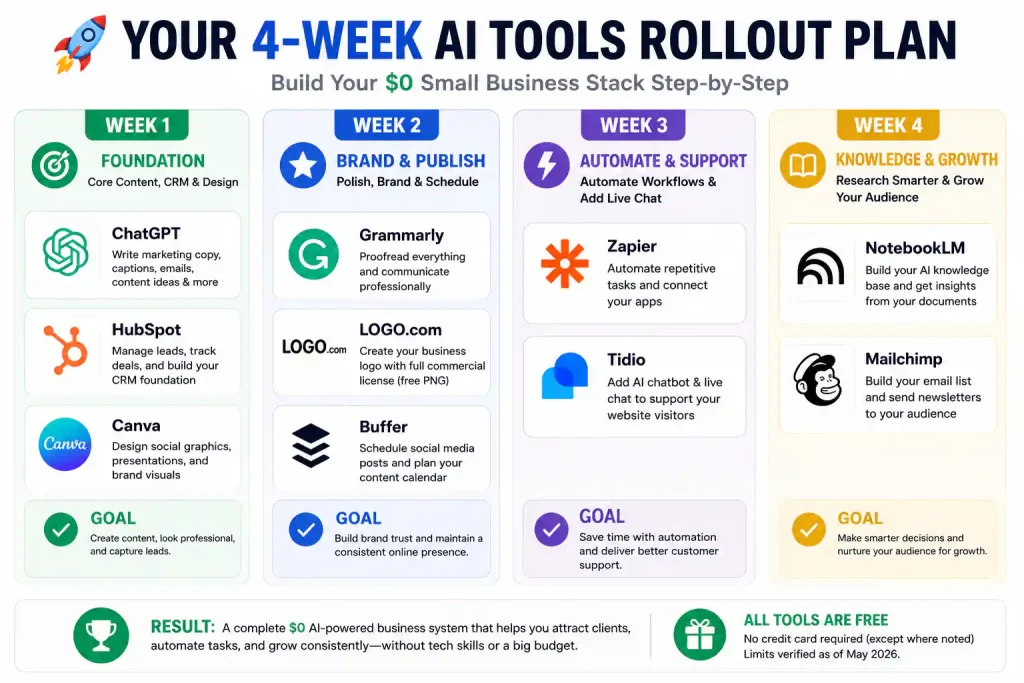
Above: The four‑week rollout plan. Don’t sign up for all 11 tools at once — master two or three per week and add gradually.
Master two or three tools well before adding more. The goal isn’t to collect AI accounts — it’s to run your business more efficiently. For a broader overview of every worthwhile free AI tool, see my complete best free AI tools 2026 roundup.
🔗 Related Nexoda Tech Guides
- Best Free AI Tools 2026: Ultimate Tested Roundup
- ChatGPT Free Tier Limits 2026: Exact Message Counts from 30 Days
- Claude Free Tier Limits 2026: Real Message & Document Upload Test
- Canva vs Adobe Express 2026: Which Free Design Tool Wins?
- Free AI Image Generators Without Watermarks 2026
- AI Free Tier Restrictions: 7 Hidden Limits That Break Workflows
- Free AI Tools Without Credit Card
- Free AI Tools for Social Media Content Creation Workflow
- Free AI Tools for LinkedIn 2026: Write Better Posts Without Paying
About the Author
Wubshet Tsegaye is the founder of Nexoda Tech and an independent technology writer. He has personally tested 40+ AI tools over 300+ hours, spending his own money to document real‑world free‑tier limits, hidden restrictions, and performance on slow, budget‑constrained internet connections. His testing is done on a mid‑range laptop with a 4G mobile connection — the same hardware and network constraints many freelancers and small business owners face worldwide. No paid reviews. No guesswork. Just research‑driven content. → More about his testing methodology
This post contains no paid promotions. Some links may be affiliate links — we earn a small commission at no cost to you if you sign up. All tools were tested independently.
Last verified: May 16, 2026. Free tiers change frequently — always check the tool’s official pricing page before relying on it for business.
