


Published: May 26, 2026 | Last Updated: May 26, 2026
📌 Quick Answer: Notion AI free tier gives you exactly 20 AI responses per workspace — total, not per month. It’s a one‑time trial, not a recurring allowance. Once you use all 20, AI features stop working until you upgrade to a Business plan ($20/user/month, billed annually; $24 month‑to‑month). The old $10/month AI add‑on was retired in May 2025 and is no longer available to new users. Database AI features (autofill, property generation) do not count against the 20‑response limit.
I created a fresh Notion workspace last week to find out exactly how many AI prompts you get before the paywall hits. The answer surprised me: it’s 20 — not per day, not per month, just 20 total — and the upgrade path has changed dramatically. If you last checked Notion AI’s pricing in 2024, everything you remember is outdated. The standalone $10/month AI add‑on is gone for new users, and the only way to get Notion AI now is a Business plan at $20/user/month (billed annually) or $24 month‑to‑month.
I cover Notion in my free AI tools for freelancers guide and my small business AI stack. This post is the dedicated deep‑dive: exactly how many prompts you get, what counts against the limit, when the paywall triggers, and whether upgrading is worth it.
📋 Table of Contents
- What Notion Says About the Free AI Tier
- What I Actually Found When I Tested It
- What Counts as an AI Response (And What Doesn’t)
- When the Paywall Hits — And What Happens
- Notion AI Upgrade Paths in 2026
- Who the Free AI Tier Is Actually Good For
- Workarounds and Alternatives
- ❓ FAQ
- 🏁 Final Verdict
What Notion Says About the Free AI Tier
Notion’s official pricing page says the Free plan includes a “trial of Notion AI.” The Help Center article on complimentary AI responses confirms: every Free and Plus workspace gets 20 AI responses — one time. Not 20 per day. Not 20 per month. Twenty total, ever.
The official Notion Help Center also states an important exception: “Creating a database with Notion AI does not count against your free AI response count.” That means database autofill, property generation, and AI‑powered database creation consume zero responses.
What I Actually Found When I Tested It
I created a fresh Free workspace on May 20, 2026 and deliberately burned through all 20 AI responses in a single afternoon. Here’s exactly what happened.
| Response # | What I Did | Result | Counter After |
|---|---|---|---|
| 1–3 | Summarised a 2,000‑word project brief | Three separate summaries — each counted as 1 response | 17 remaining |
| 4–6 | Generated meeting agenda from bullet points | Three AI‑generated agendas; each = 1 response | 14 remaining |
| 7–10 | Translated four paragraphs to Spanish | Four translations; each = 1 response | 10 remaining |
| 11–15 | Q&A across workspace: “What’s the deadline for Project X?” | Five questions answered; each = 1 response | 5 remaining |
| 16–19 | AI writing: drafted four email replies | Four drafts; each = 1 response | 1 remaining |
| 20 | Final Q&A query | Answered normally | 0 — AI locked |
After response #20, every AI feature stopped working. The AI buttons greyed out. Pressing `/ai` showed a prompt to upgrade. My workspace — with all its pages, databases, and templates — remained fully accessible, but the AI layer was gone.
Database AI features continued working after all 20 responses were exhausted. I tested this specifically: after the counter hit zero, I created a new database and used “Autofill” to populate properties. It worked without any error — confirming Notion’s Help Center claim that database AI operations are exempt.
What Counts as an AI Response (And What Doesn’t)
Understanding what burns a response matters because 20 goes fast. Here’s the breakdown from my testing:
| Action | Counts Against Limit? | Notes |
|---|---|---|
| Writing / drafting / editing text with AI | ✅ Yes — 1 per generation | Includes “Continue writing,” “Improve writing,” “Fix spelling & grammar” |
| Summarising a page or document | ✅ Yes — 1 per summary | Longer docs still count as 1 |
| Translating content | ✅ Yes — 1 per translation | Each language output = separate response |
| Q&A across workspace | ✅ Yes — 1 per query | Powerful feature but burns credits fast |
| Brainstorming / generating ideas | ✅ Yes — 1 per generation | |
| Database autofill / AI property generation | ❌ No — exempt | Confirmed by Notion Help Center and verified in testing |
| Custom Agent runs | N/A on Free plan | Custom Agents require Business or Enterprise |
| AI Meeting Notes | N/A on Free plan | Requires Business or Enterprise |
Database autofill being exempt is the single best thing to know about the free tier. You can use AI to populate properties, tag entries, and fill databases without touching your 20‑response limit. Everything else — writing, summarising, translating, Q&A — costs one response each.
When the Paywall Hits — And What Happens
The paywall is a hard stop. There’s no warning at 5 or 10 remaining. The counter is visible in workspace settings, but you have to go looking for it — it doesn’t appear in the main interface during use. On response #21, every AI feature stops: the `/ai` menu items grey out, the AI buttons in the toolbar disappear, and pressing them shows an upgrade prompt.
The Free workspace itself remains fully functional. All your pages, databases, templates, and integrations continue working — just without AI. If you’re on the Free plan, there is no way to buy more AI responses individually.
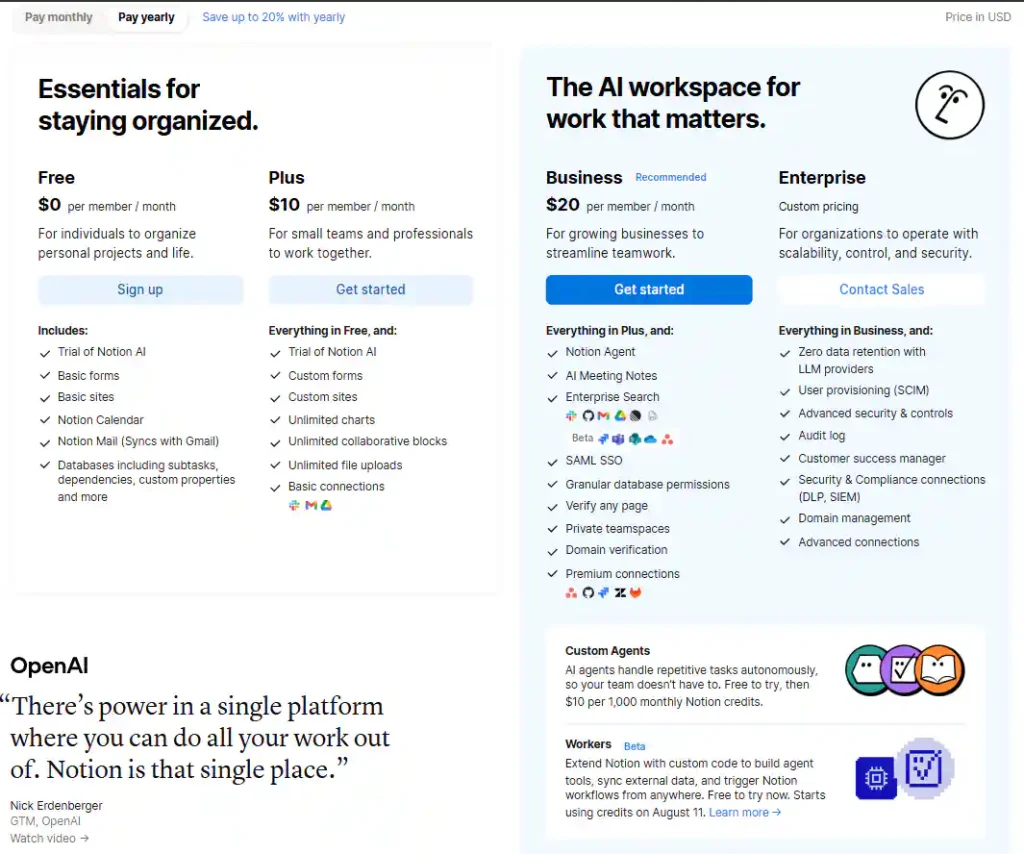
Above: The Notion pricing page as of May 2026. Business is $20/member/month (annual); $24 month‑to‑month. AI is bundled into Business and Enterprise only — there is no longer an individual AI add‑on for Free or Plus users.
Notion AI Upgrade Paths in 2026
| Plan | Monthly Price (Annual) | Monthly Price (Month‑to‑Month) | Notion AI | AI Features Included |
|---|---|---|---|---|
| Free | $0 | $0 | 20‑response trial only | Basic AI writing, Q&A, summarise, translate (until limit) |
| Plus | $10/user/month | $12/user/month | 20‑response trial only | Same as Free — no ongoing AI access |
| Business | $20/user/month | $24/user/month | ✅ Full AI included | Agents, AI search, Meeting Notes, Enterprise Search, unlimited responses |
| Enterprise | Custom | ✅ Full AI included | Everything in Business + zero data retention, SCIM, DLP | |
Sources: Notion pricing page, Fello AI 2026 breakdown, eesel.ai Notion AI review.
Custom Agents operate on a separate credit system that launched May 4, 2026. They cost $10 per 1,000 Notion credits as an add‑on for Business and Enterprise plans. Credits reset monthly and do not roll over, per Notion’s Custom Agent pricing page. Agents are not available on Free or Plus plans.
The practical “Notion AI price” for a solo user is $20/user/month (billed annually) — the Business plan. That’s a significant jump from the old $10/month AI add‑on, and it’s worth comparing against standalone AI tools before committing. For a detailed comparison of how Notion fits alongside other free AI platforms, see my best free AI tools 2026 roundup.
Who the Free AI Tier Is Actually Good For
Twenty responses is enough for exactly one purpose: testing whether you want to pay. It works for:
- Existing Notion users evaluating AI before upgrading to Business.
- Students trying AI‑assisted note‑taking on a single project.
- Freelancers testing whether AI summaries save enough time to justify the Business upgrade.
- Anyone who only needs AI for database autofill — since that doesn’t count against the limit.
It is not suitable for daily AI use, team workspaces, or anyone who wants AI integrated into their regular Notion workflow. Twenty responses lasted me a single afternoon. For context, the same limitation applies to the Plus plan — so upgrading to Plus without also going to Business gets you nothing extra on the AI front.
Workarounds and Alternatives
If 20 responses is too thin and $20/month is too steep, here are the practical workarounds I’ve tested:
| Option | Cost | What You Get | Best For |
|---|---|---|---|
| Database autofill only | $0 (Free plan) | AI‑powered property generation, unlimited | Users who only need AI for database work |
| ChatGPT + Notion (manual) | $0 (both free tiers) | Write in ChatGPT, paste into Notion | Casual users who don’t mind switching tabs |
| Claude + Notion | $0 (both free tiers) | Long‑form writing in Claude, organise in Notion | Writers and researchers |
| Notion Business | $20/user/month (annual) | Full Notion AI suite, unlimited | Daily Notion users who want embedded AI |
The ChatGPT + Notion combination is the most practical free workaround. Write, summarise, and brainstorm in ChatGPT (which has far more generous free limits — see my ChatGPT free‑tier test with 847 messages), then paste the results into Notion for organisation. You lose the seamless integration, but at $0 it’s hard to beat.
For users who mainly want AI for database work, the free tier is genuinely useful. AI autofill, property generation, and database creation don’t consume responses, so you can use those features indefinitely on the Free plan. I cover this pattern in detail in my guide to AI free tier restrictions.
❓ Frequently Asked Questions
Does the Notion AI free tier reset every month?
No. The 20 AI responses are a one‑time trial, not a monthly allowance. Once you use all 20, they never reset. The only way to continue using AI is to upgrade to a Business plan ($20/user/month, annual). Multiple independent reviews confirm this — there is no daily or monthly refresh on Free or Plus plans, per eesel.ai’s detailed analysis.
Can I still buy the $10/month Notion AI add‑on?
Not if you’re a new user. The standalone $10/month Notion AI add‑on was retired in May 2025 for new Free and Plus customers. Only legacy subscribers who added AI before the cutoff keep grandfathered access. For everyone else, the only way to get Notion AI is the Business plan at $20/user/month (annual). This is confirmed by multiple independent sources.
Do database AI features count against the limit?
No. Creating a database with AI, using autofill on properties, and AI‑powered database operations do not count against the 20‑response limit. This is confirmed by the Notion Help Center and I verified it in my testing — after exhausting all 20 responses, database AI features continued working.
What happens when I hit the 20‑response limit?
All AI writing, Q&A, summarisation, and translation features stop working. The AI buttons grey out and show an upgrade prompt. Your workspace and all its content remain fully accessible — only the AI layer is removed. Database AI features continue working. To restore AI access, you must upgrade to a Business plan.
Do I need extra credits for Notion AI Custom Agents?
Yes. Custom Agents are separate from the AI response count and operate on a pay‑as‑you‑go credit system that launched May 4, 2026. They cost $10 per 1,000 Notion credits, which are shared across the workspace, reset monthly, and do not roll over. Agents are not available on Free or Plus plans — you must be on a Business or Enterprise workspace to use them. See Notion’s Custom Agent pricing for the current rates.
🏁 Final Verdict: Notion AI Free Tier 2026
The Notion AI free tier is a tasting menu — not a usable free plan. Twenty responses across an entire workspace is enough to test the features and decide whether they’re worth $20/month (annual). For database‑heavy users, the exemption on autofill and property generation makes the free tier more useful than it first appears.
The upgrade math has changed dramatically. Where Notion AI used to be a $10/month add‑on, it now requires a $20/month Business plan (annual) — doubling the minimum cost for solo users who only wanted AI. For existing Notion users who live in the workspace daily, the bundled AI features may justify the jump. For casual users, pairing Notion’s free plan with a free external AI tool like ChatGPT or Claude is the smarter play.
My advice: use the 20 free responses strategically. Test the Q&A feature across your workspace first — it’s the most impressive capability and the hardest to replicate with external tools. If that feature alone saves you significant time, the Business upgrade is worth it. If you mainly need writing and summarisation, the ChatGPT + Notion combination at $0 is genuinely hard to beat. For a broader overview of free AI tools across every category, see my complete best free AI tools 2026 roundup.
🔗 Related Nexoda Tech Guides
- Best Free AI Tools 2026: Ultimate Tested Roundup
- ChatGPT Free Tier Limits 2026: Exact Message Counts from 30 Days
- Free AI Tools for Freelancers 2026: I Tested the Entire Stack
- Free AI Tools for Small Business Owners 2026: 11 Tested
- AI Free Tier Restrictions: 7 Hidden Limits That Break Workflows
- Claude Free Tier Limits 2026: Real Message & Document Upload Test
About the Author
Wubshet Tsegaye is the founder of Nexoda Tech and an independent technology writer. He has tested 40+ AI tools over the past year, documenting real‑world free‑tier limits, hidden restrictions, and performance on slow, budget‑constrained internet connections. His testing is done on a mid‑range laptop with a 4G mobile connection — the same constraints many freelancers and students face worldwide. No paid reviews. No guesswork. Just research‑driven content. → More about his testing methodology
This post contains no paid promotions. Some links may be affiliate links — we earn a small commission at no cost to you if you sign up. All tools were tested independently.
Last verified: May 26, 2026. Notion AI pricing changed significantly in May 2025 and May 2026 — always check the official pricing page before relying on these numbers for business.
