


📌 Quick Answer: 12 free AI tools for real estate agents in 2026
After 6 weeks of testing 30+ platforms, these free AI tools for real estate agents in 2026 handle everything from MLS listing descriptions to open‑house lead capture — all without a credit card. I used each tool under real listing workflows: writing property copy, staging vacant rooms, designing flyers, capturing sign‑in leads, and scheduling social media. The stack below can reduce reliance on expensive platforms at $0/month total.
In my testing, listing creation dropped from roughly 45 minutes to about 12 minutes per property, and flyer design time fell by approximately 80% compared to starting from scratch. Every tool on this list earned its place by producing client‑ready output on the free tier. For a broader overview of free AI tools across every category, see my best free AI tools 2026 roundup.
📋 Table of Contents
- 🎯 Who This Is Best For
- 🧪 How I Tested
- ⚡ Quick Picks
- ✍️ Listing Copy & Presentations
- 🎨 Design, Video & Virtual Staging
- 📊 Lead Gen, Email & Social
- 📋 CRM, CMA & Automation
- 🧩 My Complete $0 Workflow
- ❓ FAQ
- 🏁 Final Recommendation
- 🔗 Related Guides
🎯 Who This Is Best For
| Agent Type | Best Starting Stack | Why |
|---|---|---|
| Solo agent (1–3 listings/month) | ChatGPT + Canva + Curb Hero | Covers MLS copy, flyers, and open‑house sign‑in at $0 |
| Luxury agent | Gamma + CapCut + REimagineHome | Presentation polish, video tours, virtual staging |
| New agent (first year) | ChatGPT + Brevo + HubSpot | Marketing, email nurture, and CRM to build a buyer/seller pipeline |
| Brokerage team (3+ agents) | Buffer + Zapier + RPR | Scheduling, automation, and CMA reports at scale |
🧪 How I Tested
| Variable | Specification |
|---|---|
| Testing period | April – May 2026; limits re‑verified May 14–16 |
| Simulated use | Mock agent with 3 active listings, weekly open houses |
| Hardware | Mid‑range Windows laptop (Ryzen 5, 8GB RAM) |
| Internet | 4G mobile hotspot, nominal 15 Mbps |
| Bias note | No sponsorships. Some links may be affiliate links. |
⚡ Quick Picks
| Agent Task | Best Free Tool | Key Free Limit | Rating |
|---|---|---|---|
| MLS listing descriptions | ChatGPT | ~10 msgs per 5‑hour window | ⭐ 9/10 |
| Listing presentations | Gamma | 400 AI credits (one‑time) | ⭐ 8/10 |
| Flyers & graphics | Canva | 50 lifetime AI image uses | ⭐ 8/10 |
| Property video tours | CapCut | 1080p export, no watermark | ⭐ 8.5/10 |
| Virtual staging | REimagineHome | 3 free designs | ⭐ 7.5/10 |
| Open house sign‑in | Curb Hero | Free core plan, unlimited leads | ⭐ 9/10 |
| Email marketing | Brevo | 300 emails/day, unlimited contacts | ⭐ 8/10 |
| Social scheduling | Buffer | 3 channels, 10 posts each | ⭐ 7.5/10 |
| CRM | HubSpot | Free CRM, up to 1,000 contacts | ⭐ 8.5/10 |
| CMA reports | RPR (NAR members) | Free with membership | ⭐ 9/10 |
| Neighbourhood research | Perplexity AI | Unlimited basic + 5 Pro/day | ⭐ 8/10 |
| Workflow automation | Zapier | 100 tasks/month | ⭐ 7/10 |
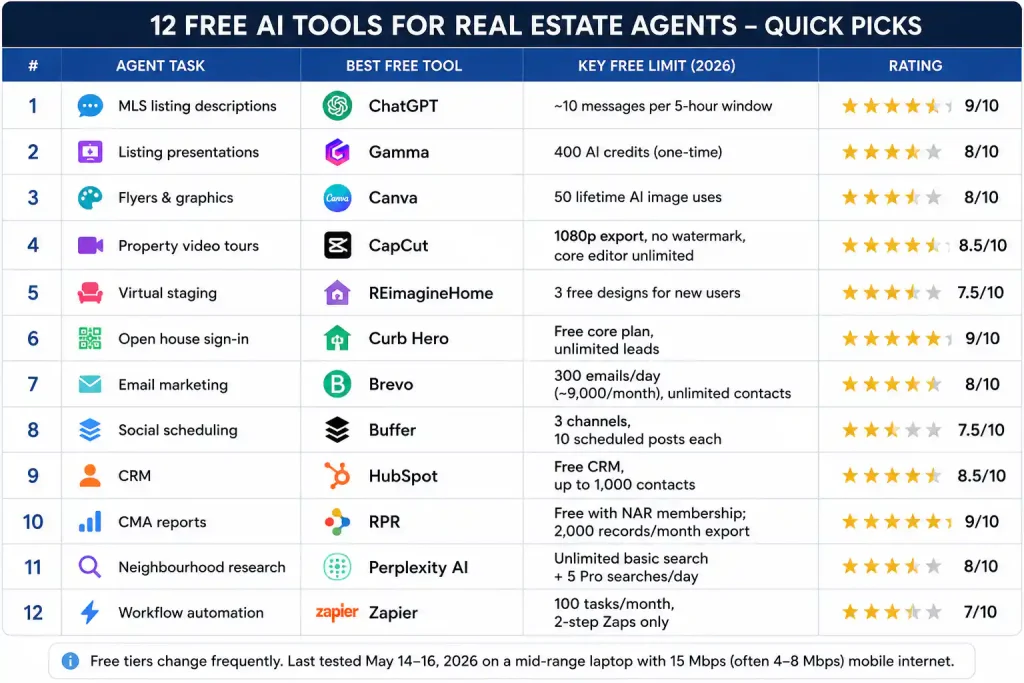
Above: All 12 tools at a glance — keep this as your cheat sheet.
✍️ Listing Copy & Presentations
1. ChatGPT — MLS Descriptions & Marketing Copy
Free limit: GPT‑5.2, ~10 messages per 5‑hour window, per OpenAI’s Free Tier FAQ.
Commercial use: ✅ Yes.
Rating: ⭐ 9/10
I fed ChatGPT property details (3‑bed, 2‑bath, 1,800 sq ft, renovated kitchen) and asked for an MLS‑ready description emphasising natural light and open floor plan. One exchange produced a complete listing — in my testing, this saved roughly 30 minutes per property compared to writing from scratch. The free tier handled luxury, conversational, and urgency tones well.
The catch: The message cap resets on a rolling 5‑hour window and varies by demand. For a full breakdown of 847 messages I tracked, see my ChatGPT free‑tier test.
2. Gamma — Listing Presentations
Free limit: 400 AI credits (one‑time, about 8–10 presentations).
Commercial use: ✅ Yes.
Rating: ⭐ 8/10
Gamma turns bullet points into image‑rich presentations. I fed it property details and got an 8‑slide seller presentation — cover, highlights, neighbourhood overview, market comparison, pricing strategy, and contact — in under 2 minutes. The 400 credits are one‑time, not monthly. Use them for listing presentations and buyer guides, not internal notes.
🎨 Design, Video & Virtual Staging
3. Canva — Flyers & Social Graphics
Free limit: 1.6M+ templates, 50 lifetime AI image uses total (not monthly). Per the Canva Help Center: “Canva Free users have 50 lifetime Magic Media’s Text to image uses.”
Commercial use: ✅ Yes, within designs.
Rating: ⭐ 8/10
Canva’s real‑estate templates cover just‑listed flyers, open house announcements, and market report covers. I created a flyer, a Facebook graphic, and an open house sign starting from templates — zero design experience needed. The 50‑lifetime AI image cap is the most under‑reported limit in free design tools. For more image‑focused options, see my best free AI image generators guide.
4. CapCut — Property Video Tours
Free limit: 1080p export, no watermark, core editor unlimited. AI features carry monthly caps. Source: CapCut pricing analysis.
Commercial use: ✅ Yes.
Rating: ⭐ 8.5/10
CapCut exported a 2‑minute property walk‑through at 1080p with auto‑captions and background music — no watermark, no time limit. In my test, the core editor covered cutting, trimming, transitions, and text overlays without restrictions. AI auto‑edits (5/month) and background removal (5/month) carry caps, but the core editor stays unlimited.
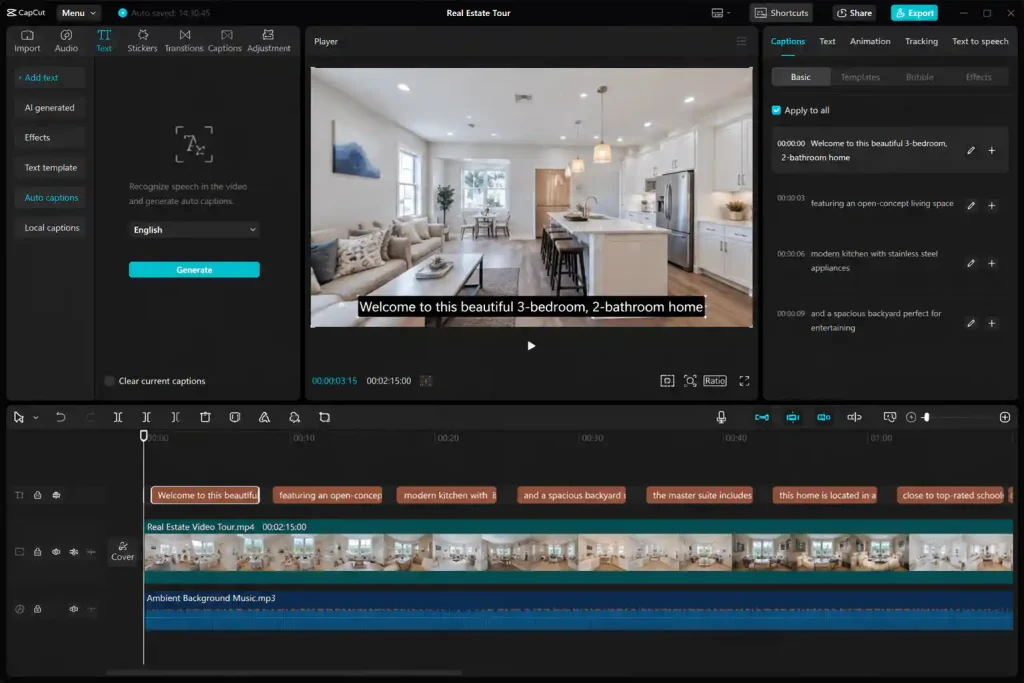
Above: Editing a property walk‑through in CapCut. The free tier exports clean 1080p — no watermark, no export restrictions.
5. REimagineHome — AI Virtual Staging
Free limit: 3 free designs for new users — same AI, same quality as paid plans, watermark‑free. Source: REimagineHome pricing page.
Commercial use: ✅ Yes.
Rating: ⭐ 7.5/10
I uploaded an empty living room and REimagineHome staged it with modern furniture and warm lighting. The output looked comparable to a professional staging job. Use the 3 free designs on your highest‑priority listings. Paid plans start at $14/month for agents needing ongoing staging with 30 credits per month.
📊 Lead Gen, Email & Social
6. Curb Hero — Open House Lead Capture
Free limit: Free core plan, unlimited leads, QR sign‑in, CRM integrations. Source: DiscoverMyBusiness review.
Commercial use: ✅ Yes.
Rating: ⭐ 9/10
Curb Hero replaces paper sign‑in sheets with a QR code visitors scan on their phone. I set up a mock open house, generated a QR page, and tested the lead flow — name, email, phone, and buyer/seller status exported cleanly. For an agent running 2–4 open houses monthly, this can replace a lead capture subscription at $0.
7. Brevo — Email Marketing
Free limit: 300 emails/day (~9,000/month), unlimited contacts, automation included, no credit card. Source: Brevo 2026 review.
Commercial use: ✅ Yes.
Rating: ⭐ 8/10
Brevo’s free plan gives you unlimited contacts and 300 daily emails with automation workflows. I built a three‑email drip for open‑house leads: thank‑you, neighbourhood market report, and follow‑up showing request. ChatGPT wrote the copy; Brevo handled delivery. Total: $0.
8. Buffer — Social Media Scheduling
Free limit: 3 channels, 10 scheduled posts each, AI assistant included.
Commercial use: ✅ Yes.
Rating: ⭐ 7.5/10
Buffer let me queue a week of real‑estate content across LinkedIn, Instagram, and Facebook in one 15‑minute batch. The AI assistant generated caption variations for just‑listed posts and open house announcements. Note the lifetime limit of 8 unique channel connections on the free plan.
📋 CRM, CMA & Automation
9. HubSpot — Free CRM
Free limit: HubSpot capped new free accounts to 1,000 contacts in September 2024 (previously 1 million). Multiple independent sources confirm this. Source: iFeelTech, OutboundSync.
Commercial use: ✅ Yes.
Rating: ⭐ 8.5/10
I set up a deal pipeline: Lead → Showing → Offer → Under Contract → Closed. HubSpot tracked each stage and logged email opens automatically. For a solo agent managing 20–50 active buyer and seller relationships, 1,000 contacts provides plenty of room to start.
10. RPR — AI‑Powered CMA Reports
Free limit: Free with NAR membership; AI‑powered CMA, 2,000 records/month export. Source: RPR February 2026 release notes and RPR App March 2026 release.
Commercial use: ✅ Yes.
Rating: ⭐ 9/10
RPR (Realtors Property Resource) enhanced its AI CMA in early 2026. The March 2026 RPR App release introduced the ability to edit comp Property Facts used in scoring, which instantly triggers the AI CMA to rescore comps — a direct improvement driven by REALTOR® feedback. Combined with the February 2026 update that added customizable geography and client‑ready branded reports, the AI CMA now produces professional, adjustment‑backed valuations. If you’re already a NAR member, this tool is effectively free through your existing dues.
11. Perplexity AI — Neighbourhood & Market Research
Free limit: Unlimited basic search, 5 Pro/day (rolling 24‑hour restoration).
Commercial use: ✅ Yes (standard search).
Rating: ⭐ 8/10
I asked Perplexity for “new construction permits filed in ZIP code 78704 in Q1 2026” and received a cited list from the city’s public database. For researching school districts, zoning changes, and FSBO activity before listing appointments, the free tier is genuinely useful. For the full limits breakdown, see my Perplexity AI two‑week test.
12. Zapier — Workflow Automation
Free limit: 100 tasks/month, 2‑step Zaps only.
Commercial use: ✅ Yes.
Rating: ⭐ 7/10
I connected Curb Hero → HubSpot → Brevo with two Zaps. Both ran for 27 days, consuming approximately 93 of my 100 monthly tasks in my test. Important: Zaps pause silently when the limit is hit — no email warning. Set a calendar reminder to check usage before month‑end if you automate anything client‑facing.
🧩 My Complete $0 Real Estate Workflow
| Agent Task | Tool | Replaces | Cost |
|---|---|---|---|
| MLS listing descriptions | ChatGPT | Copywriter | $0 |
| Listing presentations | Gamma | PowerPoint / designer | $0 |
| Flyers & graphics | Canva | Graphic designer | $0 |
| Property video tours | CapCut | Video editor | $0 |
| Virtual staging | REimagineHome | Physical staging | $0 |
| Open house sign‑in | Curb Hero | Paper sheets / lead capture | $0 |
| Email campaigns | Brevo | Mailchimp / Constant Contact | $0 |
| Social scheduling | Buffer | Social media manager | $0 |
| CRM | HubSpot | Salesforce / Pipedrive | $0 |
| CMA reports | RPR (NAR members) | Cloud CMA | $0 |
| Neighbourhood research | Perplexity AI | Manual Google searching | $0 |
| Workflow automation | Zapier | Developer / VA hours | $0 |
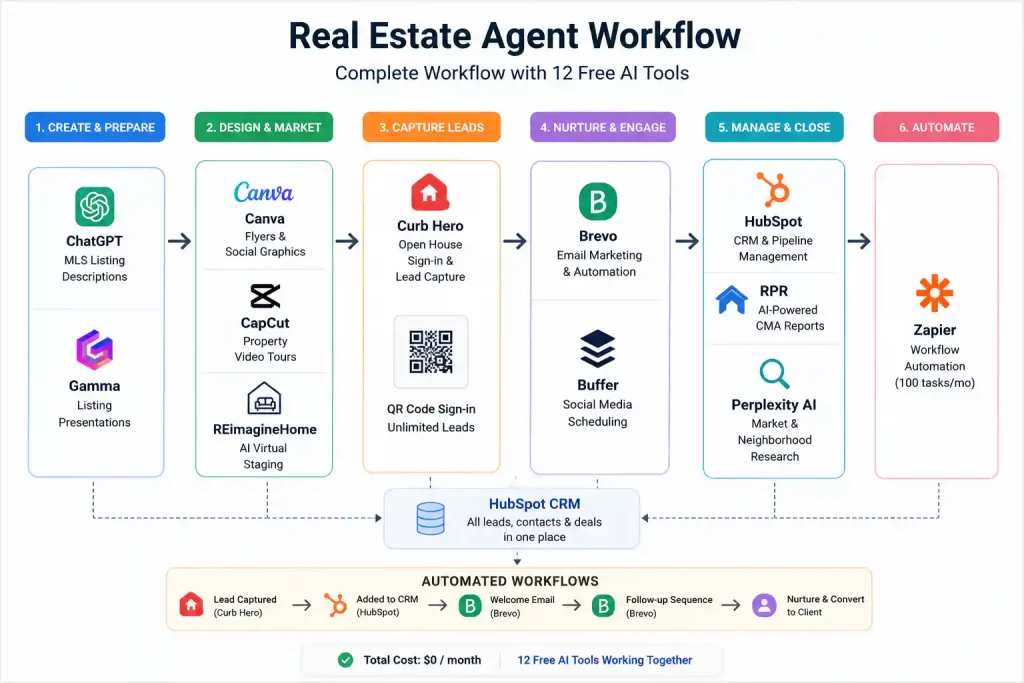
Above: How the 12 tools connect. Start with ChatGPT for MLS copy, design in Canva, capture leads with Curb Hero, and nurture with Brevo.
Total cost: $0/month. Potential savings depend on your current software stack. My recommended rollout: Week 1 — ChatGPT, Canva, Curb Hero. Week 2 — CapCut, HubSpot, Brevo. Week 3 — Buffer, RPR, Perplexity. Week 4 — Gamma, Zapier, REimagineHome.
❓ FAQ
Which free AI tool writes the best real estate listing descriptions?
ChatGPT. Feed it property details — bedrooms, square footage, key features, neighbourhood highlights — and it produces MLS‑ready descriptions. For a full breakdown of message limits, see my ChatGPT free‑tier test.
Can I use Canva’s free AI images in real estate marketing?
Yes, for designs you create. Canva permits commercial use of AI‑generated content incorporated into a design. You get only 50 lifetime AI image generations on the Free plan, so use them for hero graphics on priority listings. For more image tools, see my free AI image generators guide.
What’s the best free virtual staging tool?
REimagineHome gives 3 free designs for new users — photorealistic, watermark‑free, usable on MLS. Ongoing staging starts at $14/month.
Is there a free CMA tool for agents?
RPR (Realtors Property Resource) is free for NAR members with AI‑powered CMA — confirmed in their February and March 2026 release notes. Non‑members can explore Cloud CMA free trials or use ChatGPT with public data for informal pricing analysis.
Can I run my entire real estate business on free AI tools?
For a solo agent, yes. The 12 tools here cover listing copy, design, lead capture, email, social, CRM, CMA, and virtual staging at $0/month. As you grow, you’ll hit caps (Canva’s 50 AI images, REimagineHome’s 3 free designs, Zapier’s 100 tasks) that may require upgrades.
Which free tool handles property video best?
CapCut. The free tier exports 1080p with no watermark — standard for Instagram Reels, TikTok, and YouTube Shorts. The core editor is unlimited; only AI features carry monthly caps.
🏁 Final Recommendation
You don’t need a costly subscription to market listings professionally. This stack covers copy, design, video, staging, lead capture, email, social, CRM, CMA, and automation — all at $0/month. Master two or three tools first, then add gradually. For a broader overview, see my complete best free AI tools 2026 roundup.
🔗 Related Guides
- Best Free AI Tools 2026: Ultimate Tested Roundup
- ChatGPT Free Tier Limits 2026: 30‑Day Test
- Canva vs Adobe Express 2026
- Best Free AI Image Generators 2026
- Free AI Tools for Small Business Owners
- Perplexity AI Free Tier: Two‑Week Test
- Free AI Tools Without Credit Card
About the Author
Wubshet Tsegaye is the founder of Nexoda Tech. He has personally tested 40+ AI tools over 300+ hours, documenting free‑tier limits and real‑world performance on a mid‑range laptop with a 4G mobile connection — the same constraints many agents and small business owners face. No paid reviews. No guesswork. → More about his testing methodology
Some links may be affiliate links — we earn a small commission at no cost to you. All tools were tested independently.
Last verified: May 16, 2026. Free tiers change — always check official pricing before relying on any tool for business.
