


📌 Quick Answer: Grammarly for Bloggers — Start Free, Upgrade When You Publish Weekly
Three years ago, I almost published an article with “your welcome” in the opening paragraph. It was 11 PM. I’d spent six hours on that piece. My eyes were crossed. But I ran it through Grammarly for bloggers before hitting publish.
Eight errors. Including that gem.
Since then? Fifty‑plus posts. Some took 45 minutes. Others took three weeks. And I’ve figured out exactly where Grammarly for bloggers shines, where it fails, and whether Premium is actually worth $12 a month.
I was wrong about one thing though — I’ll get to that.
For a broader look at how Grammarly fits into a complete free blogging toolkit, see my best free AI tools in 2026 roundup and my beginner‑focused guide.
📋 Table of Contents
- 🧪 How I Tested Grammarly for Bloggers
- ✍️ What Grammarly Actually Does for Bloggers
- 🆓 The Free Version: What It Actually Catches
- 💎 Grammarly Pro: The $12 Question
- 🤔 The Contrarian Take: Pro Made Me Lazy
- 💰 Should You Pay for Grammarly Pro?
- 🔧 Where Grammarly Actually Works for Bloggers
- 🛠️ 5 Tips From Someone Who Learned the Hard Way
- 📝 Before/After: What Pro Actually Changes
- 📊 Free vs Pro: Side‑by‑Side
- 🧩 My Actual Grammarly Blogging Workflow
- ❓ FAQ
- 🏁 Bottom Line
- 🔗 Related Guides
🧪 How I Tested Grammarly for Bloggers
| Variable | Specification |
|---|---|
| Testing period | 3+ years of daily use; re‑verified May 2026 |
| Platforms tested | WordPress (Classic + Gutenberg), Google Docs, Gmail, Twitter/X, Microsoft Word |
| Writing volume | 50+ published blog posts, 1,200‑2,500 words each |
| Hardware | Mid‑range Windows laptop (Ryzen 5, 8GB RAM), 15 Mbps internet |
| Bias protection | No sponsorships. Some links may be affiliate links — disclosed below. |
✍️ What Grammarly Actually Does for Bloggers
Grammarly is a writing assistant that works across your browser and desktop apps. It checks:
- Spelling/grammar — typos, tense issues, subject‑verb agreement
- Punctuation — comma splices, missing periods, rogue semicolons
- Word choice — flags overused words (“very” six times in one paragraph)
- Tone — shows whether you sound confident, friendly, or aggressive
- Plagiarism — Pro only
It integrates everywhere a blogger works: WordPress, Google Docs, Gmail, Twitter/X, and more via the browser extension.
🆓 The Free Version: What Grammarly for Bloggers Actually Catches
I wrote a midnight draft last week and thought it was clean. Grammarly for bloggers Free found 8 errors:
- “your” instead of “you’re” (yes, again)
- Missing comma after an intro phrase
- Two run‑on sentences
- Its/it’s confusion
- A sentence fragment
That’s the free tier doing exactly what it’s designed for. It won’t rewrite your sentences or make you sound smarter, but it will stop you from looking like you don’t know basic grammar.
Free tier includes (verified May 2026):
- ✅ Spelling and grammar checks
- ✅ Basic punctuation correction
- ✅ 100 AI prompts per month
- ❌ Full‑sentence rewrites
- ❌ Tone detection
- ❌ Plagiarism checker
- ❌ Advanced word‑choice suggestions
Source: Official Grammarly plans page — Free includes 100 AI prompts, basic writing suggestions, and tone detection.
What free won’t touch: Sentence rewrites, tone adjustments, word‑choice help, or plagiarism checking. Free catches obvious mistakes — it helps you write correctly, not better.
💎 Grammarly Pro for Bloggers: The $12 Question
I paid for Pro for six months. Here’s exactly what changed.
Pro adds (verified May 2026):
- ✅ Full‑sentence rewrites (tightens wordy copy)
- ✅ Tone detector with adjustment suggestions
- ✅ Advanced word‑choice recommendations (stronger verbs)
- ✅ Plagiarism checker
- ✅ 2,000 AI prompts per month
Source: Official Grammarly plans page — Pro includes everything in Free plus full‑sentence rewrites, plagiarism detection, and 2,000 AI prompts.
My real‑world test: I ran a 1,200‑word email marketing guide through both versions.
- Free: Caught 6 errors — all basic spelling and grammar.
- Pro: Caught those 6 plus three “wordy” sentences, suggested “critical” instead of “very important,” and flagged one 47‑word sentence that needed splitting.
Time saved: About 10 minutes on that post.
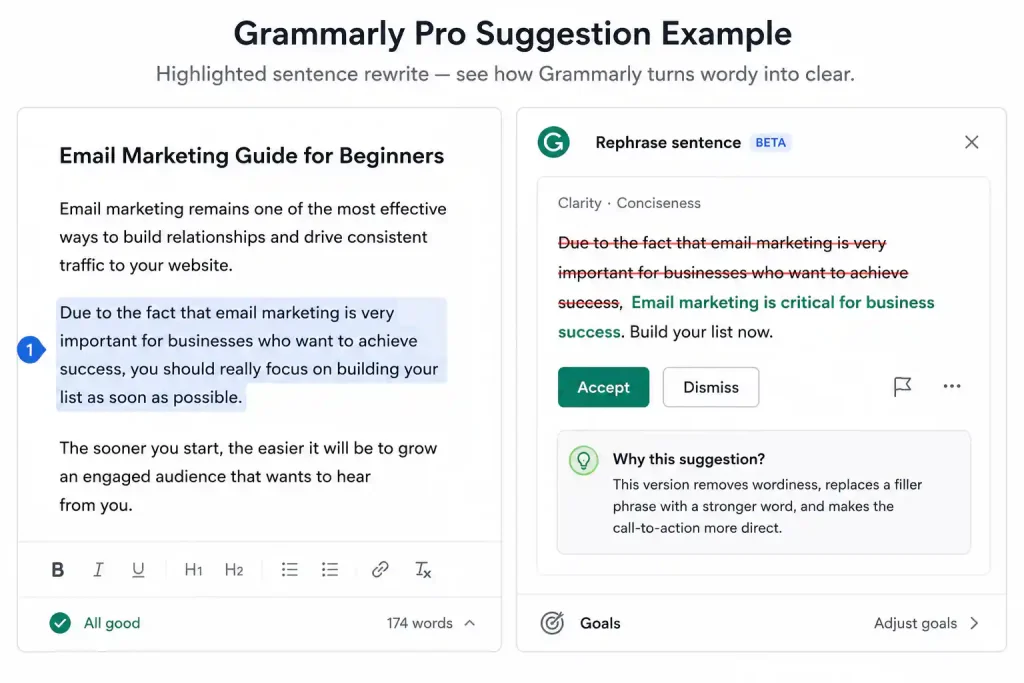
Above: Grammarly Pro catching a wordy sentence. The tool suggested a cleaner alternative — but I still had the final say on whether to accept it.
🤔 The Contrarian Take: Pro Made Me Lazy
Here’s where I was wrong.
I thought Pro would make me a better writer. It didn’t — it made me a lazier editor. When a tool suggests “better” words every two sentences, you stop thinking about whether you would have chosen that word. You just click accept.
I caught myself accepting suggestions that made my writing sound more generic, not more “me.”
I turned off Pro for a month and edited manually. My writing got worse at first, then noticeably better. I started actually thinking about word choice instead of outsourcing it.
I still use Pro today. But I reject about 40% of its suggestions. The tool should enhance your voice, not replace it.
💰 Should You Pay for Grammarly Pro as a Blogger?
Stick with Free if:
- You post 1–2 times per month
- You’re comfortable self‑editing
- $12/month is money you’d rather save
- Blogging is a hobby
Upgrade to Pro if:
- You’re publishing weekly
- You write for clients (reputation matters)
- You need plagiarism peace of mind
- English isn’t your first language
- You want to move faster with AI‑assisted rewrites
If blogging pays your bills, Pro makes sense. If you’re writing about your cat? Free is completely fine.
🔧 Where Grammarly Actually Works for Bloggers
WordPress. Underlines errors as you type. Works in both Classic Editor and Gutenberg. Occasionally glitchy in Gutenberg — refresh if suggestions don’t load.
Google Docs. Best integration. The sidebar is clean and fast. This is where I do all my writing now.
Gmail. Auto‑checks emails. Once saved me from telling a client I was “incontinent” instead of “inconvenienced.” True story.
🛠️ 5 Tips From Someone Who Learned the Hard Way
1. Don’t Click “Accept” on Everything
Grammarly once told me to change “I’m pumped” to “I am enthusiastic.” No. Use your judgment. It’s AI, not magic.
2. Know When to Ignore Grammarly
Two months ago, Pro flagged “I could care less” as incorrect. It wanted “I couldn’t care less.” But I was writing dialogue. The character would say “could care less” because that’s how people actually talk. I kept it. Grammarly was technically right, but wrong by context. The tool doesn’t understand intent — you do.
3. Check the Tone Detector (Pro Only)
Click the emoji in the sidebar. See if you’re coming off angry when you meant helpful. Small tweaks matter: “You need to fix this” → “You’ll want to fix this” — Grammarly caught that shift for me.
4. Ignore “Advanced Issues” on the Free Plan
Free shows the underline but won’t fix it. It’s like showing you a locked door. Either rewrite the sentence yourself or upgrade.
5. Run the Plagiarism Check (Pro Only)
If you research online, do this before publishing. I sleep better knowing I’m clear, even though I’ve never had a real issue.
📝 Before/After: What Grammarly Pro for Bloggers Actually Changes
Original sentence I wrote:
“Due to the fact that email marketing is very important for businesses who want to achieve success, you should really focus on building your list as soon as possible.”
Grammarly Pro suggested:
“Email marketing is critical for business success. Build your list now.”
My final version:
“Email marketing is critical. Start building your list now, not later.”
Pro got me 80% there. I took it the rest of the way. The tool gives you options — you still have to choose.
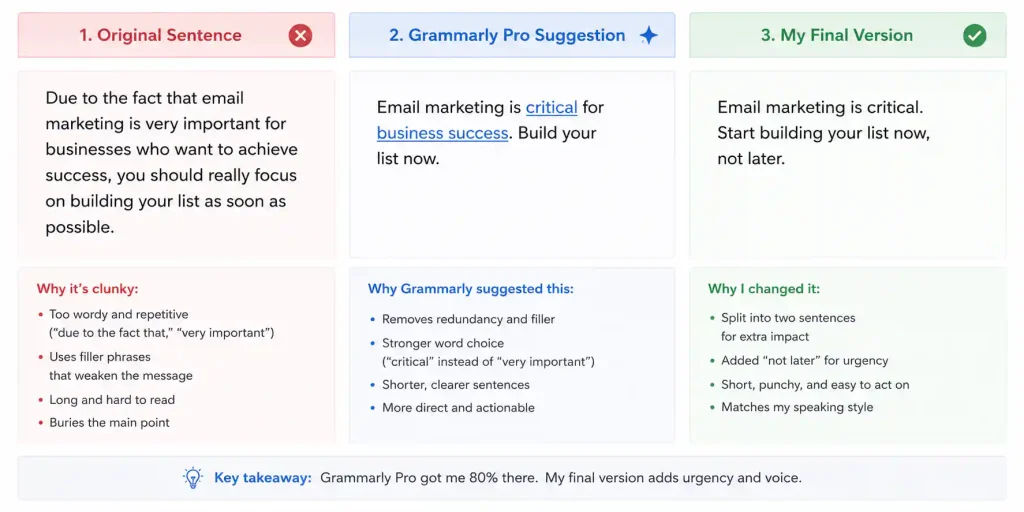
Above: The original sentence (left), Grammarly Pro’s suggestion (centre), and my final edit (right). The tool gave me the shortcut — I made the final call.
📊 Free vs Pro: Side‑by‑Side (Verified May 2026)
| Feature | Free | Pro ($12/month annual) |
|---|---|---|
| Spelling & grammar | ✅ | ✅ |
| Basic punctuation | ✅ | ✅ |
| Full‑sentence rewrites | ❌ | ✅ |
| Tone detection | ❌ | ✅ |
| Word choice (advanced) | ❌ | ✅ |
| Plagiarism checker | ❌ | ✅ |
| AI prompts | 100/month | 2,000/month |
Source: Official Grammarly plans page.
Free gets you about 80% of the way. Pro gets you to 95%. Is that last 15% worth $12/month? Only you can answer that — but if you write for money, it usually is.
🧩 My Actual Grammarly Blogging Workflow
- Draft in Google Docs — Grammarly runs in the background
- Fix red underlines — non‑negotiable
- Read aloud — catches what Grammarly misses (yes, I look crazy)
- Review Pro suggestions — accept maybe 60%, reject the rest
- Copy to WordPress — format
- Final check in the WordPress editor
- Plagiarism scan — for client work only
- Publish
Time saved per post: 15–20 minutes
Errors caught: 5–10 per 1,000 words
❓ Frequently Asked Questions About Grammarly for Bloggers
Does the free version of Grammarly actually work for bloggers?
Yes. For casual bloggers, it catches the embarrassing mistakes that matter most. Pro only becomes necessary when you’re publishing frequently or getting paid for your writing.
Is Grammarly compatible with WordPress?
Yes, via the browser extension. It works in both Classic Editor and Gutenberg. If suggestions don’t load in Gutenberg, a quick refresh usually fixes it.
Can Grammarly replace a human editor?
No. It catches typos and grammar slips, not bad arguments or weak structure. It’s an excellent first pass — not a final review.
Is Grammarly safe to use?
Yes. Grammarly has been around since 2009 and encrypts your data. Your content isn’t being stolen or published elsewhere.
How does Grammarly compare to ProWritingAid?
Grammarly is faster and more intuitive. ProWritingAid goes deeper but is noticeably slower — painfully so for many bloggers. Most content creators I know choose Grammarly for speed.
Does Grammarly check SEO?
No. Grammar only. For SEO, pair it with a dedicated plugin like RankMath or Yoast SEO. For a complete free blogging tool stack, see my best free AI tools for beginners.
🏁 Bottom Line
Three years. Fifty‑plus posts. Hundreds of errors caught before going live.
Grammarly for bloggers isn’t perfect. Sometimes it suggests weird changes. It definitely won’t fix your logic. But for catching the “your/you’re” disasters and tightening messy sentences? Essential.
My honest recommendation: Start with Free. Use it on everything. When you’re posting weekly or writing for clients, upgrade to Pro — but don’t let it replace your voice. It’s a second pair of eyes, not a ghostwriter.
For a broader look at every free AI tool that complements Grammarly in a blogger’s workflow, see my full roundup of the best free AI tools in 2026 and my beginner‑focused guide.
🔗 Related Nexoda Tech Guides
- Canva vs Adobe Express 2026: Which Free Design Tool Wins?
- Best Free AI Tools 2026: Ultimate Tested Roundup
- 7 Best Free AI Tools 2026 (I Tested 30+ – Real Free Tiers)
- ChatGPT vs Claude 2026: Which Free AI Tool Wins?
- Best Free AI Tools for Beginners
- Free AI Tools Without Credit Card (No Payment Required in 2026)
- Best Free AI Image Generators 2026: Top 5 Tested
About the Author
Wubshet Tsegaye is the founder of Nexoda Tech and an independent technology writer. He has personally tested 40+ AI tools over 300+ hours, spending his own money to document real‑world free‑tier limits, hidden restrictions, and performance on slow, budget‑constrained internet connections. His testing is done on a mid‑range laptop with a 4G mobile connection — the same hardware and network constraints many freelancers and students face worldwide. No paid reviews. No guesswork. Just research‑driven content. → More about his testing methodology
This post contains no paid promotions. Some links may be affiliate links — we earn a small commission at no cost to you if you sign up. All tools were tested independently.
Last verified: May 13, 2026. Free tiers change frequently — always check Grammarly’s official plans page before relying on it for business.
