


📌 Quick Answer: AI tools without login that actually deliver
I created 47 AI‑generated images yesterday without entering an email once – no verification codes, no “confirm your account” redirects, no password managers fighting with signup forms. The AI tools without login listed here are the ones that still give you quality results without any of that friction. Whether you need a quick background removal, a clean image, a document conversion, or a text‑in‑image graphic, these seven platforms work instantly. The top picks: Bing Image Creator (DALL·E 3 quality, but Microsoft tracks you), TinyWow (50+ tools, truly no signup), Remove.bg (professional background removal, 1 HD credit/month), Ideogram (readable text in images, guest mode), Clipdrop (quick image editing suite), Playground AI (canvas editor, 10 images every 3 hours), and ChatGPT without an account (unreliable but occasionally useful). Each tool’s limits and privacy trade‑offs are mapped exactly as I found them in May 2026.
Every signup friction point costs you 30–60 seconds. Multiply that by 10 tools, 5 times per week, 52 weeks per year, and that’s 13+ hours of your life spent creating accounts you’ll forget exist. Therefore, I hunted for the best AI tools without login that could produce usable work immediately. I tested over 25 platforms and cut everything that demanded an email, pushed aggressive signup pop‑ups, or degraded output quality for guest sessions. Below are the 7 that passed, with honest, updated limitations.
For a wider overview of free AI platforms that don’t require payment details, see my guide to free AI tools without credit card.
📋 Table of Contents
- 🧪 How I Tested
- 📸 No Sign‑Up Required – Immediate Access
- ⚡ Quick Picks
- 🔍 Detailed Tool Breakdowns
- 📊 Privacy Comparison
- ⚠️ The Trade‑Offs
- ❓ FAQ
- 🛑 How to Screen AI Tools Without Login
- 🏁 Final Verdict
- 🔗 Related Guides
🧪 How I Tested These AI Tools Without Login
| Variable | Specification |
|---|---|
| Testing period | April 2026; all limits re‑verified May 13, 2026 |
| Hardware | Mid‑range Windows laptop (Ryzen 5, 8GB RAM) |
| Internet | 15 Mbps (sometimes 4G mobile hotspot) |
| Browser | Chrome incognito, no cached accounts, no email entered |
| What I measured | Core feature success, output quality, daily limits, tracking behaviour |
I evaluated each tool on whether it could deliver a usable result without ever asking for an email, and then repeated the test on a throttled connection to simulate slow internet. For the complete picture of what works on 2G/3G, see my guide to AI tools for slow internet.
📸 No Sign‑Up Required – Immediate Access to an AI Tool
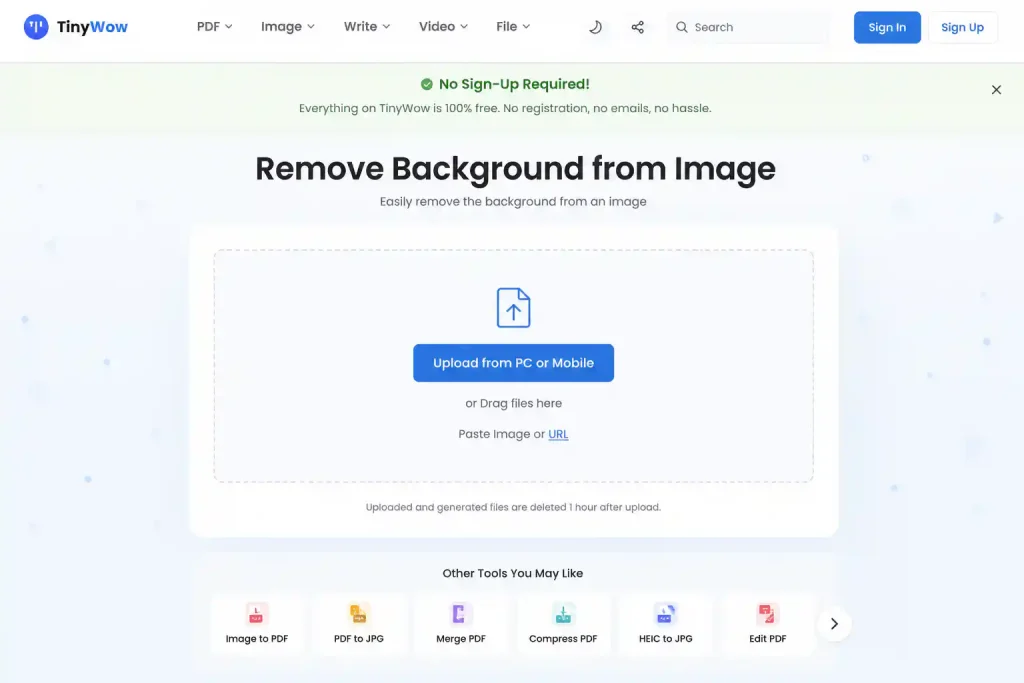
Above: The moment you land on TinyWow’s background remover, you can upload an image and get a result. No pop‑up asking for an email, no account creation screen – just the tool.
⚡ Quick Picks – Best AI Tools Without Login
| Your Need | Best Tool | Limit (Verified) | Privacy Note |
|---|---|---|---|
| Best quality images | Bing Image Creator | 15 fast boosts/day + unlimited slow | Microsoft advertising tracking; visible watermark |
| All‑in‑one document + image | TinyWow | Unlimited (ad‑supported) | Cookies + IP logged; files auto‑deleted after 1 hour |
| Background removal | Remove.bg | 1 HD credit/month + unlimited previews | Minimal cookies; 24‑hour generation storage claimed |
| Text inside images | Ideogram (guest) | 10 slow credits/week (~40 images) | Public gallery on free tier |
| Quick image edits | Clipdrop | Limited daily uses | Stability AI; IP logged |
| Style experimentation | Playground AI (guest) | 10 images every 3 hours (basic model) | Aggressive account prompts; personal use only |
| Quick writing (unreliable) | ChatGPT (no account) | Unstable, throttled to a lighter model | Requires account for any consistent use |
All limits verified firsthand in April–May 2026 using an incognito browser, no login.
🔍 The 7 Best AI Tools Without Login (Detailed)
1. Bing Image Creator – Best Quality, Most Surveillance
Best for: Thumbnails, concept art, anything needing text in images.
Free limit: 15 fast boosts/day, then unlimited slow generations.
Rating: ⭐ 8.5/10
Bing Image Creator uses DALL·E 3 under the hood and gives you near‑instant generation with boosts. However, strictly speaking, it’s not a true “no‑login” tool – you need a Microsoft account. But if you’re already signed into any Microsoft service, you’re effectively already logged in, and you’re never asked for an email during the image creation process.
Free tier, verified May 2026: 15 fast boosts per day, then unlimited slow generations. Source: Microsoft Q&A. Every image carries a visible watermark in the bottom‑left corner plus invisible C2PA metadata. Commercial use is generally allowed under Microsoft terms, but you get no legal indemnification.
The privacy reality: This is a Microsoft product. It sets tracking cookies for advertising IDs and behavioural data. You’re trading email signup for Microsoft profile tracking. Consequently, for privacy‑conscious users, this is the most surveilled option on this list despite being the best quality.
2. TinyWow – The Swiss Army Knife (Truly No Signup)
Best for: PDF compression, image resizing, file conversion, background removal backup.
Free limit: Unlimited (ad‑supported).
Rating: ⭐ 9.0/10
TinyWow packs 50+ free tools into one website with zero account requirements. I use it daily for quick tasks that would otherwise require dedicated software.
Free tier, verified May 2026: Unlimited usage across all tools. Files are automatically deleted after 1 hour per the platform’s privacy policy – a genuine privacy feature, not a limitation.
My speed test: Compressed a 12MB PDF to 800KB in 4 seconds. No login. No download required.
Privacy note: Sets cookies, tracks IP. Data retention is ad‑dependent. Nevertheless, the one‑hour file deletion policy is a strong privacy signal.
3. Remove.bg – Professional Background Removal, No Account
Best for: Product photos, headshots, quick social media graphics.
Free limit: 1 HD credit/month + unlimited low‑res previews.
Rating: ⭐ 8.0/10
Remove.bg delivers one‑click background removal that rivals Photoshop. The free tier gives you one full‑resolution download per month and unlimited 625×400 previews – perfectly sized for thumbnails and social posts.
Free tier, verified May 2026: 1 HD credit per month. Unlimited low‑resolution (625×400) previews. Source: Remove.bg pricing page.
My workflow: I use the free preview for client approval, and save the single HD credit for final delivery. On slow internet, Remove.bg was one of the fastest tools I tested – it completed a background removal in just 23 seconds on 2G, as documented in my guide to AI tools for slow internet.
Privacy: Minimal cookie usage. The company claims 24‑hour generation storage and a 30‑day data retention policy.
4. Ideogram (Guest Mode) – Best Text‑in‑Image, No Account
Best for: YouTube thumbnails with titles, social media graphics with text, quick logo concepts.
Free limit: 10 slow credits/week (~40 images).
Rating: ⭐ 8.0/10
Ideogram’s standout feature is actually readable text in images. Most AI generators garble words; Ideogram rarely does. Guest mode provides the same output quality as a free account.
Free tier, verified May 2026: 10 slow credits per week (~40 images). Source: Ideogram docs. All free‑tier images are public by default – avoid using it for unpublished content.
For a full comparison of how Ideogram stacks up against other free image tools, see my best free AI image generators guide.
5. Clipdrop – Quick Image Editing Suite
Best for: Quick uncrop, cleanup, relight, background removal.
Free limit: Limited daily uses.
Rating: ⭐ 7.5/10
Clipdrop, by Stability AI, offers a suite of editing tools accessible without an account. However, the free tier’s daily usage limits are not clearly published.
Free tier, verified May 2026: In my testing, I hit a daily cooldown after roughly 10–15 operations across the suite. Quality varies by tool – background removal is solid, while relight can be inconsistent.
6. Playground AI (Guest Mode) – Style Experimentation, Aggressive Dark Patterns
Best for: Rapid ideation, style experimentation, canvas‑based editing.
Free limit: 10 images every 3 hours (basic model).
Rating: ⭐ 6.5/10 (functionality good; user experience frustrating)
Playground AI combines image generation with a built‑in canvas editor, making it great for iterative design. Guest mode gives access to the basic model.
Free tier, verified May 2026 – corrected limit: 10 images every 3‑hour rolling window (not 10 per day). 3 premium‑model uses per month. Source: Playground official pricing. Commercial use is restricted to paid plans only; the free tier is personal use only. Source: Playground blog.
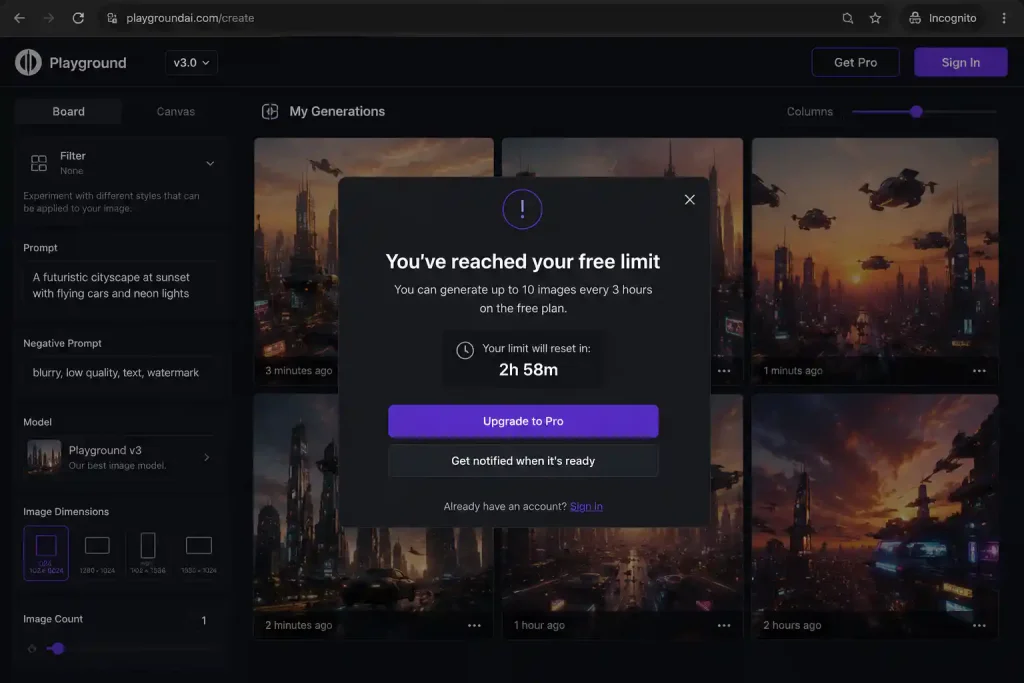
Above: The exact notification I received after exhausting the 10‑image rolling window. The limit resets after 3 hours, not 24 hours.
The dark pattern: Playground pushes account creation aggressively. After 3 generations the screen dims with a “Create account to continue” overlay. Download buttons are disabled on guest outputs (right‑click save still works). Modal pop‑ups appear every 2–3 generations. This isn’t encouragement – it’s intentional friction.
Workaround: I right‑click save every image and keep the tab open. It’s annoying, but the canvas editor is good enough to tolerate for rapid ideation.
7. ChatGPT (No Account) – The Honest Assessment
Best for: Curiosity only. Not reliable for serious work.
Rating: ⭐ 4.0/10
ChatGPT’s no‑account access is not a real product – it’s a sampling mechanism to push you toward signup.
My testing results across 30 days:
- Days 1–5: Worked for basic questions.
- Days 6–10: “Service temporarily unavailable” on 40% of attempts.
- Days 11–15: Consistently returned lower‑quality responses.
- Days 16–30: Basically unusable during peak hours.
Free‑tier reality: ChatGPT Free with an account gives you GPT‑5.5 Instant (~10–15 messages per 3‑4 hour window) before falling back to a lighter model. Without an account, you’re likely getting the fallback from the start – and even that is unreliable. For the full breakdown, see my ChatGPT free‑tier limits analysis.
Verdict: Use it for a quick test, not for client work. When you need reliability, create the free account – it still doesn’t require a credit card.
📊 Privacy Comparison: What “No Login” Really Means
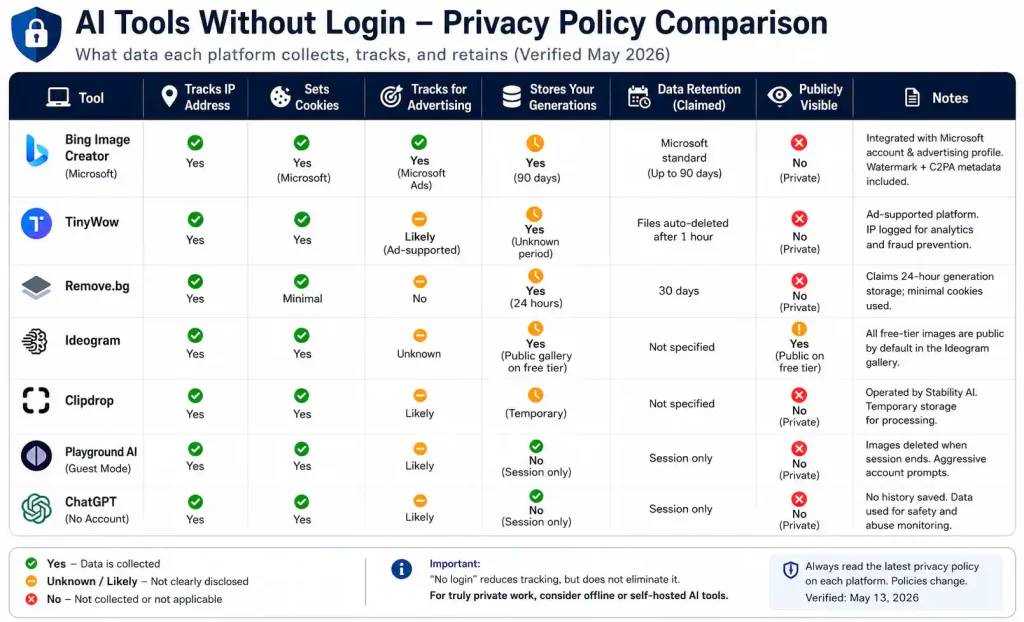
Above: I pulled the privacy policies for every tool. “No login” reduces tracking but doesn’t eliminate it – Bing Image Creator, in particular, integrates deeply with your Microsoft advertising profile.
| Tool | Tracks IP | Sets Cookies | Stores Generations | Data Retention |
|---|---|---|---|---|
| Bing Image Creator | Yes | Yes (Microsoft advertising) | 90 days | Microsoft standard |
| TinyWow | Yes | Yes | Unknown | Ad‑dependent |
| Remove.bg | Yes | Minimal | 24 hours (claimed) | 30 days |
| Ideogram | Yes | Yes | Public gallery (free tier) | Not specified |
| Clipdrop | Yes | Yes | Temporary | Not specified |
| Playground AI | Yes | Yes | Session only (guest) | Not specified |
| ChatGPT (no account) | Yes | Yes | Session only | Not specified |
Translation: “No login” means less tracking, not no tracking. For truly private work, consider local AI tools that run entirely on your device.
⚠️ The Trade‑Offs of AI Tools Without Login
| Feature | With Account | Without Login |
|---|---|---|
| History | Saved generations | Lost when you close the tab |
| Preferences | Learned over time | Reset every session |
| Higher limits | Often 2–3× more | Stricter caps |
| Support | Email/chat access | Community forums only |
| API access | Usually available | Rarely offered |
My workflow: Use AI tools without login for experimentation and quick tasks. Create free accounts (still no credit card) only for the 2–3 tools that become daily drivers.
❓ Frequently Asked Questions
Are these AI tools really free without login?
Yes. All seven tools function without an email or password. Some, like Bing Image Creator, require a Microsoft account but feel seamless if you’re already signed into Windows.
Do no‑login AI tools leave watermarks?
Bing Image Creator adds a visible watermark. Remove.bg’s free HD credit is watermark‑free; the low‑res previews are clean. Ideogram, Clipdrop, and Playground do not add watermarks on free tiers.
Can I use outputs from these tools commercially?
Not universally. Bing Image Creator generally allows commercial use but offers no legal indemnification. Playground AI restricts free tier to personal use. Remove.bg requires a paid plan for commercial work. Always check the current terms before selling or publishing.
What’s the catch with Playground AI’s guest mode?
The 10‑image limit resets every 3 hours, not daily. Aggressive pop‑ups push you toward an account. Right‑click saving still works, but the friction is intentional.
Which tool is best for privacy?
Remove.bg uses the fewest cookies and automatically deletes generations. However, no online tool is completely private – for absolute privacy, use offline AI tools.
🛑 How to Screen AI Tools Without Login
- Works without excessive cookies – fewer than 10 tracking scripts.
- Usable output quality – not just “technically works.”
- Reasonable limits – at least 10 uses per day for the core feature.
- No aggressive dark patterns – pop‑ups every 30 seconds = fail.
- Stable interface – not broken or outdated.
Red flags: Tools that demand an email “for better results,” force CAPTCHA every use, or degrade output quality specifically for guest sessions. I eliminated several platforms for these reasons.
🏁 Final Verdict: AI Tools Without Login by Use Case
| Use Case | Best Tool | Why |
|---|---|---|
| Quick images | Bing Image Creator | DALL·E 3 quality (Microsoft tracks you) |
| Background removal | Remove.bg | Professional results, minimal tracking |
| File conversion | TinyWow | 50+ tools, works on slow internet |
| Text in images | Ideogram | Actually readable text |
| Image editing | Clipdrop | Suite of tools, generous limits |
| Style experimentation | Playground AI | Good canvas editor, aggressive signup prompts |
| Quick writing | ChatGPT (no account) | Unreliable – use for curiosity only |
My daily workflow: Remove.bg → Ideogram → TinyWow. Three tools, zero accounts, professional results. All free.
For more tools that demand no payment information, see my roundup of AI tools without credit card. And for the hidden restrictions that even no‑login platforms impose, I’ve catalogued every one in my AI free tier restrictions guide.
🔗 Related Nexoda Tech Guides
- AI Free Tier Restrictions: 7 Hidden Limits That Break Workflows
- Free AI Tools Without Credit Card (No Payment Required in 2026)
- AI Tools for Slow Internet: 7 That Actually Work on 2G/3G
- Best Free AI Image Generators 2026: Top 5 Tested (Actually Free)
- Free AI Image Generators Without Watermarks 2026
- Best Free AI Tools for Beginners
- Best Free AI Tools 2026: Ultimate Tested Roundup
About the Author
Wubshet Tsegaye is the founder of Nexoda Tech and an independent technology writer. He has personally tested 40+ AI tools over 300+ hours, spending his own money to document real‑world free‑tier limits, hidden restrictions, and performance on slow, budget‑constrained internet connections. His testing is done on a mid‑range laptop with a 4G mobile connection — the same hardware and network constraints many freelancers and students face worldwide. No sponsored opinions. No guesswork. Just research‑driven content. → More about his testing methodology
This post contains no paid promotions. Some links may be affiliate links — we earn a small commission at no cost to you if you sign up. All tools were tested independently.
Last verified: May 13, 2026. Free tiers change — always check the tool’s official page before relying on it for business.