


Published: June 2, 2026 | Last Updated: June 2, 2026
📌 Quick Answer: The best free AI tools for Etsy sellers in 2026 cover listing descriptions, SEO keyword research, product photo editing, social media promotion, and pricing research. After testing 20+ platforms, the top free stack includes ChatGPT for listing copy and Etsy SEO tags, Canva for product collage images and shop banners (50 lifetime AI image uses), Remove.bg for clean product backgrounds (1 HD credit/month), Perplexity AI for pricing research, and CapCut for product video clips. All tools are free to start, with no credit card required, though each has limits you need to know before building a workflow.
I spent several weeks building a complete, $0‑budget toolkit for an Etsy shop, simulating the work of a seller who designs printable wall art, custom mugs, and handmade jewelry. I wrote listing titles and descriptions, researched Etsy keywords, edited product photos, created social media posts, and analysed competitor pricing — all using only free AI tools. This guide maps exactly what each free tier gives you, where the hidden limits kick in, and how to combine these free AI tools for Etsy sellers in 2026 into a complete daily workflow.
Most “Etsy seller tool” roundups push paid platforms like Marmalead (approximately $19/month) and eRank (approximately $9.99/month). However, after hitting every free‑tier wall myself, I found that a carefully stacked set of free AI tools can handle the vast majority of what a new or solo seller needs. For a broader overview of free tools across all categories, see my best free AI tools 2026 roundup.
📋 Table of Contents
- 🧪 How I Tested
- ⚡ Quick Picks — Best Free AI Tools for Etsy Sellers 2026
- ✍️ Writing & SEO Tools
- 🎨 Design & Image Tools
- 📱 Social Media Tools
- 🔍 Pricing & Market Research Tools
- 🧩 My Complete $0 Etsy Seller Workflow
- ❓ FAQ
- 🏁 Final Recommendation
- 🔗 Related Guides
🧪 How I Tested
| Variable | Specification |
|---|---|
| Testing period | May – June 2026; all limits re‑verified June 2, 2026 |
| Simulated shop | Mock Etsy store selling printable art, custom mugs, and handmade jewelry |
| Hardware | Mid‑range Windows laptop (Ryzen 5, 8GB RAM) |
| Internet | 4G mobile hotspot, nominal 15 Mbps |
| What I measured | Free tier limits, output quality, commercial‑use rights, time saved per task |
| Bias note | No sponsorships. Some links may be affiliate links. |
Each tool was evaluated on three Etsy‑specific criteria: does it produce listing‑ready output without paid upgrades? Is the free tier sustainable for a seller listing 2–5 new items per month? Can you legally use the output in your commercial Etsy shop?
⚡ Quick Picks — Best Free AI Tools for Etsy Sellers 2026
| Seller Task | Best Free AI Tool | Key Free Limit | Rating |
|---|---|---|---|
| Listing descriptions & Etsy tags | ChatGPT | GPT‑4o mini, ~10 messages per 5‑hour window | ⭐ 9/10 |
| Etsy keyword research | Perplexity AI | Unlimited basic + 5 Pro/day (rolling 24‑hour restoration) | ⭐ 8/10 |
| Product photo backgrounds | Remove.bg | 1 HD credit/month + unlimited low‑res previews | ⭐ 7.5/10 |
| Banners, collages & mockups | Canva | 50 lifetime AI image uses, 1.6M+ templates | ⭐ 8.5/10 |
| Image upscaling (print quality) | Upscale.media | 10 images/day, AI upscaling up to 4x | ⭐ 8/10 |
| Product video clips (Reels, TikTok) | CapCut | 1080p export, no watermark, AI features capped | ⭐ 8.5/10 |
| Social media scheduling | Buffer | Up to 10 scheduled posts/channel (verify current limit) | ⭐ 7.5/10 |
*Buffer’s free plan has changed over time — always verify current limits on Buffer’s pricing page before building your scheduling workflow.
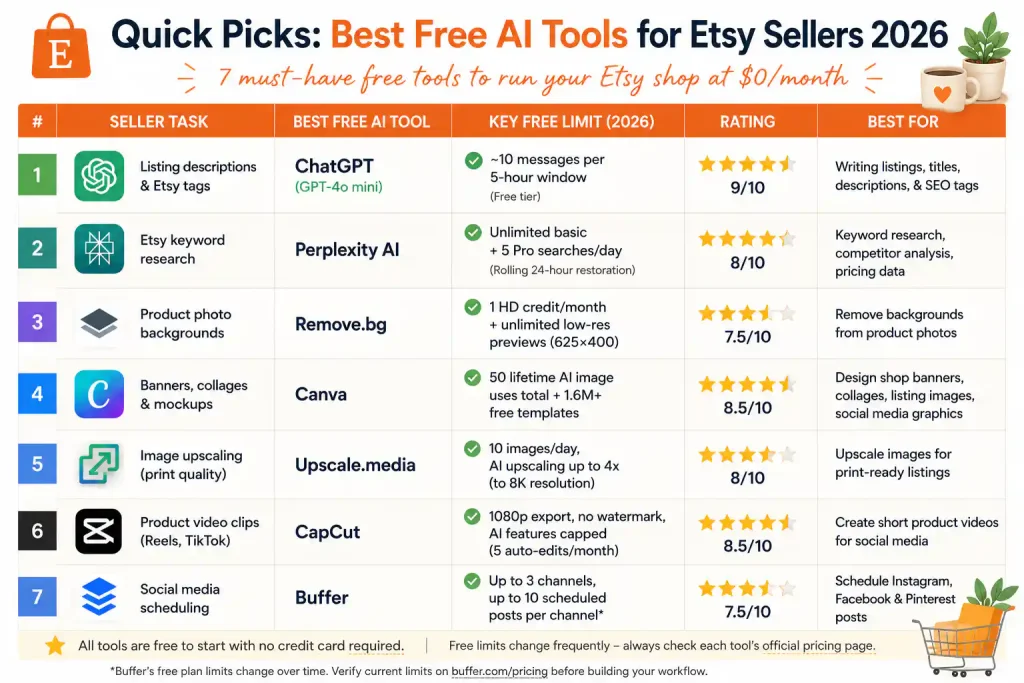
Above: All 7 tools at a glance — keep this as your cheat sheet for building your Etsy seller toolkit.
✍️ Writing & SEO Tools for Etsy Listings
1. ChatGPT — Listing Descriptions, Titles & Etsy SEO Tags
Best for: Writing Etsy listing titles, product descriptions, shop announcements, and generating SEO tags.
Free limit: The free tier uses GPT‑4o mini, with a limited number of messages within a five‑hour window, per OpenAI’s official Free Tier FAQ. (Model names and limits can change — check the FAQ for the latest.)
Commercial use: ✅ Yes — OpenAI permits commercial use of outputs on all plans.
Rating: ⭐ 9/10
ChatGPT is the single most versatile free tool for an Etsy seller’s writing workflow. In my test, I used it to write three complete listings: one for a printable wall art design, one for a personalized mug, and one for a handmade silver pendant. In addition, I asked it to generate 13 Etsy SEO tags per listing based on a description of the product.
The process I used: I fed ChatGPT a short product description, the main material, the intended buyer, and the style (e.g., “boho nursery decor”). It then produced a full, keyword‑rich listing title (the first 40 characters are critical for Etsy search — a widely cited seller tip aligned with Etsy’s own Seller Handbook), a two‑paragraph description with bullet points, and 13 relevant tags. The output needed only minor edits — mostly to inject my own brand voice and remove a few generic adjectives.
Etsy‑specific tip: Always ask ChatGPT to include long‑tail keywords in the listing title, such as “boho nursery wall art printable set of 3” instead of just “wall art.” Etsy’s algorithm matches buyer searches to the exact words in your title and tags.
The catch: ChatGPT’s message cap resets on a rolling 5‑hour window. For a seller listing 2–3 items per week, this is plenty. For bulk listing sessions, plan your work in batches around the reset window. For a full breakdown of the 847 messages I tracked, see my ChatGPT free‑tier limits test.
2. Perplexity AI — Etsy Keyword Research & Competitor Analysis
Best for: Researching trending Etsy keywords, analysing competitor listings, and finding pricing data.
Free limit: Unlimited basic searches; 5 Pro Searches/day (rolling 24‑hour restoration).
Commercial use: ✅ Yes (standard search results).
Rating: ⭐ 8/10
Perplexity AI returns direct answers with numbered source citations. For an Etsy seller, this means asking “What are the most searched Etsy keywords for boho nursery decor in 2026?” and getting a cited, sourced answer instead of scrolling through blog posts. The free tier includes unlimited basic searches and 5 Pro Searches per day with a rolling 24‑hour credit restoration — not a midnight reset.
Real seller use: I asked Perplexity for “the top 10 Etsy keywords for personalized wedding gifts in 2026.” It returned a list with search volume estimates and linked sources — data I could immediately use to optimize my listing titles and tags. For a complete breakdown of Perplexity’s limits, see my Perplexity AI two‑week test.
🎨 Design & Image Tools for Etsy Products
3. Canva — Banners, Collages & Listing Images
Best for: Creating Etsy shop banners, product collage images, listing photos with text overlays, and social media graphics.
Free limit: 1.6M+ free templates, 50 lifetime AI image generation uses total (not per month). Source: Canva Help Center.
Commercial use: ✅ Yes — Canva permits commercial use of designs on the Free plan, including AI‑generated content incorporated into a design.
Rating: ⭐ 8.5/10
Canva is the go‑to design tool for Etsy sellers. For my mock shop, I created an Etsy shop banner (3360×840px), three product collage listing images, and a “how‑to‑use” instruction card for a digital download — all starting from Canva’s free templates. Moreover, the Brand Kit kept my shop’s fonts and colors consistent across all designs. The AI background remover, however, is Pro‑only ($14.99/month), and the free alternative is limited.
Critical correction: Canva’s AI image generation gives you 50 lifetime uses total on the Free plan — not 50 per month. Once exhausted, they never reset. For an Etsy seller creating product mockups, use these AI image credits strategically for hero images, and stick to free templates for everything else.
4. Remove.bg — Clean Product Backgrounds (1 Free HD/Month)
Best for: Removing distracting backgrounds from product photos so your items stand out on Etsy search pages.
Free limit: 1 HD credit/month + unlimited low‑resolution previews (625×400). Source: Remove.bg pricing.
Commercial use: ✅ Yes — free tier outputs can be used commercially, though high‑volume sellers will need a paid plan.
Rating: ⭐ 7.5/10
Remove.bg processed my test product photo (a handmade necklace on a cluttered desk) in about 5 seconds, outputting a clean PNG with the object isolated. The free HD credit gave me a high‑resolution, watermark‑free download. For the remaining images, I used the 625×400 low‑res previews — fine for Etsy thumbnails, but too small for hero images.
Workaround: I use the single HD credit each month on my most important listing. For everything else, I switch to Adobe Express Free, which removes backgrounds without watermarks or usage caps. For 2–5 new listings per month, this free combination covers you completely. For a complete comparison, see my background removal guide.
5. Upscale.media — Image Upscaling for Print‑Ready Listings
Best for: Enhancing AI‑generated or low‑resolution images to the print‑quality resolution Etsy customers expect.
Free limit: 10 images per day, AI upscaling up to 4x (to 8K resolution).
Commercial use: ✅ Yes — no watermarks added during upscaling.
Rating: ⭐ 8/10
Upscale.media is a web‑based tool that enlarges images without losing quality. For my mock printable art shop, I used an AI‑generated image (1024×1024px) and upscaled it to 4096×4096px — print‑ready at 300 DPI for a 13.6×13.6‑inch print. The free tier’s 10 images/day is generous for most Etsy sellers listing a handful of new products weekly.
📱 Social Media Tools for Promoting Your Etsy Shop
6. CapCut — Product Video Clips for Instagram Reels & TikTok
Best for: Creating short, engaging product videos to promote Etsy listings on social media.
Free limit: 1080p export, no watermark, core editor unlimited. AI features capped at 5 auto‑edits/month, 10 min auto captions/video.
Commercial use: ✅ Yes — exports are watermark‑free and usable for your shop’s social media.
Rating: ⭐ 8.5/10
CapCut’s free tier exports clean 1080p video with no watermark, making it the best free option for product promotion videos. I shot a 30‑second clip of my mock handmade mug, trimmed it, added auto‑captions (“handmade ceramic mug — available now on Etsy”), and exported it in under 5 minutes — all within the free tier.
7. Buffer — Social Media Scheduling
Best for: Scheduling Instagram, Facebook, and Pinterest posts to promote your Etsy listings consistently.
Free limit: Up to 3 channels, up to 10 scheduled posts per channel, AI assistant included (verify current limits on Buffer’s pricing page).
Commercial use: ✅ Yes — built for business social media management.
Rating: ⭐ 7.5/10
Buffer’s free plan connects Instagram, Facebook, and Pinterest — the three platforms where most Etsy sellers find customers. I scheduled a week’s worth of product posts, including new listing announcements, customer review highlights, and behind‑the‑scenes content — all in one 15‑minute batch. The AI assistant generated caption variations for each post.
*Buffer’s free plan limits have changed in the past; always verify current allowances on Buffer’s pricing page before building your scheduling workflow.
🔍 Pricing & Market Research Tools for Etsy Sellers
While I covered Perplexity AI above for external keyword research, Etsy’s own search bar is actually the best free tool for understanding what buyers are actively searching for. Start typing a product idea into the Etsy search field and note the auto‑complete suggestions — these are real, high‑volume searches from actual shoppers. Then use Perplexity AI to broaden your research with external data, like pricing trends and competitor analysis.
For my mock shop, I used Etsy’s search suggestions to discover that “boho nursery set of 3” was a more specific and less competitive phrase than just “boho nursery decor.” I then confirmed the pricing range for that niche by asking Perplexity: “What are the average prices for handmade ceramic mugs on Etsy in the US market in 2026?” It returned a price range ($18–35 for standard mugs) with citations from Etsy listings and craft blogs. Together, these two free tools gave me a complete picture of keyword demand and competitive pricing.
For a deeper dive into how to research competitors and track trending items across platforms, see my AI free tier restrictions guide, which covers how to stack free tools without hitting hidden limits.
🧩 My Complete $0 Etsy Seller Workflow
Here’s the exact pipeline I use to manage an Etsy shop on free AI tools. Potential savings depend on your current software stack:
| Seller Task | Tool | Replaces | Cost |
|---|---|---|---|
| Write listing titles & descriptions | ChatGPT | Copywriter / hours of drafting | $0 |
| Research Etsy keywords & pricing | Etsy search bar + Perplexity AI | Marmalead / eRank | $0 |
| Design shop banners & collages | Canva | Graphic designer / Canva Pro | $0 |
| Remove product backgrounds | Remove.bg (HD) + Adobe Express | Photo editor | $0 |
| Upscale images for print listings | Upscale.media | Photoshop / paid upscaler | $0 |
| Create product promo videos | CapCut | Video editor | $0 |
| Schedule social media posts | Buffer | Social media manager | $0 |
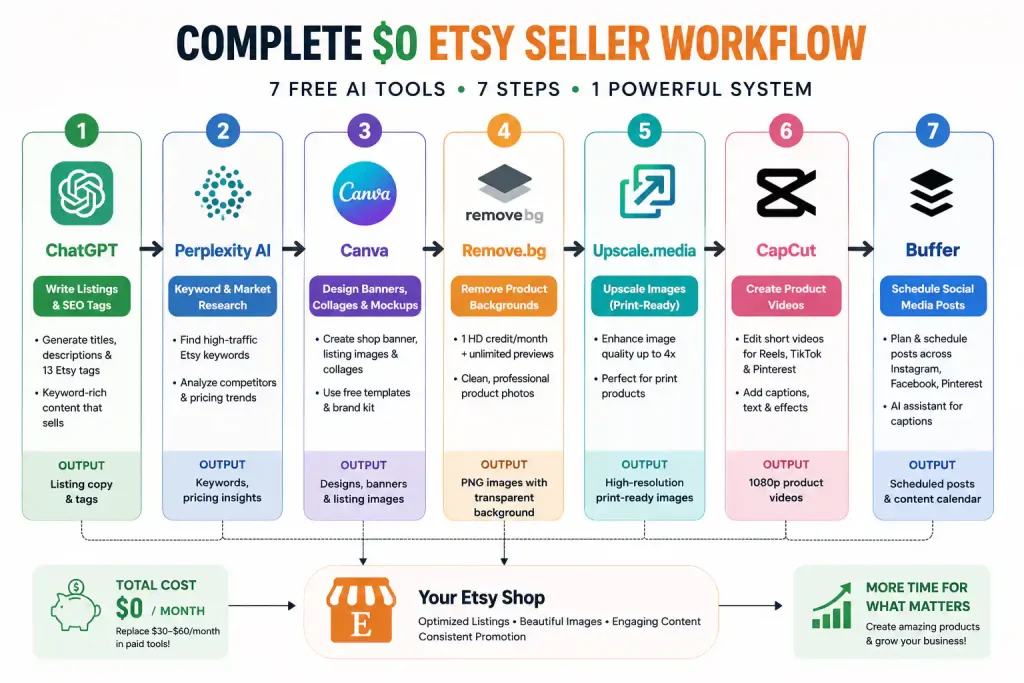
Above: How the 7 tools connect into a single $0 workflow. Start with ChatGPT for your listing copy, design in Canva, clean up photos with Remove.bg, and promote with Buffer.
Total cost: $0/month. This stack replaces several paid tools that would otherwise cost a seller $30–60 monthly. Your actual savings depend on which tools you currently pay for and your listing volume.
❓ Frequently Asked Questions
Can I use ChatGPT to write Etsy listing descriptions?
Yes — and it’s the most effective free tool for this task. Feed it your product type, materials, target buyer, and style, and it produces a complete listing title, description, and 13 SEO tags. OpenAI permits commercial use of ChatGPT outputs. For a full breakdown of the free tier limits, see my ChatGPT free‑tier test.
What’s the best free tool for Etsy keyword research?
Start with Etsy’s own search bar — the auto‑complete suggestions are real buyer searches. Then use Perplexity AI to get external data like search volume estimates and competitor pricing. The unlimited basic search tier is free forever. For competitor analysis, combine both with ChatGPT to reverse‑engineer top‑selling listing titles and tags.
Can I use Canva’s free AI images on my Etsy products?
Yes. Canva permits commercial use of AI‑generated content on the Free plan, as long as it’s incorporated into a design — not sold as‑is. However, you get only 50 lifetime AI image generations, so use them strategically for hero product images. For more image‑focused tools, see my free AI image generators guide.
How can I remove product photo backgrounds for free?
Remove.bg gives you 1 HD credit per month (watermark‑free, high resolution) plus unlimited low‑resolution previews. For unlimited free background removal with no watermark, pair it with Adobe Express Free — it includes this feature on the free tier. See my complete background removal guide for the detailed comparison.
🏁 Final Recommendation: Best Free AI Tools for Etsy Sellers 2026
You don’t need a paid subscription or a graphic designer on retainer to run a professional Etsy shop. This free stack covers listing copy, SEO research, image editing, video promo, and social scheduling — all at $0/month. My recommended starting order:
- Week 1: Set up ChatGPT (listing descriptions) + Canva (shop banner & images) + start using Etsy’s search bar and Perplexity AI for keyword research.
- Week 2: Add Remove.bg (product photos) + Upscale.media (print‑ready images).
- Week 3: Set up CapCut (product videos) + Buffer (social media scheduling).
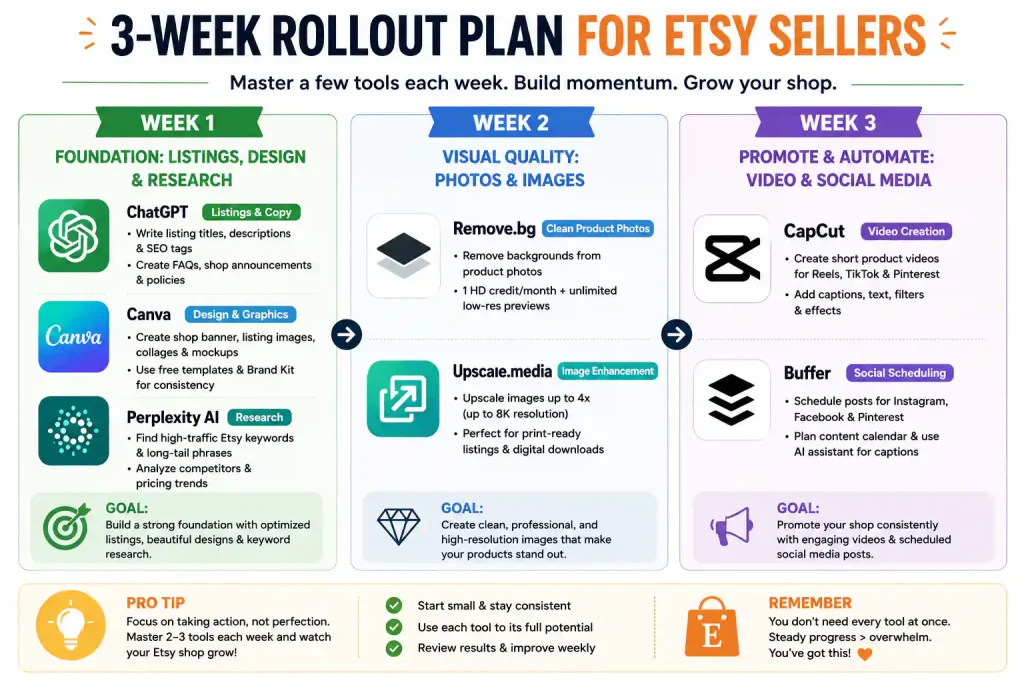
Above: The three‑week rollout plan. Don’t sign up for all 7 tools at once — master two or three per week and add gradually.
Master two or three tools well before adding more. The goal isn’t to collect AI accounts — it’s to spend more time making your products and less time on marketing busywork. For a broader overview of every worthwhile free AI tool, see my complete best free AI tools 2026 roundup.
🔗 Related Nexoda Tech Guides
- Best Free AI Tools 2026: Ultimate Tested Roundup
- ChatGPT Free Tier Limits 2026: Exact Message Counts from 30 Days
- Perplexity AI Free Tier: An Honest Two‑Week Test
- Remove Background from Images Using Free AI Tools
About the Author
Wubshet Tsegaye is the founder of Nexoda Tech and an independent technology writer. He has tested 40+ AI tools over the past year, documenting real‑world free‑tier limits and restrictions so that freelancers, small business owners, and Etsy sellers know exactly what they’re signing up for — without the marketing hype. No paid reviews. No guesswork. → More about his testing methodology
This post contains no paid promotions. Some links may be affiliate links — we earn a small commission at no cost to you if you sign up. All tools were tested independently.
Last verified: June 2, 2026. Free tiers change frequently — always check each tool’s official pricing page before relying on it for your Etsy shop.
