


📌 Quick Answer: In this Canva vs Adobe Express comparison after creating 50+ graphics with both free tiers, Canva Free wins for templates (1.6M+ free), ease of use, and overall design flexibility—but its AI image generation is capped at 50 lifetime uses total, and background remover is locked behind the $14.99/month Pro plan. Adobe Express Free wins for video editing, background removal (unlimited, no watermark, truly free), and commercial‑safe AI images — plus its Premium plan is cheaper at $9.99/month. The smart move: use both free tiers together. My daily stack costs $0.
If you need free AI tools for blogging, social media, or marketing, both Canva and Adobe Express offer genuinely free tiers. But they work very differently — and the most important fact about Canva’s AI features is widely misreported. This Canva vs Adobe Express comparison corrects that and shows you exactly what each free tier delivers after hands‑on testing with 50+ graphics.
📋 Table of Contents
- 🎯 Quick Comparison Table
- 🥇 Canva Free: Best for Templates and Ease of Use
- 🥈 Adobe Express Free: Best for Video, Branding, and Truly Free AI
- 📝 Canva vs Adobe Express for Bloggers
- 🎨 AI Features Compared
- 🧩 My Workflow: Using Both Free Tiers Together
- 💰 When to Upgrade: Premium Plans Compared
- ❓ FAQ
- 🏁 Final Verdict
- 🔗 Related Guides
🎯 Canva vs Adobe Express: Quick Comparison
| Feature | Canva Free | Adobe Express Free | Winner |
|---|---|---|---|
| Free Templates | 1.6M+ | 268,000+ | Canva |
| AI Image Gen | 50 lifetime uses total | 25 generative credits/month | Adobe (monthly reset vs. lifetime cap) |
| Stock Photos & Assets | 4.7M+ free photos/videos/audio | 500,000+ Adobe Stock photos | Canva |
| Brand Kit | ✅ Yes (1 kit, 3 colors) | ✅ Yes (limited) | Tie (both free) |
| Video Editing | Basic | Better (30‑min videos, animations) | Adobe |
| Mobile App | ⭐⭐⭐⭐⭐ | ⭐⭐⭐⭐ | Canva |
| Export Quality | PNG/JPG/PDF | PNG/JPG/PDF + transparent PNG | Adobe (transparent PNG) |
| Background Remover | ❌ (Pro only) | ✅ (free, unlimited) | Adobe |
| Cloud Storage | 5GB | 5GB | Tie |
| Magic Write (AI Copy) | 50 lifetime uses total | N/A (no AI writing tool) | Canva (exists) |
| Commercial Use | ✅ Yes (within designs) | ✅ Yes (Firefly‑powered, commercially safe) | Tie |
Sources: Canva official pricing page — 1.6M+ free templates, 4.7M+ free assets, 1 brand kit (3 colors), Pro at $14.99/month. Adobe Express official pricing page — 268,000+ templates, 500,000+ Adobe Stock photos, 4,000+ Adobe Fonts, Premium at $9.99/month. Canva Help Center — Magic Media: 50 lifetime uses free. Canva Help Center — Background Remover: Pro only. Adobe Express Help — Free plan: 25 generative credits/month. Adobe Express Help — Background Remover: free on all plans.
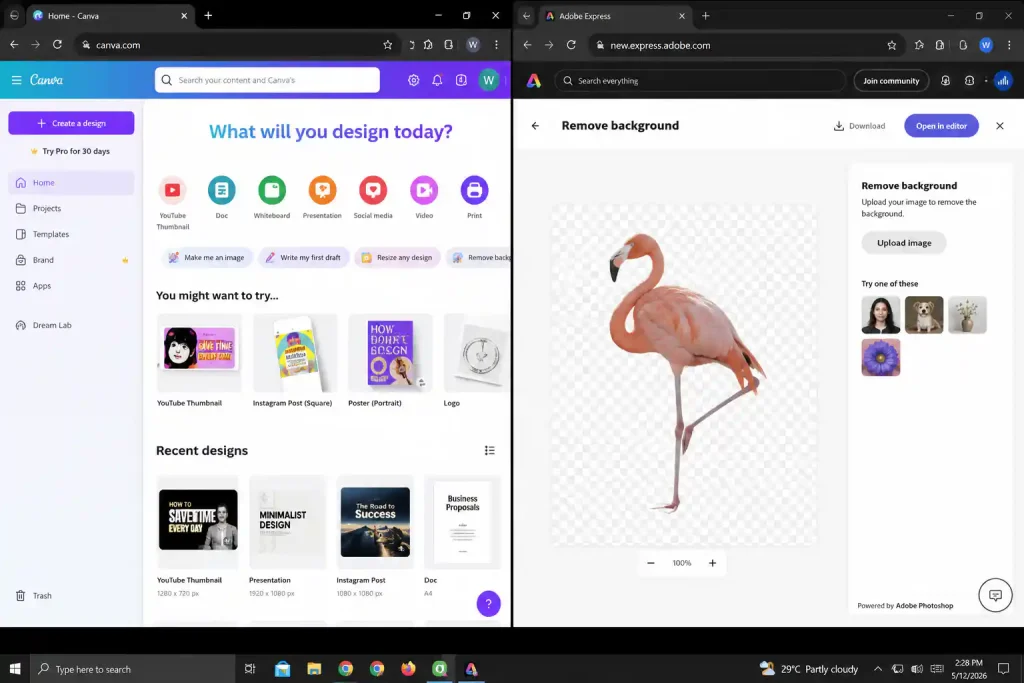
Above: Canva (left) and Adobe Express (right) side by side. Canva’s template library is dramatically larger; Adobe’s background remover is free and unlimited on all plans.
🥇 Canva Free: Best for Templates and Ease of Use
Best for: Social media graphics, presentations, quick designs, beginners
What makes Canva special in the Canva vs Adobe Express debate:
- Massive template library — 1.6 million+ free templates across every format. Start any project from a professionally designed starting point, not a blank canvas.
- Intuitive drag‑and‑drop interface — the lowest learning curve of any design tool I’ve tested.
- AI text‑to‑image via Magic Media, but with a critical caveat: 50 lifetime uses total, not 50 per month. Once exhausted on the free plan, they never reset.
- Magic Write AI copy assistant, also 50 lifetime uses total.
- Resize designs for multiple platforms with one click.
My test results: I created 20 Instagram posts in 45 minutes using templates. Magic Media generated unique backgrounds for each—but I burned through 12 of my 50 lifetime credits in one session. For a daily blogger, the 50‑use cap means AI image generation runs out within weeks.
Free tier includes (verified May 2026):
- ✅ 1.6M+ free templates
- ✅ 4.7M+ free photos, videos, illustrations, and audio
- ✅ 50 lifetime Magic Media (text‑to‑image) uses total — not 50/month
- ✅ 50 lifetime Magic Write (AI copy) uses total
- ✅ 1 brand kit (3 colors)
- ✅ 5GB cloud storage
- ✅ Basic animations
- ❌ Background remover (Pro only — Magic Eraser available for manual touch‑ups)
The catch: Background remover and unlimited AI image generation both require Canva Pro at $14.99/month (or $119.99/year). The 50‑lifetime‑use caps on Magic Media and Magic Write are the most under‑reported limitations in free design tool comparisons.
Verdict: ⭐ 8.5/10 — Canva wins Canva vs Adobe Express for most users on template count and ease, but the lifetime AI caps mean it’s a gateway to Pro, not a permanent free AI tool.
🥈 Adobe Express Free: Best for Video, Branding, and Truly Free AI Features
Best for: Video content, brand consistency, background removal, Adobe ecosystem users
What makes Adobe Express special in the Canva vs Adobe Express comparison:
- Adobe Stock integration — 500,000+ high‑quality photos, plus access to the broader Adobe Fonts library (4,000+ fonts on free plan).
- Better video editing tools — supports videos up to 30 minutes, with dynamic animations, voiceover recording, and video transitions.
- Background remover included in the free tier — unlimited uses, no watermark, no credit system. This alone saves $14.99/month compared to Canva Pro.
- Brand kit available on the free plan (colors, logos, fonts).
- AI image generation with 25 generative credits/month — credits reset monthly. Powered by Adobe Firefly, trained on licensed content, and designed to be commercially safe.
My test results: I edited a 30‑second video with text overlays, background music, and animations—smoother and more capable than Canva’s video editor. Background remover on product photos worked perfectly, outputting transparent PNGs at full resolution with no watermark.
Free tier includes (verified May 2026):
- ✅ 268,000+ free templates (static, motion, video)
- ✅ 500,000+ Adobe Stock photos
- ✅ Background remover — unlimited, free, no watermark
- ✅ 25 generative AI credits per month (resets monthly)
- ✅ Basic brand kit
- ✅ Video editing with animations, voiceover, transitions
- ✅ 4,000+ Adobe Fonts
- ✅ Export as PNG with transparent background
- ✅ 5GB cloud storage
The catch: Fewer templates than Canva. Smaller free asset library. AI credits are monthly (25) rather than the lifetime model Canva uses—better for occasional use, but 25/month is still tight for heavy generators.
Verdict: ⭐ 8.5/10 — Adobe Express wins Canva vs Adobe Express for anyone who needs background removal, video editing, or commercially safe AI images without paying.
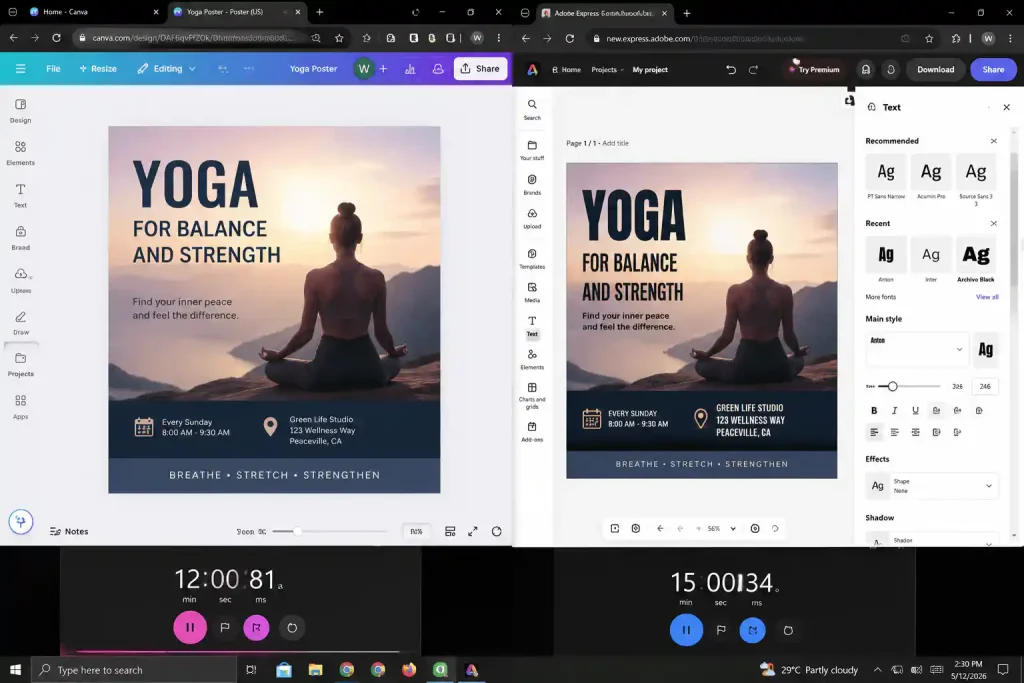
Above: I created the same poster design in both tools. Canva was faster (12 minutes vs 15 minutes) due to its larger template library; Adobe Express produced better text effects and a cleaner background removal.
📝 Canva vs Adobe Express for Bloggers
For blog featured images:
- Canva: Far more templates, but AI image generation caps at 50 lifetime uses. Once exhausted, you’re working with stock templates alone.
- Adobe Express: Fewer templates, but 25 AI credits reset monthly, background remover is free, and all AI outputs are commercially safe via Firefly.
- Winner: Canva for template variety and design flexibility; Adobe for sustainable free AI generation.
For social media graphics:
- Canva: Resize for multiple platforms instantly. Template variety is unmatched.
- Adobe Express: Better animations and video content. Background remover saves time.
- Winner: Tie — depends on whether you prioritize templates (Canva) or video + background removal (Adobe).
For YouTube thumbnails:
- Canva: Thousands of thumbnail‑specific templates.
- Adobe Express: Better text effects, free background remover, and Firefly‑powered AI images with no commercial‑use concerns.
- Winner: Adobe Express — the free background remover alone is worth switching for.
For a deeper look at which free AI image tools complement these design platforms, see my full guide to the best free AI image generators.
🎨 Canva vs Adobe Express: AI Features Compared
| AI Feature | Canva Free | Adobe Express Free |
|---|---|---|
| Text to Image | Magic Media: 50 lifetime uses total | 25 generative credits/month (Firefly‑powered) |
| AI Copywriting | Magic Write: 50 lifetime uses total | Not available |
| Object Removal | Magic Eraser (manual brush) | Insert & Remove Objects (free daily generations) |
| Background Removal | ❌ Pro only | ✅ Free, unlimited |
| Generative Fill | Magic Edit (limited) | ✅ Free daily generations |
| Text to Template | Magic Design (limited) | ✅ AI‑generated layouts |
| Commercial Safety | Canva terms apply | ✅ Firefly trained on licensed content |
Winner: Adobe Express for sustainable free AI use that resets monthly. Canva’s lifetime caps mean serious creators will exhaust AI features within weeks and face the Pro paywall.
🧩 My Workflow: How I Use Both Free Tiers Together
I don’t choose between Canva vs Adobe Express — I use both free tiers for different tasks. Here’s the exact breakdown:
| Task | My Tool | Why |
|---|---|---|
| Social media posts | Canva Free | Templates are unbeatable for Instagram, Facebook, Pinterest |
| Blog featured images | Canva Free (template) + Adobe Express (AI image) | Canva’s layout flexibility, Adobe’s monthly AI credits |
| YouTube thumbnails | Adobe Express Free | Free background remover + Firefly AI + text effects |
| Video content | Adobe Express Free | Better video editor, animations, up to 30 minutes |
| Presentations | Canva Free | Presentation templates are best‑in‑class |
| Product photos | Adobe Express Free | Background remover is free, unlimited, high quality |
| Quick text graphics | Canva Free | Magic Write + templates for quote graphics |
| Batch background removal | Adobe Express Free | Unlimited removals, no credit system, transparent PNG export |
Total cost: $0 (both free tiers)
💰 When to Upgrade: Canva vs Adobe Express Premium Plans
| Canva Pro | Adobe Express Premium | |
|---|---|---|
| Monthly Price | $14.99/month | $9.99/month |
| Annual Price | $119.99/year ($10/month) | $99.99/year ($8.33/month) |
| AI Credits | 500 Magic Media uses/month + shared AI allowance | 250 generative credits/month |
| Background Remover | ✅ Yes | ✅ Yes (already free) |
| Templates | All premium templates | All premium templates |
| Stock Assets | 141M+ premium photos, videos, audio | 350M+ Adobe Stock assets |
| Storage | 1TB | 100GB |
| Brand Kits | 5 brand kits | Enhanced brand kit |
| Fonts | All Canva fonts | 30,000+ Adobe Fonts |
Sources: Canva Pro pricing — Vendr ($14.99/month or $119.99/year), Adobe Express Premium pricing ($9.99/month or $99.99/year).
My upgrade recommendation:
- Start free on both platforms. Learn which one handles your most frequent tasks.
- Upgrade Canva Pro first if you design graphics daily and need background remover, unlimited AI, and premium templates.
- Upgrade Adobe Express Premium if video is your focus, or if you’re already in the Adobe ecosystem and want 250 monthly AI credits plus 350M+ Stock assets—at $5/month less than Canva Pro.
- The best value combo: Canva Free (templates) + Adobe Express Premium ($9.99/month) gives you the widest capabilities for the lowest cost.
❓ Canva vs Adobe Express: Frequently Asked Questions
Which is better for beginners — Canva or Adobe Express?
Canva. Its interface is more intuitive, its template library is dramatically larger (1.6M+ vs. 268,000+), and the learning curve is near‑zero. Adobe Express is close, but Canva’s onboarding and template‑first approach make it the clear beginner winner.
Which has the better free stock photo library?
Canva. Canva Free gives you access to 4.7M+ free photos, videos, illustrations, and audio. Adobe Express Free includes 500,000+ Adobe Stock photos — higher average quality, but a much smaller pool.
Can I use both Canva and Adobe Express for free?
Yes — and you should. Both free tiers are genuinely free (no credit card required). I use Canva for template‑heavy tasks like social posts and presentations, and Adobe Express for any task involving background removal, video, or AI image generation that needs to be commercially safe.
Does Canva Free really include background remover?
No. This is the most common misconception in design tool comparisons. Background remover is a Canva Pro feature only ($14.99/month). Canva Free users get Magic Eraser for manual touch‑ups, but no one‑click background removal. Adobe Express includes background remover free on all plans. Source: Canva Help Center.
Is Canva’s AI image generation really 50 per month?
No — it’s 50 lifetime uses total. This is the single most important fact to understand before relying on Canva’s free AI tools. Once you hit 50 Magic Media image generations on the free plan, they never reset. Many blog posts and comparison pages get this wrong. I verified it directly against the Canva Help Center and multiple independent analyses. For monthly‑resetting AI image generation, Adobe Express (25 credits/month) is the better free option.
Which is better for YouTube thumbnails — Canva or Adobe Express?
Adobe Express. Canva has more thumbnail templates, but Adobe Express offers free background removal, better text effects, and Firefly‑powered AI images that are commercially safe — critical for monetized YouTube channels. The free background remover alone justifies the switch for thumbnail creation.
Does Adobe Express work without a Creative Cloud subscription?
Yes, completely separate. Adobe Express Free requires only an Adobe ID (free to create). You don’t need any Creative Cloud plan. The free tier is standalone.
Is Canva Pro worth it at $14.99/month?
If you design 5+ graphics per week, yes. Background remover alone saves hours of manual editing. The 500 monthly Magic Media uses and 1TB storage justify the cost for regular creators. But if your needs are lighter, Adobe Express Free’s background remover and monthly AI credits may cover you at $0.
🏁 Final Verdict: Canva vs Adobe Express 2026
Choose Canva Free if:
- You want the largest template library (1.6M+ free)
- You create lots of social media content and presentations
- You’re a beginner who values the easiest learning curve
- You don’t mind hitting lifetime AI caps and upgrading to Pro later
Choose Adobe Express Free if:
- You edit video content regularly
- You need background removal — free, unlimited, no watermark
- You’re already in the Adobe ecosystem
- You want commercially safe AI images (Firefly) that reset monthly
- You want the cheaper premium upgrade ($9.99/month vs. $14.99/month)
Winner: There is no single winner in this Canva vs Adobe Express comparison. Canva Free wins for template‑first design and absolute beginner ease. Adobe Express Free wins for video, background removal, and sustainable free AI features. The smartest move is using both free tiers together — as I do every day — at a total cost of $0.
For creators who want to pair these design tools with free AI image generation that doesn’t hit a lifetime cap, my complete free AI image generators guide covers every tool that integrates with both Canva and Adobe Express.
🔗 Related Nexoda Tech Guides (Fact‑Checked & Verified)
- Best Free AI Image Generators 2026: Top 5 Tested (Actually Free)
- Free AI Image Generators Without Watermarks 2026
- Best Free AI Tools 2026: Ultimate Tested Roundup
- 7 Best Free AI Tools 2026 (I Tested 30+ – Real Free Tiers)
- Grammarly for Bloggers: Complete Guide 2026
- Best Free AI Tools for Beginners
- Free AI Tools Without Credit Card (No Payment Required in 2026)
- How to Remove Background from Images Using Free AI Tools
- AI Free Tier Restrictions: 7 Hidden Limits That Break Workflows
About the Author
Wubshet Tsegaye is the founder of Nexoda Tech and an independent technology writer. He has personally tested 40+ AI tools over 300+ hours, spending his own money to document real‑world free‑tier limits, hidden restrictions, and performance on slow, budget‑constrained internet connections. His testing is done on a mid‑range laptop with a 4G mobile connection — the same hardware and network constraints many freelancers and students face worldwide. No sponsored opinions. No guesswork. Just research‑driven content. → More about his testing methodology
This post contains no paid promotions. Some links may be affiliate links — we earn a small commission at no cost to you if you sign up. All tools were tested independently.
Last verified: May 15, 2026. Free tiers change frequently — always check the tool’s official pricing page before relying on it for business.
