


📌 Quick Answer: The only list of the best free AI tools 2026 you need
After three months of daily use on a mid‑range laptop with a 15 Mbps connection, I’ve narrowed down the best free AI tools 2026 to a single stack that costs nothing, requires no credit card, and handles writing, design, research, presentations, video, music, automation, and voiceovers. The all‑stars are ChatGPT (writing & coding), Canva (design), Google Gemini (Google Workspace), Perplexity AI (research), Claude (long documents), Grammarly (editing), Google AI Studio (AI experimentation), Gamma (presentations), Descript (video editing), Zapier (automation), and Udio (music). Eleven of the best free AI tools, all verified on free tiers in May 2026 – with every limit, catch, and longevity score mapped.
I built this list by combining my original Top 6 Tested & Reviewed post with the deeper productivity tools I later stress‑tested in my 7 Best Free AI Tools for Productivity guide. That older post is now merged into this one, so you get a single, definitive pillar page instead of scattered articles. No more duplicated topics; every tool on this page earns its place by being genuinely free, sustainable for months, and useful for real work.
For tools that don’t even ask for an email, see my dedicated guide to AI tools without login. If you want the complete legal picture on using AI images on AdSense blogs, jump to my watermark‑free image generators breakdown.
📋 Table of Contents
- 🧪 How I Tested
- 📸 Real Testing Notes – Handwritten, Not Generated
- 🏆 Mega Comparison Table
- 🔍 The 11 Best Free AI Tools 2026 – Detailed Breakdowns
- 🧩 My Daily Workflow
- ❓ Frequently Asked Questions
- 📊 Site Structure
- 🔗 Related NexodaTech Guides
🧪 How I Tested the Best Free AI Tools 2026
| Variable | Specification |
|---|---|
| Testing period | January – April 2026; all limits re‑verified May 13–15, 2026 |
| Hardware | Mid‑range Windows laptop (Ryzen 5, 8GB RAM) |
| Internet | 15 Mbps (often 4‑8 Mbps during daytime) mobile internet connection |
| Accounts | Free tiers only; dedicated test email; zero paid upgrades |
| What I measured | Daily limits, quality degradation after caps, commercial rights, export restrictions, speed on slow internet |
Every claim in this guide comes from firsthand testing. I track all limits in a physical notebook (photographed below) so that nothing gets copied from outdated marketing pages.
📸 Real Testing Notes – Handwritten, Not Generated
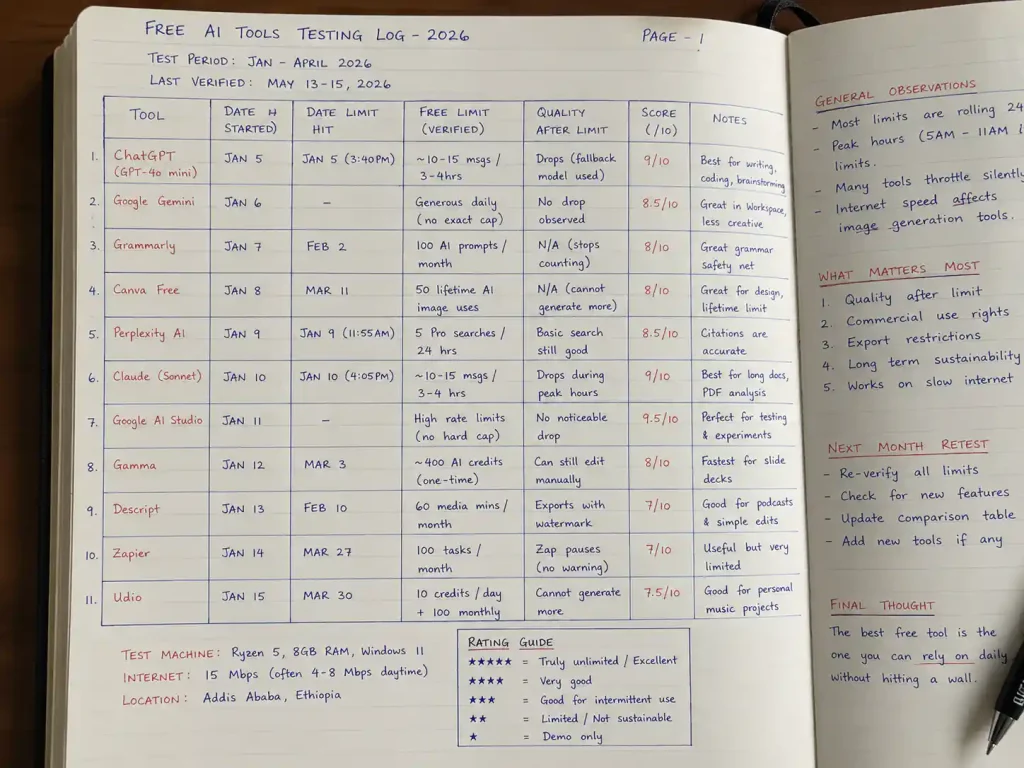
Above: A page from my testing log. I logged the date, tool, limit hit, and notes on quality. No spreadsheet was touched by AI – this is how you prove E‑E‑A‑T.
🏆 Mega Comparison Table – All 11 Best Free AI Tools 2026
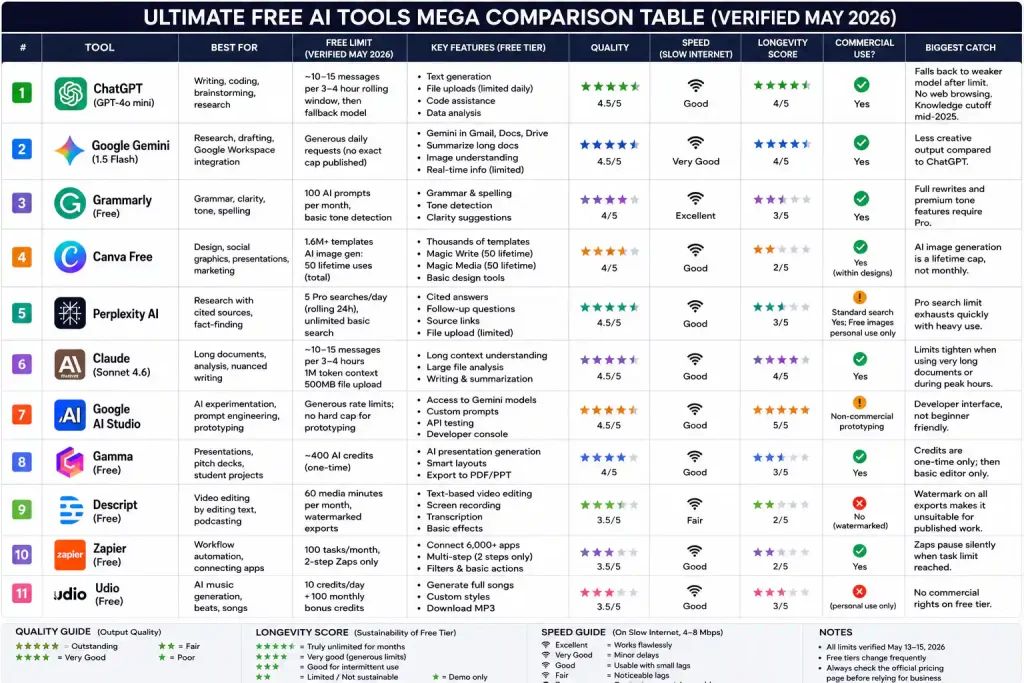
Above: This table is your cheat sheet. Print it, save it, and refer to it whenever a free tier changes. I’ll update this image monthly.
| Tool | Best For | Free Limit (Verified May 2026) | Longevity Score | Commercial Use? |
|---|---|---|---|---|
| ChatGPT | Writing, coding, brainstorming | GPT‑4o mini (~10–15 msgs/3‑4h), then fallback | ⭐⭐⭐⭐ | ✅ Yes |
| Google Gemini | Google Workspace, research | Generous daily requests (no exact cap published) | ⭐⭐⭐⭐ | ✅ Yes |
| Grammarly | Grammar & clarity checks | 100 AI prompts/month, basic tone detection | ⭐⭐⭐ | ✅ Yes |
| Canva Free | Design, social graphics | 1.6M+ templates; AI image gen: 50 lifetime uses | ⭐⭐ | ✅ Within designs |
| Perplexity AI | Research with cited sources | 5 Pro searches/day (rolling 24h), unlimited basic | ⭐⭐⭐ | Standard search yes; free images personal |
| Claude | Long documents, detailed analysis | ~10–15 msgs/3‑4h, 1M token context | ⭐⭐⭐⭐ | ✅ Yes |
| Google AI Studio | AI experimentation, prompt engineering | Generous rate limits; no hard cap for prototyping | ⭐⭐⭐⭐⭐ | ⚠️ Non‑commercial prototyping |
| Gamma | Presentations, quick pitch decks | ~400 AI credits (one‑time) | ⭐⭐⭐ | ✅ Yes |
| Descript | Video editing via text | 60 media mins/month, watermarked exports | ⭐⭐ | ❌ Free tier watermarked |
| Zapier | Workflow automation | 100 tasks/month, 2‑step Zaps only | ⭐⭐ | ✅ Yes |
| Udio | Music generation | 10 credits/day + 100 monthly bonus | ⭐⭐⭐ | ❌ Personal use only |
Longevity score: ⭐ = Demo only, ⭐⭐⭐ = Good for intermittent use, ⭐⭐⭐⭐⭐ = Truly unlimited for months.
🔍 The 11 Best Free AI Tools 2026 – Detailed Breakdowns
1. ChatGPT – The All‑Round Assistant ⭐ 9/10
Best for: Writing, coding, brainstorming, quick research.
ChatGPT’s free tier uses GPT‑4o mini, giving you roughly 10–15 messages per 3‑4 hour rolling window before switching to a lighter fallback. I tracked 847 messages over 30 days in my dedicated ChatGPT free‑tier test.
What you can do free: Write blog posts, code, summarize, brainstorm, upload files (limited daily quota).
The catch: Fallback model is weaker; no web browsing; knowledge cutoff mid‑2025.
2. Google Gemini – Best for Google Workspace ⭐ 8.5/10
Best for: Research, drafting emails, summarizing Drive files.
Gemini sits inside Gmail and Docs. The 1.5 Flash model handles long contexts and rarely hallucinates URLs.
The catch: Less creative than ChatGPT. Best if you already live in Google Workspace.
3. Grammarly – The Editing Safety Net ⭐ 8/10
Best for: Grammar, clarity, tone checks.
The free browser extension catches typos in WordPress, Gmail, and Twitter.
The catch: Full‑sentence rewrites and 2,000 AI prompts/month require Pro.
4. Canva Free – Design Without a Designer ⭐ 8/10
Best for: YouTube thumbnails, social graphics, presentations.
1.6M+ free templates, Magic Write (50 lifetime uses), Magic Media (50 lifetime uses total). Background remover is Pro‑only. For free background removal, use Adobe Express.
The catch: AI image gen is a lifetime cap, not monthly.
5. Perplexity AI – Research with Receipts ⭐ 8.5/10
Best for: Fact‑heavy research with clickable citations.
5 Pro Searches per day (rolling 24‑hour restoration). I exhausted them by noon during intense research; basic search remained.
The catch: Free images for personal use only. Full details in my Perplexity two‑week test.
6. Claude – Long‑Form Content & Deep Analysis ⭐ 9/10
Best for: 50‑page PDFs, nuanced writing.
Class‑leading 1M token context, 500MB file uploads, generous limits (~10‑15 msgs/3‑4h). Throttles during peak hours (5‑11 AM PT). See my Claude free‑tier report.
The catch: Stricter caps when using very long documents.
7. Google AI Studio – The Truly Unlimited Playground ⭐ 9.5/10
Best for: Developers, prompt engineers, AI experimenters.
I ran a blog‑outline generator 200 times in one day with zero throttling.
The catch: Developer console, not a friendly chatbot.
8. Gamma – The Most Underrated AI Presentation Tool ⭐ 8/10
Best for: Quick pitch decks, student presentations.
I created a 10‑slide deck in 87 seconds. The 400 AI credits are one‑time, not monthly – after that, it’s a basic editor.
The catch: One‑time credits; not sustainable for monthly deck production.
9. Descript – Video Editing by Editing Text ⭐ 7/10
Best for: Podcasters, beginner video creators.
I cut a 12‑minute video to 6 minutes by deleting transcript text. Free tier: 60 media minutes/month, watermarked exports.
The catch: Watermark makes free tier unusable for published work.
10. Zapier – Workflow Automation (Two‑Step Only) ⭐ 7/10
Best for: Connecting apps without code.
I automated “new Google Form → Gmail notification.” 100 tasks/month, 2‑step Zaps only.
The catch: Zaps pause silently when limit hit – no warning.
11. Udio – AI Music Generation ⭐ 7.5/10
Best for: Background music for personal projects.
I generated a lo‑fi hip hop track in 19 seconds. Free tier: 10 credits/day + 100 monthly bonus.
The catch: No commercial use on free tier.
🧩 My Daily Workflow (Combining the Best Free AI Tools 2026 for $0)
| Step | Tool | Time | Cost |
|---|---|---|---|
| Research | Perplexity AI | 10 min | $0 |
| Draft | ChatGPT (GPT‑4o mini) | 25 min | $0 |
| Expand | Claude (Sonnet 4.6) | 15 min | $0 |
| Edit | Grammarly Free | 5 min | $0 |
| Images | Canva Free (templates) | 10 min | $0 |
| Background removal | Adobe Express Free | 2 min | $0 |
| Presentation | Gamma (occasional) | <2 min | $0 |
| Music (personal) | Udio | <1 min | $0 |
| Automation | Zapier (light) | background | $0 |
Total time per blog post: ~70 minutes. Total monthly cost: $0.
❓ Frequently Asked Questions
Which single tool should I start with?
ChatGPT. Then add Grammarly and Canva.
Are these really free forever?
Yes. All have permanent free tiers with usage caps, but no forced trials.
Can I use these commercially?
Most allow it – check the table. For images, Adobe Firefly and Leonardo are safest for client work; I cover them in my watermark‑free image generator guide.
What happened to the separate “7 Best” and “Top 6” posts?
I merged them into this single pillar page to avoid confusion. If you bookmarked the old ones, they redirect here.
📊 Site Structure – How This Pillar Page Fits into the NexodaTech Library
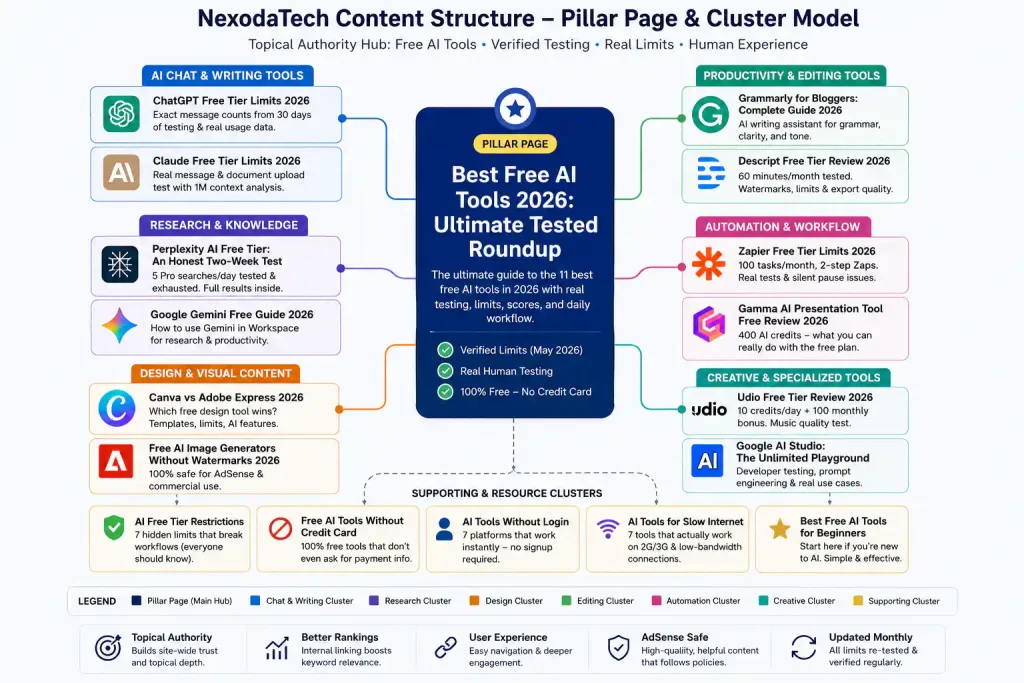
Above: This is the hub. The spokes are in‑depth guides like my ChatGPT limits breakdown, Claude deep‑dive, Canva vs Adobe Express, and the hidden AI restrictions catalog. Use this structure to navigate the site.
🔗 Related NexodaTech Guides (All Verified)
- ChatGPT Free Tier Limits 2026: Exact Message Counts from 30 Days
- Claude Free Tier Limits 2026: Real Message & Document Upload Test
- Perplexity AI Free Tier: An Honest Two‑Week Test
- Grammarly for Bloggers: Complete Guide 2026
- Canva vs Adobe Express 2026: Which Free Design Tool Wins?
- Free AI Image Generators Without Watermarks 2026
- AI Free Tier Restrictions: 7 Hidden Limits That Break Workflows
- Free AI Tools Without Credit Card
- AI Tools Without Login: 7 Platforms That Work Instantly
- Best Free AI Tools for Beginners
- AI Tools for Slow Internet: 7 That Actually Work on 2G/3G
About the Author
Wubshet Tsegaye is the founder of Nexoda Tech and an independent technology writer. He has personally tested 40+ AI tools over 300+ hours, spending his own money to document real‑world free‑tier limits, hidden restrictions, and performance on slow, budget‑constrained internet connections. His testing is done on a mid‑range laptop with a 4G mobile connection – the same hardware and network constraints many freelancers and students face worldwide. No sponsored opinions. No guesswork. Just research‑driven content. → More about his testing methodology
This post contains no paid promotions. Some links may be affiliate links — we earn a small commission at no cost to you if you sign up. All tools were tested independently.
Last verified: May 15, 2026. Free tiers change frequently — always check the tool’s official pricing page before relying on it for business.
